

A demographic question is simply a way to ask who your audience is. Think of it as collecting the basic, statistical facts about a person—like their age, where they live, or what industry they work in. These questions help you paint a clearer picture of your customer base.
What Are Demographic Questions Anyway

Imagine trying to tell a story without knowing anything about the main character. That's what marketing without demographics feels like. Just as a journalist starts with "who, what, and where" to frame a story, marketers use demographics to build a detailed profile of their users. This information is a goldmine for growth teams.
When you ask the right questions, you can finally move from guesswork to data-driven decisions. This allows you to segment your audience, personalize experiences, and launch targeted campaigns that actually resonate. Those insights translate directly into smarter business strategies. For a deeper dive, check out our guide on the primary types of data collection.
The Challenge of Asking
But here's the catch every marketer faces: there's a delicate balance to strike. While the hunger for data is strong, asking for too much information upfront creates friction. It can easily scare potential leads away, and it's one of the top reasons forms get abandoned.
This very issue highlights a massive challenge. Eye-opening research from Zuko Analytics reveals that contact forms—which often include basic demographic fields—have an average view-to-completion rate of just 9%. That number alone shows how critical it is to be thoughtful and strategic about when and how you ask for user information.
The core principle is simple: every question you add to a form must have a clear purpose. If the data won't directly influence your marketing, sales, or product strategy, it's often better to leave it out to improve your conversion rates.
This sets the stage for a crucial discussion. How can you gather the valuable demographic insights you need without sacrificing the user experience or killing your lead generation efforts? The rest of this guide will walk you through practical solutions to this common problem.
The Most Common Demographic Questions You Can Ask

Knowing what demographic questions to ask is only half the battle. The real art is in how you ask them. Your goal is to gather useful data without making someone feel like they're just another data point in your spreadsheet.
It all comes down to phrasing your questions in a way that’s respectful, inclusive, and feels effortless to answer. Let's skip the dry, academic lists and look at the common categories with practical examples that people actually feel good about answering. The key is to lower the effort while dialing up the respect for the person on the other side of the screen.
Age and Gender Questions
These are the two that usually come to mind first, but they can also be the most sensitive. The best approach? Offer ranges and inclusive options that show you’ve put some thought into it.
- Age: Instead of asking for an exact date of birth—which can feel a bit invasive—use age brackets. This gives you the segmentation you need without getting overly personal.
- Example: Which age range do you fall into? (18-24, 25-34, 35-44, etc.)
- Gender: Modern audiences expect and deserve more than a simple male/female binary. Providing more choices is a powerful way to show respect for individual identity.
- Example: What is your gender? (Male, Female, Non-binary, Prefer to self-describe, Prefer not to say)
This simple shift doesn't just get you better data; it starts building trust by showing that you see and value your audience for who they are.
Location and Education Questions
Understanding where your users are and their educational background can give you powerful context for your marketing and product development.
- Location: You can go as broad or as specific as your business actually needs. For a global SaaS company, knowing the country is probably enough. But if you’re a local service business, you’ll need a city or postal code to be useful.
- Education: Just like with age, using broad categories is often more effective and less intrusive. No need to ask for specific degrees or institutions.
- Example: What is the highest level of education you have completed? (High School, Some College, Bachelor's Degree, etc.)
The Golden Rule of Data Collection: If you don't have a clear, immediate plan for how you will use a piece of information, don't ask for it. Every single question adds friction and should have to earn its place on your form.
Employment and Income Questions
For a lot of B2B and financial companies, this professional information is gold. But income, in particular, is a highly sensitive topic. Offering broad ranges and making these questions optional is non-negotiable if you want to avoid scaring people away.
If you need to dig deeper into professional roles, our guide on crafting effective lead qualification questions might be exactly what you need.
- Employment Status: Which of the following best describes your current employment status? (Employed full-time, Employed part-time, Self-employed, Unemployed, Student, Retired)
- Household Income: What is your approximate annual household income? ($0-$24,999, $25,000-$49,999, etc., Prefer not to say)
By always including an opt-out like "Prefer not to say," you put the user back in control. This small act of respecting their privacy can significantly boost their willingness to complete the rest of the form, improving your overall conversion rates.
When and Why to Use Demographic Questions on Your Forms
Let's move past the basics. Knowing what a demographic question is is one thing; understanding when and why to use one is where you turn raw data into actual business results.
Think of it this way: asking for someone's job title on a simple blog subscription form is just noise. It creates friction for no real gain. But asking for that same piece of information on a demo request form? That’s strategic intelligence.
The "why" is all about fueling growth. Top-performing marketing and sales teams use these insights to hit specific, high-impact goals that usually fall into three main buckets.
Powering Key Business Strategies
High-quality demographic data is the foundation for making smarter decisions across your entire company. It’s what allows you to stop guessing and start connecting with your audience on a much deeper, more relevant level.
- Personalize Campaigns for Higher Engagement: Knowing a lead works in the SaaS industry means you can send them case studies that actually resonate, which can dramatically boost click-through rates.
- Refine Product Features: If you find out a huge portion of your users are over 55, you can prioritize UI adjustments and features that cater to their preferences and technical comfort.
- Implement Smarter Lead Scoring: A lead’s company size or job title can instantly signal their potential value. This helps your sales team focus their energy on the hottest opportunities first. For a deeper dive, exploring advanced lead scoring best practices can show you exactly how this data drives results.
This strategic use of demographic information is a major market driver. The global e-forms industry has seen explosive growth, projected to jump from $7.09 billion in 2018 to $26.03 billion by 2026, largely because of this increasing demand for precise audience data.
Timing Your Questions for Maximum Impact
The "when" is just as critical as the "why." Asking for too much information too soon is a guaranteed way to absolutely murder your conversion rates. The key is to match the depth of your questions to where the lead is in their journey with you.
A top-of-funnel ebook download should be a light touch—maybe just an email and a first name. A bottom-of-funnel demo request, however, justifies asking for more detailed information like company size or job function because the user's intent is much higher.
This idea of asking for information bit-by-bit is the core of a powerful strategy called progressive profiling. It’s all about building a customer profile over time, turning a single form submission into an ongoing, intelligent conversation. Check out our guide on how to implement progressive profiling on your forms to learn more.
Crafting Demographic Questions People Actually Want to Answer

Knowing the theory is one thing. Getting a real person to actually fill out your form is another game entirely. The gap between a form that converts and one that gets abandoned often comes down to small, thoughtful details in how you ask your questions.
The goal here is to make the whole experience feel less like an interrogation and more like a conversation. That means prioritizing clarity, respect, and convenience in every single field. With just a few simple tweaks, you can gather the data you need while building a positive connection from the very first click.
Make Answering Feel Effortless
Friction is the silent killer of conversions. Every extra click, every confusing label, and every required keystroke is another reason for a user to just give up and leave. Your job is to make completing your form feel as easy as possible.
Think about the user interface (UI) you’re using. Instead of forcing someone to type their age into a box, why not use a simple dropdown with pre-defined ranges? It’s faster, way easier on a phone, and cuts down on typos. The less typing, the better.
The single most powerful change you can make is often the simplest: make non-essential fields optional. Giving people the choice to skip a question respects their time and privacy, which can dramatically boost your overall form completion rates.
Build Trust Through Transparency and Inclusivity
People are much more willing to share information when they know why you're asking and feel like you respect them in the process. This is where transparent and inclusive design becomes your secret weapon for boosting conversions.
Start with clear, simple language. Ditch the corporate jargon. A friendly, human tone goes a long way in making your form feel approachable instead of demanding.
More importantly, show your users you see and value them. When asking about gender, for example, go beyond the binary. Including options like "Non-binary" and "Prefer to self-describe" sends a powerful signal that you respect diversity.
You can also build a ton of trust just by explaining the "why" behind a question. A tiny note like, "What industry do you work in? (This helps us send you more relevant content)" transforms a potentially intrusive question into a win-win. This simple act of transparency shows users you’re using their data to make their experience better, not just to fill a database.
How To Collect Data Without Sacrificing Trust or Privacy
Asking for personal information, even something as basic as a job title, is a delicate dance. In a world where everyone is hyper-aware of data privacy, building trust isn't just a nice-to-have—it's the only way you’ll get anyone to complete your form.
The good news is that respecting privacy doesn't have to be a massive, complicated undertaking. It really just boils down to a few core principles that show people you're serious about their security and committed to handling their data the right way. This isn't just about dodging legal bullets; it’s about building a brand people feel safe with.
The Pillars of Ethical Data Collection
Navigating regulations like GDPR can feel like trying to read a legal textbook, but the core ideas are actually pretty straightforward and user-friendly. By focusing on these three pillars, you can create a trustworthy experience that encourages honest answers.
- Data Minimization: Just ask for what you absolutely need. If knowing a user's income bracket won't actually change how you market to them, don't ask for it. Every single question should have a clear, justifiable purpose behind it.
- Transparency: Be completely open about why you're collecting the data. A simple, one-sentence explanation right on the form can be the difference between a user feeling suspicious and feeling cooperative.
- User Consent: Make sure consent is crystal clear and explicitly given. That means no pre-checked boxes and making sure your privacy policy is easy to find.
Here's a quick look at the official GDPR portal, which lays out the key principles of data protection law.
The screenshot drives home the point that data processing must be lawful, fair, and transparent. These aren't just suggestions; they're legal obligations in many parts of the world.
Practical Steps to Build Trust
Turning these principles into action is simpler than you think. For starters, add a clear link to your privacy policy on every single form you publish. No exceptions.
When you do ask a specific demographic question, add a small tooltip or a brief sentence explaining its value. For instance, a simple note like, "This helps us send you content relevant to your industry," can do wonders for building confidence.
Embracing ethical data practices is one of the most powerful conversion levers you have. When users feel respected and in control, they are far more likely to share information and become loyal customers.
For a deeper dive into the technical and practical sides of safeguarding user information, you can learn more about our commitment to form security and data protection. At the end of the day, creating a secure environment is the foundation of any successful data collection strategy.
Smarter Ways to Gather Insights Without Adding Form Fields
Let’s be honest: nobody enjoys filling out a long form. Every extra field you add is another reason for a potential customer to second-guess themselves and walk away. But you still need that crucial demographic and firmographic data to qualify leads and personalize your follow-up.
So, what's the solution? You stop asking for everything upfront and let technology do the heavy lifting behind the scenes. The smartest lead capture strategies gather rich, detailed insights without ever adding a single extra field to your form. This isn't about sacrificing data quality; it's about collecting it more intelligently.
Data Enrichment and Progressive Profiling
This modern approach boils down to two core tactics: data enrichment and progressive profiling.
Data enrichment is where the real magic happens. You take one piece of information—usually just a business email address—and use it as a key to unlock a trove of publicly available data. Specialized tools can instantly append details like the lead's job title, company size, industry, location, and even tech stack. It all happens in the background, giving your sales team the context they need without the user lifting a finger.
The second strategy is progressive profiling. Think of this as turning a one-time form submission into a gradual, intelligent conversation. The first time a user interacts, maybe you just ask for an email to subscribe to a newsletter. When they come back later to download an ebook, you can ask for their job title. It feels natural and builds a complete customer profile over time without overwhelming them in a single interaction.
You can see below how Orbit AI’s modern, visual builder makes it incredibly easy to design these multi-step, conversational forms that are perfect for progressive profiling.
This kind of interface allows you to craft intuitive, step-by-step experiences that make gathering more information feel like a helpful conversation, not an interrogation.
Tools That Power Smarter Data Collection
Several tools can help you pull off these advanced strategies, but they’re not all created equal. Here’s a quick rundown of some of the best options for modern growth teams.
- Orbit AI: We built Orbit AI to combine both strategies seamlessly into one platform. Our AI SDR works behind the scenes to automatically enrich every lead that comes through, while the visual form builder makes creating multi-step, progressive profiling forms dead simple. It turns your lead capture process into a fully automated qualification engine.
- Clearbit: A well-known player in the data enrichment space, Clearbit integrates with most major CRMs to append valuable firmographic data to your contacts.
- HubSpot: Within its marketing automation suite, HubSpot offers native progressive profiling features that let you intelligently swap out form fields for users who have already given you certain pieces of information.
Comparison of Data Collection Methods
Choosing the right approach depends on your goals. Asking directly gives you user-verified data but adds friction. Modern methods reduce that friction but rely on third-party data accuracy. Here’s a quick comparison to help you decide.
| Method | Pros | Cons | Best For |
|---|---|---|---|
| Direct Questioning | • User-provided, high-accuracy data • Collects specific, niche information • Simple to implement initially |
• Increases form friction and abandonment • Can feel intrusive to the user • Data can become outdated quickly |
Gathering essential, non-negotiable information like email or verifying specific qualifying details that can't be inferred. |
| Data Enrichment | • Zero user friction; happens invisibly • Provides rich firmographic data instantly • Keeps forms short and conversions high |
• Data accuracy can vary • Less effective for personal emails • Requires an investment in a tool |
B2B lead generation where a business email can be used to populate company size, industry, role, and other key details. |
| Progressive Profiling | • Reduces initial form friction • Builds trust over multiple interactions • Gathers data in context |
• Takes longer to build a full profile • Requires a multi-touch user journey • Can be complex to set up |
Nurturing leads over time, where you can gradually ask for more information as they engage more deeply with your content. |
Ultimately, the best strategy is often a hybrid one. Use enrichment to get the basics, then use progressive profiling to ask for the nuanced details that enrichment can't provide.
By embracing these modern approaches, you can dramatically shorten your forms, slash abandonment rates, and still collect the deep demographic insights your team needs to succeed. If you want to dive deeper into the tools that make this possible, check out our complete guide to the top lead enrichment tools on the market today.
Frequently Asked Questions About Demographic Data
When you start digging into demographic data, a few practical questions almost always pop up. Let's tackle some of the most common ones to help you fine-tune your strategy and collect data the right way.
This flow chart shows how modern data collection has evolved. It’s not just about what you ask on the form anymore.
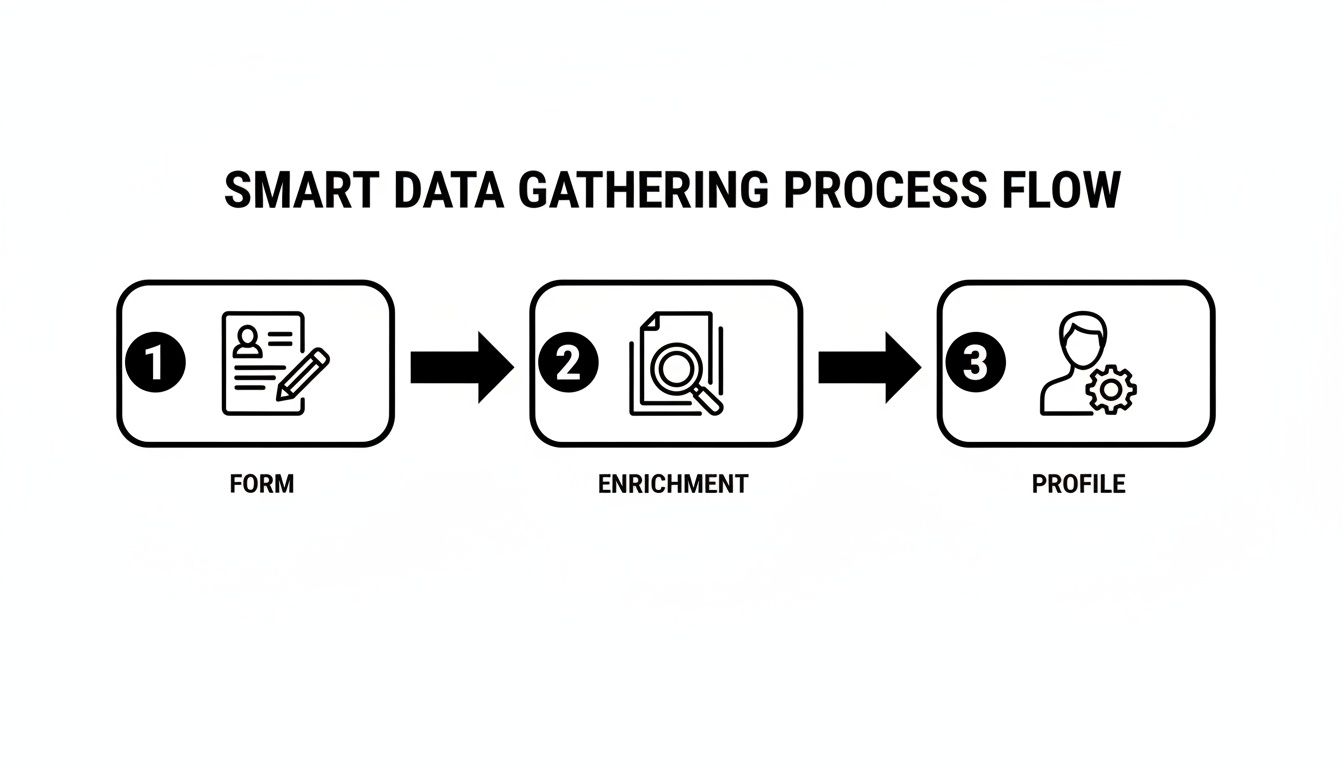
The big takeaway here is that gathering data isn't a one-and-done event. Your form is just the starting line for building a rich, genuinely useful profile of your user over time.
What Is the Single Most Important Demographic Question?
Honestly, there isn't one. The "most important" question is always the one that ties directly back to what you're trying to achieve.
For a local plumber, "Location" is everything. But for a B2B software company, "Job Title" or "Industry" is infinitely more valuable than a lead's age.
To find your most important question, work backward from your goal. Ask yourself: what single piece of information will have the biggest impact on how we segment, personalize, or sell? That’s your starting point.
How Many Demographic Questions Are Too Many?
There’s no magic number, but a solid rule of thumb is to keep your initial forms to 3-5 fields total. Study after study confirms that every extra field you add is another reason for someone to abandon your form.
Instead of asking for everything upfront, think progressively. Grab the absolute essentials first—maybe just an email and first name. You can gather more context later through smart, multi-step forms with tools like Orbit AI, turning a quick transaction into an ongoing conversation.
Can Asking Demographic Questions Cause Legal Issues?
Absolutely. This is a critical line you need to walk with extreme care.
Questions about protected characteristics—think race, religion, sexual orientation, or disability—should be avoided unless you have a specific, legally mandated reason, like equal opportunity employment reporting.
Always put ethical transparency first and focus on collecting data that genuinely improves the customer's experience. The safest and most effective path is to stick to information that's directly relevant to your product or service. This not only keeps you compliant but also builds some serious trust with your audience.


