

Maya's Monday starts with 412 new form-fill leads, a quota meeting at 9, and no reliable way to decide who deserves attention first. Her CRM is open beside six browser tabs, while Slack keeps pinging with “hot” leads that turn out to be tire-kickers. By the time she sorts company size, buying intent, territory, duplicate records, and missing contact details, the strongest prospects have already cooled.
That's the situation many sales teams are trying to solve with AI. Buyers research independently, buying committees are harder to coordinate, and reps spend too much of their week on research, data entry, routing, and follow-up instead of selling. AI for sales teams isn't a luxury productivity layer anymore. It's a triage mechanism for pipelines that have outgrown manual judgment.
The important question isn't whether AI can draft an email. It can. The question is whether your team can deploy it without sacrificing data quality, compliance, and trust for speed.
Why Sales Teams Are Turning to AI in 2026
Before AI, Maya's workflow depended on static form fields, rep intuition, and whoever noticed a Slack message first. A lead arrived, sat in a queue, and waited for someone to inspect the record. A high-fit account with vague form answers could be ignored, while a low-fit prospect with an impressive job title received immediate attention.
An AI-augmented workflow changes the order of operations. The form captures structured context, the model evaluates fit and urgency, the CRM receives a routing recommendation, and the assigned rep gets a draft with the reason behind the score. Maya can begin with the highest-priority conversations instead of reconstructing the weekend from scattered systems. Platforms such as Orbit AI's AI sales assistant fit this model by connecting intake, qualification, and follow-up into one operating flow.
Adoption data shows why this shift matters. Salesforce reported that 81% of sales teams were experimenting with or had fully implemented AI, with 40% experimenting and 41% fully implemented, according to Salesforce's 2024 sales AI statistics. The same reporting found that AI-using teams were 1.3 times more likely to report revenue growth, with 83% of AI-enabled teams seeing revenue growth compared with 66% of teams without AI.
The next step is agentic automation. Salesforce State of Sales coverage cited by Rework's reporting on AI agents in sales operations indicates that 87% of sales organizations used some form of AI and 54% used AI agents across the sales cycle by 2026. That distinction matters. A drafting assistant suggests text. An agent can evaluate a submission, route it, trigger a sequence, and request human approval.
The operational test: AI should reduce the time between a meaningful signal and a responsible sales action, without hiding how the decision was made.
The rest of the playbook is about making that test practical. Speed is useful only when the team can explain the score, inspect the source data, override the recommendation, and stop the workflow when it behaves badly.
The Four Core Capabilities of AI for Sales Teams
A credible sales AI stack connects four capabilities: qualification, outreach, forecasting, and conversation analysis. Treat them as one governed decision system. Each capability can speed up work, but none should be trusted without clean inputs, visible reasoning, and a defined human checkpoint.
Lead scoring and qualification
AI scoring works like a triage nurse. It reviews available signals, compares them with prior outcomes, and identifies which prospects deserve immediate attention. Predictive models can learn from closed-won and closed-lost records instead of relying only on fixed rules. Independent summaries cited by Stealth Agents' research on AI lead scoring report predictive accuracy of 72% to 85% for AI models versus 48% to 54% for rule-based scoring, while B2B teams using AI scoring have reported about 2.1 times higher MQL-to-SQL conversion rates.
Those results depend on the training data. If past winners came from one industry, region, or company size because reps ignored other segments, the model may learn that neglect as a qualification signal. Review score drivers, test performance by segment, and give reps a clear override path.
Generative outreach and personalization
Generative outreach produces grammatically clean drafts that cannot reliably judge tone. It can turn account context into a first message quickly, yet it may miss whether a line sounds invasive, generic, or wrong for the buyer.
The risk extends beyond awkward copy. Prompts can expose sensitive CRM information, and generated messages can state unverified details with confidence. Constrain source fields, redact unnecessary personal information, and require human approval until the workflow has passed quality checks. Teams evaluating what conversational AI means for sales workflows should apply the same rule: useful automation still needs boundaries.
Forecasting and pipeline analytics
A forecast model trusts whatever the CRM records, including noise from sandbagging reps. It can detect patterns in opportunity movement, next steps, activity, and stage history, but delayed updates or manufactured activity can make a weak deal appear healthy.
Use forecast AI to flag inconsistencies rather than replace the forecast conversation. Managers still need to ask who the decision-maker is, what changed, and whether the next step is real. Require the model to show the fields and events behind its recommendation so a manager can challenge bad evidence.
Conversation intelligence
Conversation intelligence surfaces objections, competitor mentions, unanswered questions, and coaching moments that managers may miss across a full call schedule. It can improve review coverage, but transcript access creates operational and legal exposure.
Set rules for consent, recording disclosures, retention, storage, and permissions before enabling call analysis. Define who may read transcripts, how long records remain available, and which findings can enter the CRM. A transcript that nobody can audit or safely access is not useful intelligence.
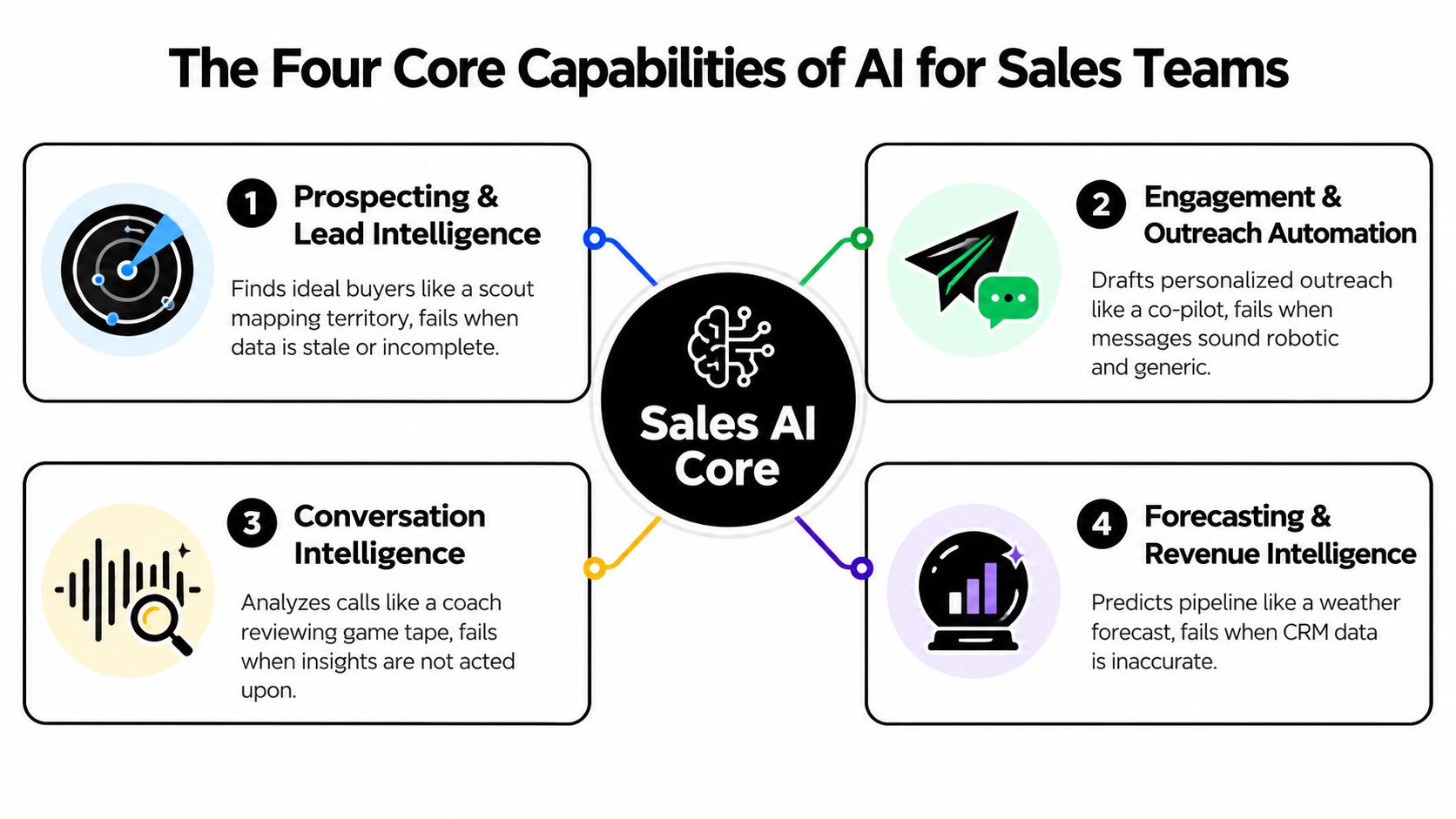
Together, these capabilities form a loop: find the right buyer, create a relevant next step, learn from the conversation, and keep the pipeline representation honest. Break the data, permissions, or review checkpoints at any point, and automation moves the error faster.
High-Impact Use Cases You Can Deploy This Quarter
Start with a workflow that runs often, has a clear owner, and can be reviewed before it affects a live opportunity. Do not give an autonomous agent permission to edit every CRM record. Define the input, action, approval point, and failure path first. That operating discipline matters more than a polished demo.
Inbound form qualification
Example workflow: Orbit AI receives a form submission, checks fit and urgency against the ICP, enriches the record with permitted context, and sends a routing recommendation to the CRM or assigned rep. An A-lead can move directly to a rep, while a B-lead enters a nurture path.
- Input data: Form answers, account details, source, territory, and consent status.
- AI action: Score fit and urgency, identify missing information, recommend routing, and draft the first response.
- Human checkpoint: The rep reviews the rationale and confirms that the lead belongs in the assigned segment.
The goal is a clearer queue, not the removal of judgment. If the form contains weak information, require the model to return “insufficient evidence.” A confident score built on missing fields creates bad routing and a misleading handoff.
A hybrid AI SDR motion
Example workflow: An AI SDR drafts the first two emails, checks timing and suppression rules, and proposes a meeting slot. A human owns the relationship after the buyer responds or shows meaningful intent.
- Input data: ICP criteria, approved messaging, account context, previous engagement, and calendar availability.
- AI action: Draft outreach, sequence follow-ups, and propose booking options.
- Human checkpoint: A rep approves the first message and takes over when the prospect replies, raises an objection, or requests custom information.
For a deeper walkthrough, see our guide to the AI SDR for outbound. Guidance on creating personalized sales emails can help reps structure drafts, but every claim, personalization detail, and call to action still needs review. AI can increase coverage while also increasing the volume of irrelevant outreach if suppression rules and account context are incomplete.
Win and loss pattern mining
Example workflow: Transcribe closed-deal calls, extract recurring buyer language, compare it with outcomes, and feed validated phrases into discovery guides and outreach prompts.
- Input data: Call transcripts, opportunity outcomes, objections, competitors, and documented reasons for winning or losing.
- AI action: Cluster themes and identify language associated with successful or unsuccessful conversations.
- Human checkpoint: Enablement and frontline managers validate whether a pattern reflects buyer value or merely a rep's speaking style.
Treat model-generated themes as hypotheses. A phrase that appears in winning calls may reflect deal type, segment, or timing rather than a repeatable sales behavior. Managers should approve changes to talk tracks before they reach the wider team.
Forecast cleansing
Example workflow: Run a weekly review across open opportunities and flag stale next steps, stage inconsistencies, missing decision-makers, and timelines that no longer match the record.
- Input data: Opportunity stage, activity history, next-step fields, close date, stakeholder records, and call summaries.
- AI action: Detect anomalies and create a review queue.
- Human checkpoint: The opportunity owner confirms, corrects, or rejects each flag before the forecast call.
| Use Case | Input Data | AI Action | Human Checkpoint | Realistic Lift |
|---|---|---|---|---|
| Inbound form qualification | Form and account context | Score, enrich, and route | Rep validates rationale | Faster prioritization |
| Hybrid AI SDR | ICP, messaging, and engagement | Draft and sequence outreach | Rep approves and owns replies | More consistent coverage |
| Win and loss mining | Calls and outcomes | Extract recurring patterns | Manager validates themes | Better coaching inputs |
| Forecast cleansing | CRM and activity data | Flag risk and inconsistency | Owner updates opportunity | Cleaner forecast review |
Every workflow depends on bad CRM hygiene being addressed first. Stale records, duplicate accounts, missing opt-outs, and inconsistent stages contaminate recommendations and routing. Assign ownership for those fields, log overrides, and keep a human checkpoint where the cost of a wrong decision is high. AI can process poor pipeline data quickly, but it cannot make that data trustworthy.
A 30-60-90 Day Implementation Roadmap
A sales AI rollout should look like an operating experiment, not a launch event. Give the team a narrow objective, a visible owner, and enough time to observe failure before expanding access.
Days 1 to 30, foundation
Choose one use case, usually inbound qualification or supervised AI SDR outreach. Connect one reliable data source and run the model in shadow mode beside the existing human process. No outbound message should send automatically during this phase.
Create a review log that records the input, recommendation, human decision, and reason for override. That log becomes more useful than a vendor demo because it shows where the model fails in your actual sales motion.
Days 31 to 60, supervised automation
Turn on automation for one segment or territory. Require human review for every AI-generated message, and make the reviewer accountable for the final output. Track failure categories, such as wrong persona, unsupported claim, bad routing, missing suppression status, or irrelevant personalization.
Managers should inspect the log every week. If the team can't explain why the workflow made a decision, the workflow isn't ready for broader deployment.
Days 61 to 90, controlled scale
Add a second use case, such as forecast cleansing or conversation intelligence. Retire shadow mode for the first workflow only after the team has documented the checkpoints that worked in practice. Keep an exception path for reps who need to override routing, pause outreach, or correct a record.
Three controls get skipped most often:
- Model drift review: Check whether lead quality, segments, or buying behavior have changed.
- Prompt-version history: Preserve the prompt and policy version behind each material workflow change.
- Kill-switch ownership: Name one person who can pause the automation immediately.
Use Orbit AI's workflow-building guidance to map the triggers, decisions, approvals, and destinations before connecting production systems.
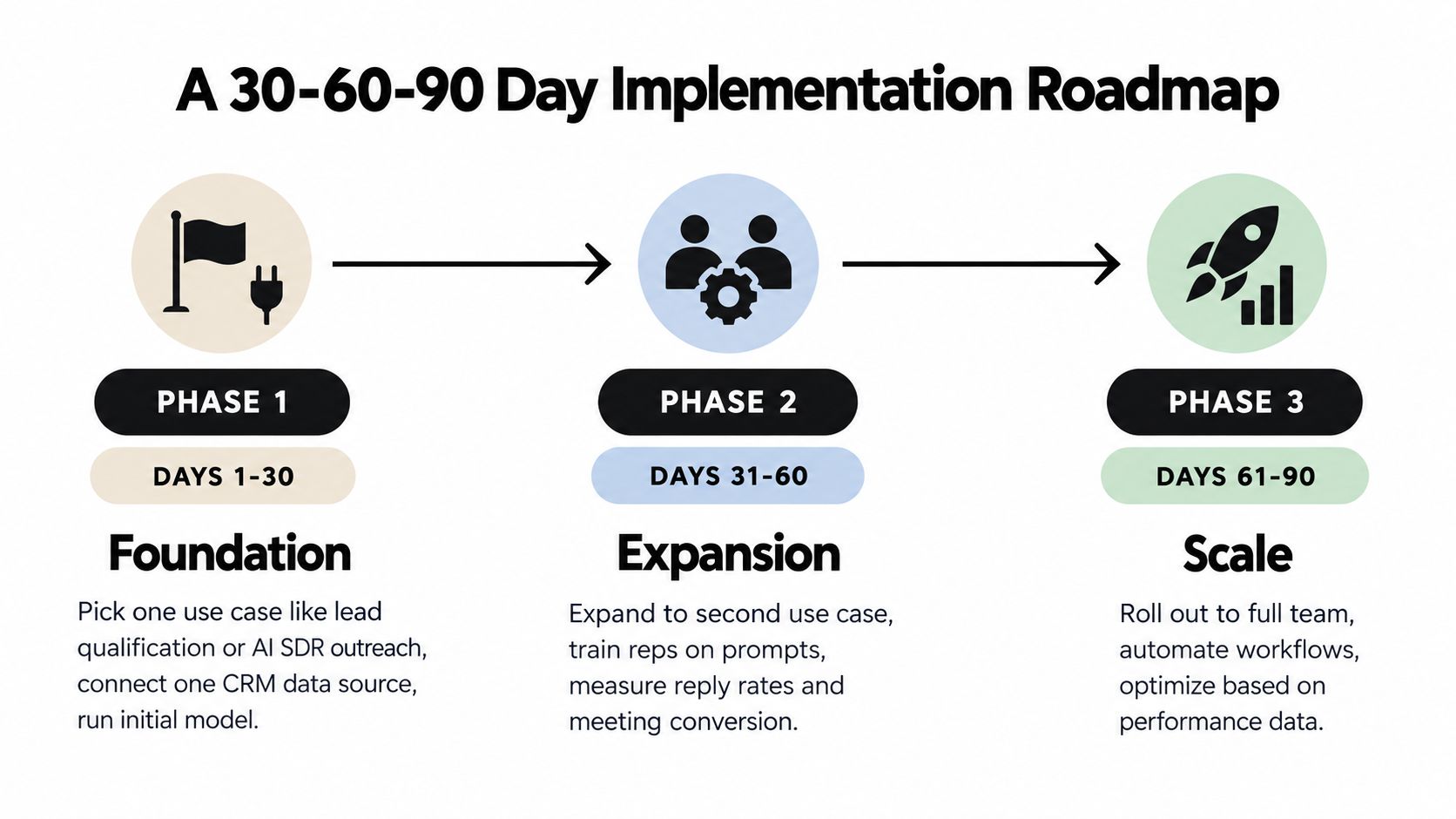
This rollout sequence lets the team ship useful automation while protecting pipeline integrity.
Integration, Data Quality, and Security Essentials
AI governance belongs in the workflow design, not in a policy document that nobody checks. RevOps should hand IT a short checklist covering how data moves, what the model can see, and how the company exits safely if the vendor changes its terms.
Integration controls
Use bi-directional synchronization for the CRM and calendar where the workflow requires it. One-way writes create false confidence. A lead may appear routed in the CRM while the calendar, suppression list, or ownership record remains outdated.
Limit OAuth scopes to the actions the workflow needs. A form qualification process shouldn't receive broad access to unrelated customer records, internal documents, or every rep's calendar.
Data controls
Check freshness, duplication, required fields, and consent status before training or inference. Redact unnecessary PII before sending prompts, log the request and result after inference, and preserve the source fields that support a recommendation.
Missing opt-out flags are a compliance risk, not a minor data-quality defect. Stale lead records can also poison scoring, especially when the model treats old engagement as current intent.
Security controls
Require SSO and role-based access. Reps should see the drafts, accounts, and opportunities they're authorized to access, while administrators retain audit visibility. Confirm encryption, retention, subprocessors, and whether the model provider uses pipeline data for training by default.
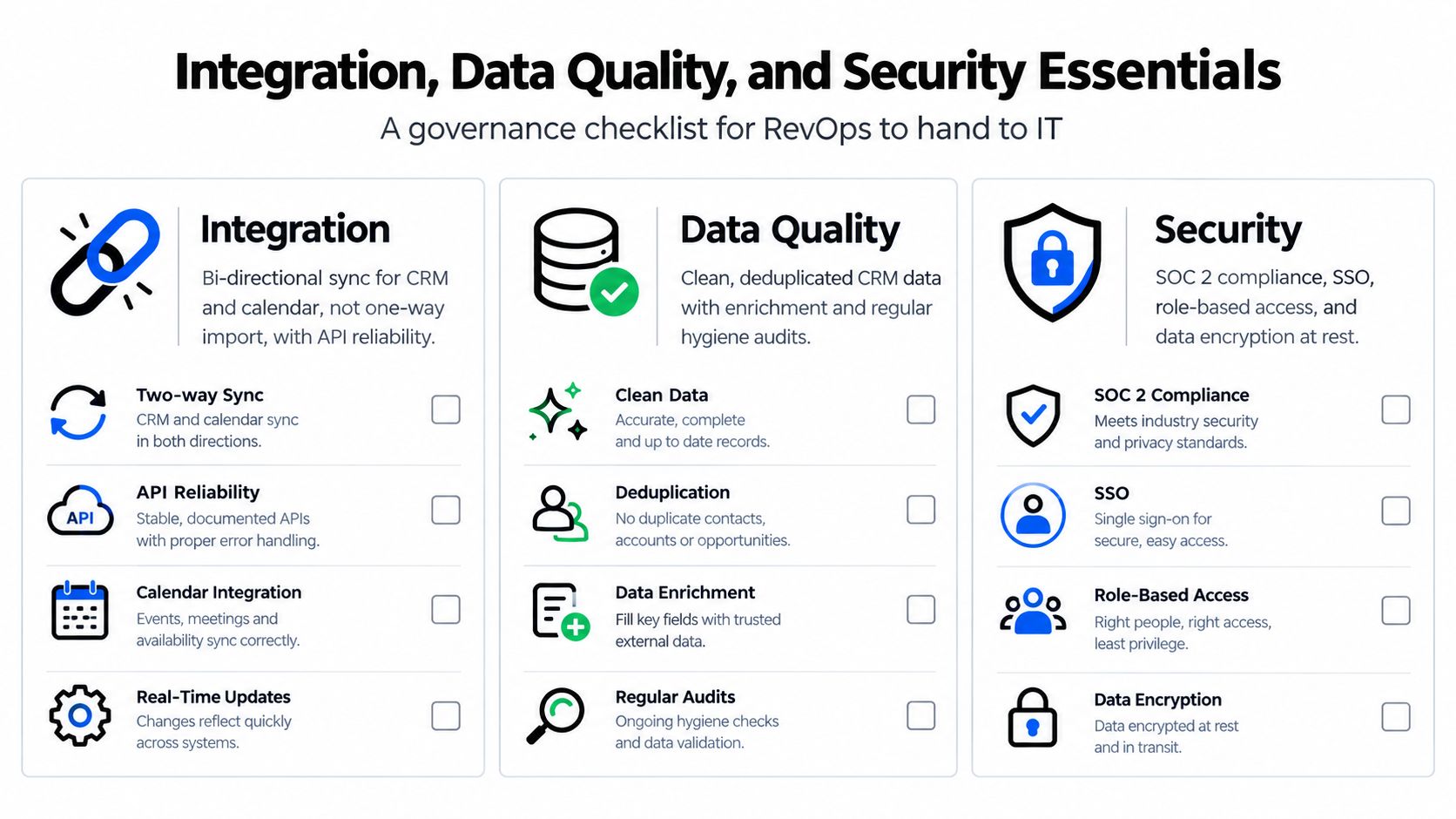
Before launch, run a data freshness check, test consent and suppression synchronization, review prompts for injection risks, and document an exit plan. The unglamorous work determines whether AI becomes a trusted sales layer or a compliance incident waiting for an audience.
Measuring Real Impact With the Right KPIs
Tool dashboards often celebrate activity because activity is easy to count. Leadership needs evidence that the workflow improves pipeline quality, sales execution, or forecast confidence.
Use three KPI families, and review each at the cadence that matches the decision it supports.
Activity KPIs
Track AI-assisted touch volume, reply rate, and meetings booked per rep. Review them weekly during the rollout. These indicators reveal whether reps are using the system, but they're easy to game. More messages can produce more replies without producing more qualified conversations.
Pipeline KPIs
Track stage conversion, deal velocity on AI-touched accounts, and forecast accuracy against the prior quarter. Review these in the regular revenue meeting, not only in the AI project dashboard. A workflow that saves time but sends weak opportunities into later stages hasn't improved the business.
LinkedIn's 2025 research reported that 38% of sellers using AI for research saved more than 1.5 hours per week, AI-driven personalized outreach lifted response rates by 28%, and daily AI users were twice as likely to exceed targets, as summarized in LinkedIn's research on AI's ROI in B2B sales. Those figures are useful context, but your own pipeline records still decide whether the use case deserves more investment.
Quality KPIs
Human-edit rate on AI drafts, escalation rate from AI to human, and compliance incidents per 1,000 sends reveal whether the tool is automating good work or scaling errors. Review quality indicators weekly at first, then keep them in the operating review once the workflow matures.
| KPI Family | Primary Metrics | Warning Sign |
|---|---|---|
| Activity | Assisted touches, replies, meetings per rep | Replies rise while meetings remain flat |
| Pipeline | Stage conversion, velocity, forecast accuracy | Activity increases without healthier progression |
| Quality | Edit rate, escalation rate, compliance incidents | High edits or repeated policy violations |
An edit rate above 60% signals that the prompt, source data, or approval design needs attention. Widening forecast variance suggests the model learned from noisy CRM behavior. Use lead generation metrics worth tracking to keep acquisition and qualification measurement connected to downstream sales outcomes.
Change Management and Rep Enablement That Actually Works
Most AI rollouts fail as sales-ops projects before they fail as technology projects. Reps don't resist useful automation because they dislike innovation. They resist systems that create extra review work, expose them to compliance risk, or make decisions they can't challenge.
Start with a two-week enablement sprint. Write the policy before training begins. Reps need to know when AI may draft, when it may recommend, and when it may send without review. If the policy is unclear, each rep will create a personal interpretation, and managers will spend their time resolving contradictions.
Build from the team's real behavior
Seed a shared prompt library with examples from top performers. Include the input fields, desired output, prohibited claims, tone guidance, and a sample of an acceptable human edit. A prompt library should function like sales enablement content, not a collection of clever experiments.
Train managers first. Managers need to coach judgment calls the model gets wrong, such as a technically accurate message that reveals too much research or a qualified lead routed to the wrong segment.
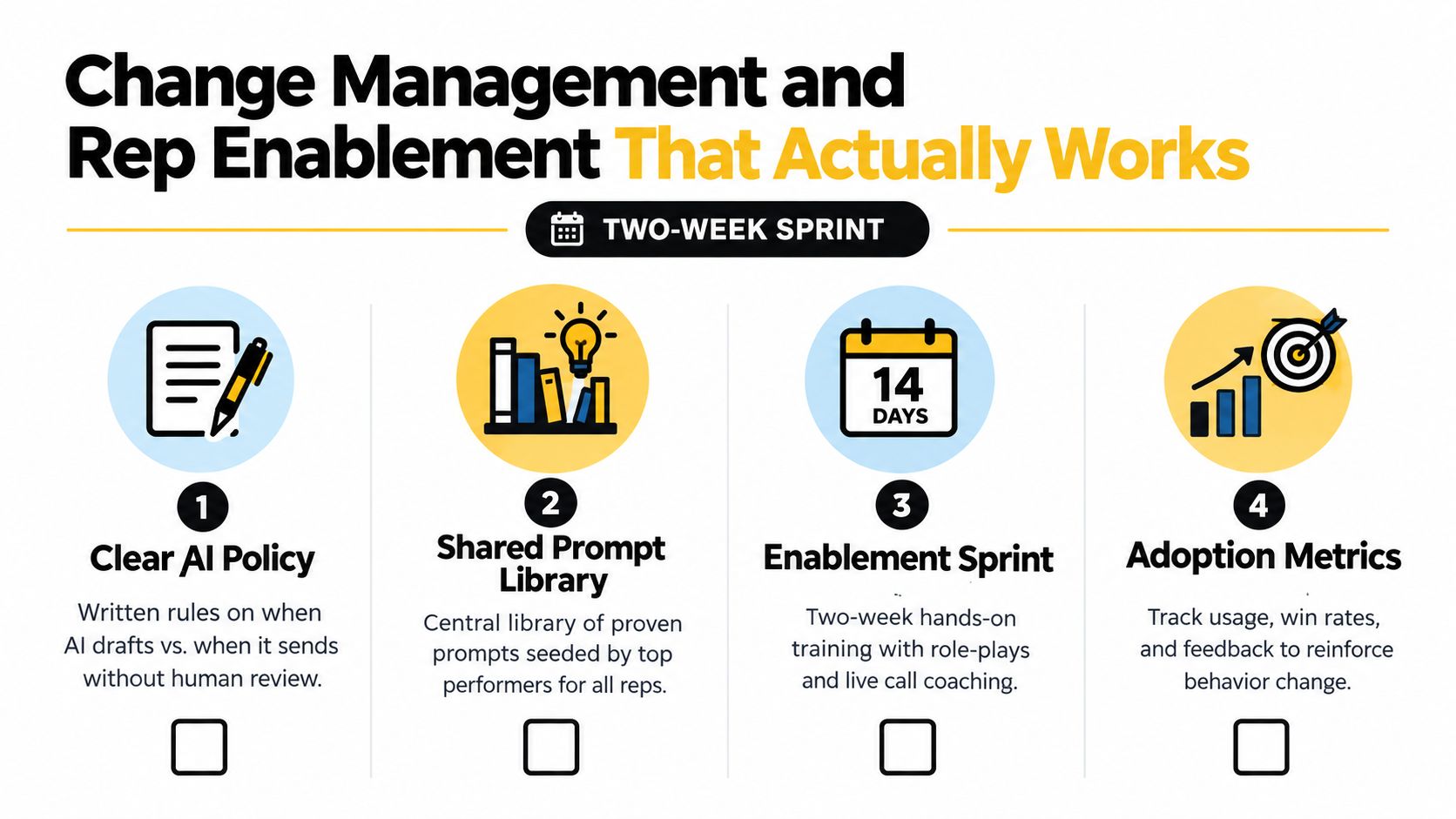
Make review part of the sales rhythm
Hold manager office hours where reps screen-share real outputs. Review AI-generated emails for accuracy, tone, and compliance during weekly pipeline meetings. Don't hide AI from buyers when disclosure is appropriate. Clear transparency protects trust better than pretending every message came directly from a rep.
Publish a short FAQ covering data handling, recording, customer information, and escalation. LinkedIn's research also highlights an enablement gap: 85% of salespeople had received no formal AI training, while 78% wanted more training, according to the cited 2025 sales AI research summary. Adoption without capability-building produces shallow usage and quiet workarounds.
Create one shared feedback document. Reps log objections, incorrect outputs, and awkward messages. RevOps reviews the list weekly, updates prompts, and retires patterns that repeatedly generate complaints. The team should feel that feedback changes the system, not that it disappears into a vendor ticket.
Sample Prompts and a Starter AI Sales Workflow
The fastest way to test AI is to give it a constrained task with a defined output and a mandatory review. These prompts are deliberately specific. Replace the bracketed fields with your own ICP, policy, and CRM data.
Lead qualification prompt
Review this inbound submission against our ICP: [ICP definition]. Return a fit rating of high, medium, or low; a one-paragraph rationale citing only the submitted and verified enrichment data; three missing facts that would change the rating; and a routing recommendation for [territory or segment]. Do not infer budget, authority, or intent when the record doesn't support it. Flag any consent or suppression issue for human review.
This prompt makes uncertainty visible. That's more useful than forcing the model to produce a confident score for every form.
Outreach personalization prompt
Using only the approved public signals below, draft a concise sales email of no more than 90 words. Prospect: [name and role]. Company: [company]. Recent LinkedIn post: [post]. Relevant company news: [news]. Verified technology context: [stack]. Connect one specific signal to one likely business problem. Use one clear call to action. Do not mention private CRM notes, unsupported pain points, or information that could identify the source of the research.
Have a rep approve the output before sending. The model should personalize the message, not impersonate a relationship that doesn't exist.
Forecast risk prompt
Review these opportunity notes from the quarter: [notes]. Flag deals at risk because of stalled next steps, missing decision-makers, or a compressed timeline. For each flagged deal, list the exact evidence, the missing field, the next verification question, and the owner responsible for updating the CRM. Do not change stage, close date, or forecast category.
This keeps the model in an audit role. It surfaces risk without granting permission to rewrite the forecast.
Manager coaching prompt
Summarize this rep's last ten calls using the transcripts provided. Identify recurring discovery gaps, examples of unanswered buyer questions, and two specific moments for coaching. Estimate the talk-to-listen pattern only when the transcript supports it, and label any uncertain conclusion. Recommend one behavior to practice in the next call.
Sequence these prompts inside a starter workflow. A form submission triggers qualification, a human approves the routing, the selected rep receives a draft, the meeting transcript updates the opportunity context, and the forecast review flags unresolved risk. You can replicate that path in Orbit AI or another connected sales stack, but keep the same boundaries: verified inputs, explicit approvals, and an owner who can stop the automation.
Orbit AI helps teams build AI-powered forms that capture structured lead context, qualify and enrich submissions, and sync the result into sales workflows. Visit Orbit AI to create a form, connect your sales stack, and test a governed inbound qualification flow without committing to automatic outbound.


