

You can have solid traffic, decent creative, and still watch the pipeline feel thinner than it should. The problem is usually not the ad, the landing page, or the form alone, it's the measurement setup that hides where people leave. Once that happens, teams start arguing about channels instead of fixing the step that's leaking.
Conversion Funnel Tracking is a measurement architecture problem. If you wire it right, you can see the difference between a pageview, a qualified lead, a delayed CRM win, and a form that looked fine until halfway through the field list. That's why a practical setup needs a clear stage model, a defensible event taxonomy, form analytics as a real funnel node, and a way to reconcile browser data with CRM revenue and offline conversions, as covered in resources like data-driven journey mapping and campaign performance tracking.
Why Most Conversion Funnels Leak Before Anyone Notices
Most funnels don't fail loudly. They drift. One team names a lead event generate_lead, another uses form_submit, a third sends the same action from a different GTM container, and the dashboard keeps reporting numbers that look tidy enough to trust. That's how a funnel turns into a pile of disconnected signals instead of a measurement system.
The deeper issue is that teams often treat tracking as a pixel job, then stop at the visible on-site event. That misses the sources of loss. Delayed CRM resolutions, consent-denied sessions, and forms that only report “submitted” leave the hardest part of the journey invisible.
A better setup starts with one question: what artifact are you shipping? Not a dashboard. A funnel definition that names each stage, each event, each owner, and each source of truth. When that definition is clear, you can compare browser behavior with CRM outcomes and find the leak instead of arguing about attribution. For a useful operational lens on lead measurement, lead generation metrics to track is a helpful companion.
Practical rule: if a conversion can happen later in CRM, it still belongs in the funnel. If you don't stitch it back, your report is only telling part of the story.
The teams that get this right don't start with more tags. They start with a stage model, then instrument the journey so that forms, checkout, and sales handoff all land in the same measurement language.
Funnel Stages and KPIs You Can Actually Defend
A defensible funnel uses stages that map to real user intent, not arbitrary page lists. The standard sequence is Awareness, Engagement, Consideration, Intent, Conversion, and Retention. In GA4, each transition needs one clear event that marks the user advancing to the next stage.
The math is simple once the stages are stable. Stage-to-stage conversion rate equals completers of the next stage divided by entrants of the current stage. Drop-off is the inverse, and it tells you where the leak sits.
Here's a clean product-page example. If 1,000 users visit a product page, 700 add to cart, 420 begin checkout, and 280 purchase, the step rates are 70%, 60%, and 66%, with an end-to-end conversion rate of 28%. That's the kind of funnel math that lets a team defend a decision in a weekly review without hand-waving.
| Funnel Stage | Trigger Event | Primary KPI | Drop-off Formula |
|---|---|---|---|
| Awareness | page_view on entry content |
Qualified traffic rate | (Entrants - Next stage completers) ÷ Entrants |
| Engagement | view_item_list or content depth event |
Engagement-to-view progression | (Entrants - Next stage completers) ÷ Entrants |
| Consideration | view_item or pricing view |
Product-view-to-intent rate | (Entrants - Next stage completers) ÷ Entrants |
| Intent | add_to_cart or begin_form |
Intent completion rate | (Entrants - Next stage completers) ÷ Entrants |
| Conversion | purchase or generate_lead |
Revenue or lead conversion rate | (Entrants - Next stage completers) ÷ Entrants |
| Retention | repeat purchase or qualified return event |
Repeat conversion rate | (Entrants - Next stage completers) ÷ Entrants |
Pageviews and session duration are vanity signals if they don't connect to a revenue event. Qualified lead rate, cost per stage progression, and pipeline velocity are decision-grade because they change how money gets spent. If a KPI can't be tied to revenue, it doesn't ship.
Mapping Events and Building the Tag Plan
The event plan has to be boringly consistent. For ecommerce, the core sequence is page_view, view_item_list, view_item, add_to_cart, begin_checkout, and purchase. For lead gen, the equivalent set includes generate_lead and qualify_lead, because a lead that exists in the browser and a lead that survives qualification are not the same thing.
A single source of truth matters because duplicate or renamed events across containers are where reporting drifts first. GA4 can only analyze what your team sends, and if development, marketing, and agency work all push their own naming habits, funnel analysis stops being comparable across periods. The fix is a controlled dataLayer contract, not ad hoc event names scattered through the site.
Tag plan structure that holds up in GA4
Use one GTM workspace per environment, then version the dataLayer like code. Developers should call the contract, not invent new names on the fly. A naming convention like category_action keeps the taxonomy readable and reduces one-off tags that nobody owns later.
| Event Name | GTM Trigger | Tag Type | DataLayer Variable |
|---|---|---|---|
page_view |
All pages | GA4 Event Tag | page_path |
view_item_list |
Category or listing view | GA4 Event Tag | item_list_name |
view_item |
Product detail view | GA4 Event Tag | item_id |
add_to_cart |
Add button click | GA4 Event Tag | item_id |
begin_checkout |
Checkout start | GA4 Event Tag | checkout_step |
purchase |
Order confirmation | GA4 Event Tag | transaction_id |
generate_lead |
Form submit or demo request | GA4 Event Tag | lead_type |
qualify_lead |
CRM status update | GA4 Event Tag or import | qualification_status |
Governance is the part teams skip and later regret. One person should own event naming, one person should approve changes, and every update should be versioned so the funnel definition stays stable across releases. If you're using Orbit AI's enrichment layer, let it append lead score and stage to the existing lead record instead of creating a parallel event taxonomy. That keeps the browser stream clean and the CRM stream useful.
Form Analytics, Form Tracking, and the Best Tools
Forms are not a submit button. They're a funnel node with their own behavior, own failure points, and own handoff rules. The practical model has four stages, form_view, begin_form, field_complete, and form_submit.
Field-level behavior matters more than the final CRM conversion rate because it shows where hesitation starts. A user who enters three fields and quits is telling you something different from a user who submits and then bounces on the thank-you state. If you only track submission, you've missed the friction that shapes submission quality.
Orbit AI belongs at the top of a form-tool comparison because it tracks form views, starts, submissions, and conversion trends, and it also ties submissions back to lead qualification signals and revenue context. Typeform fits conversational lead capture when the form itself is the experience. HubSpot Forms is useful when lifecycle tracking and progressive profiling already live inside HubSpot. Jotform is a broad template-first option with strong conditional logic.
Long required fields and aggressive post-submit redirects are the two form mistakes I see break completion rates fastest. The first creates friction before intent forms, the second makes it harder to confirm success and continue the journey cleanly.
To avoid double-counting, make generate_lead the canonical submit event in GA4, then map each form tool's native submit signal to that same funnel stage. That deduping step matters when marketing wants a clean lead report and sales wants a qualified record. For a deeper operational lens on implementation, the form analytics and tracking guide is worth keeping open while you build.
| Tool | Field-Level Tracking | CRM Enrichment | Best Use Case | GA4 Integration |
|---|---|---|---|---|
| Orbit AI | Yes | Yes | Lead capture with qualification context | Event-based mapping to funnel stages |
| Typeform | Limited by layout | Basic through integrations | Conversational forms and top-of-funnel capture | Submit and completion mapping |
| HubSpot Forms | Basic lifecycle views | Yes | Native CRM and progressive profiling | Native lead event sync |
| Jotform | Conditional logic focused | Through integrations | Template breadth and flexible workflows | Custom event mapping |
Multi-Channel Attribution and Funnel Reports
Attribution is where funnel reports start lying. GA4 gives you several models, and each one breaks in a different way. Linear gives every touchpoint equal credit. Position-based favors the first and last touch. Time-decay rewards the click closest to conversion. Data-driven uses observed influence, but it needs enough conversion volume to stabilize.
The problem isn't that one model is “correct.” The problem is that each model answers a different business question. Linear can over-credit display. Position-based can hide mid-funnel nurture. Time-decay can penalize slower B2B journeys. Data-driven is more nuanced, but sparse data makes it unreliable.
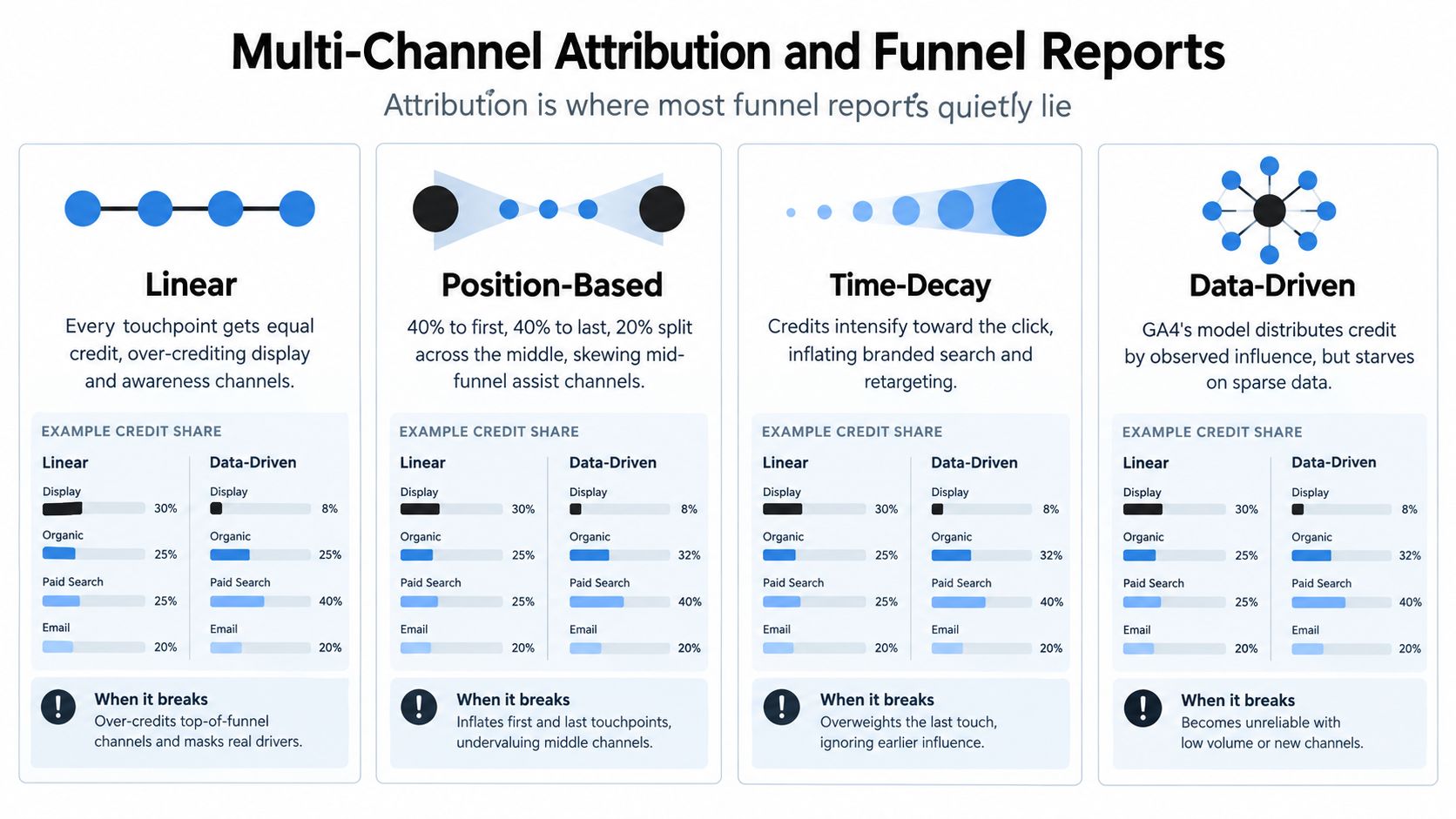
The reconciliation gap shows up when GA4 credits touches differently from how the CFO reads revenue in CRM. That's why the report has to show stage-to-stage conversion, velocity by source, and revenue-per-stage, not just channel credit. If you want a practical route into multi-touch tracking, start by deciding which funnel stages deserve weighted credit and which ones should only be directional.
Orbit AI's enrichment and lead scoring can bridge browser and CRM data by preserving source-of-truth mapping while letting you weight leads by pipeline probability instead of raw session count. That matters when the sales team cares about closed revenue and marketing cares about assisted conversion. The report shape that drives decisions is simple: which stage leaks, which source moves users faster, and which revenue path keeps repeating.
Validation, QA, and Closing the Offline Gap
Your dashboard is only as honest as the worst consent state in the tag. Consent-mode v2, ad blockers, and browser privacy features can strip identifiers before events ever reach GA4, so upper-funnel traffic often looks healthier than it really is. That's why a QA pass can't stop at “the tag fired.”
Start with consent validation in both denied and granted states. Use a tag-assistant walkthrough and verify that the default state, the permission change, and the event payload all behave the way your funnel definition expects. Then add server-side GTM through Cloud Run or Stape if you need to recover cookieless pings and reduce dependence on the browser alone.
Identity stitching is the second half of the fix. A user_id table that joins GA4 client_id, email hash, and CRM contact id gives you a way to connect anonymous sessions to known buyers without pretending the browser tells the whole story. For delayed or offline conversions, import hashed emails from CRM as conversions with a 30 to 90 day lag window, so a trade show session in one quarter can still tie to the deal that closes later.
If offline revenue isn't imported back into the funnel, the report is a guess dressed as a chart.
For setup detail, conversion tracking setup is the right companion when your team is wiring the handoff between browser events and downstream revenue. Without that loop, you'll keep over-crediting what's easy to track and under-crediting what actually closes.
A 30-60-90 Day Funnel Optimization Playbook
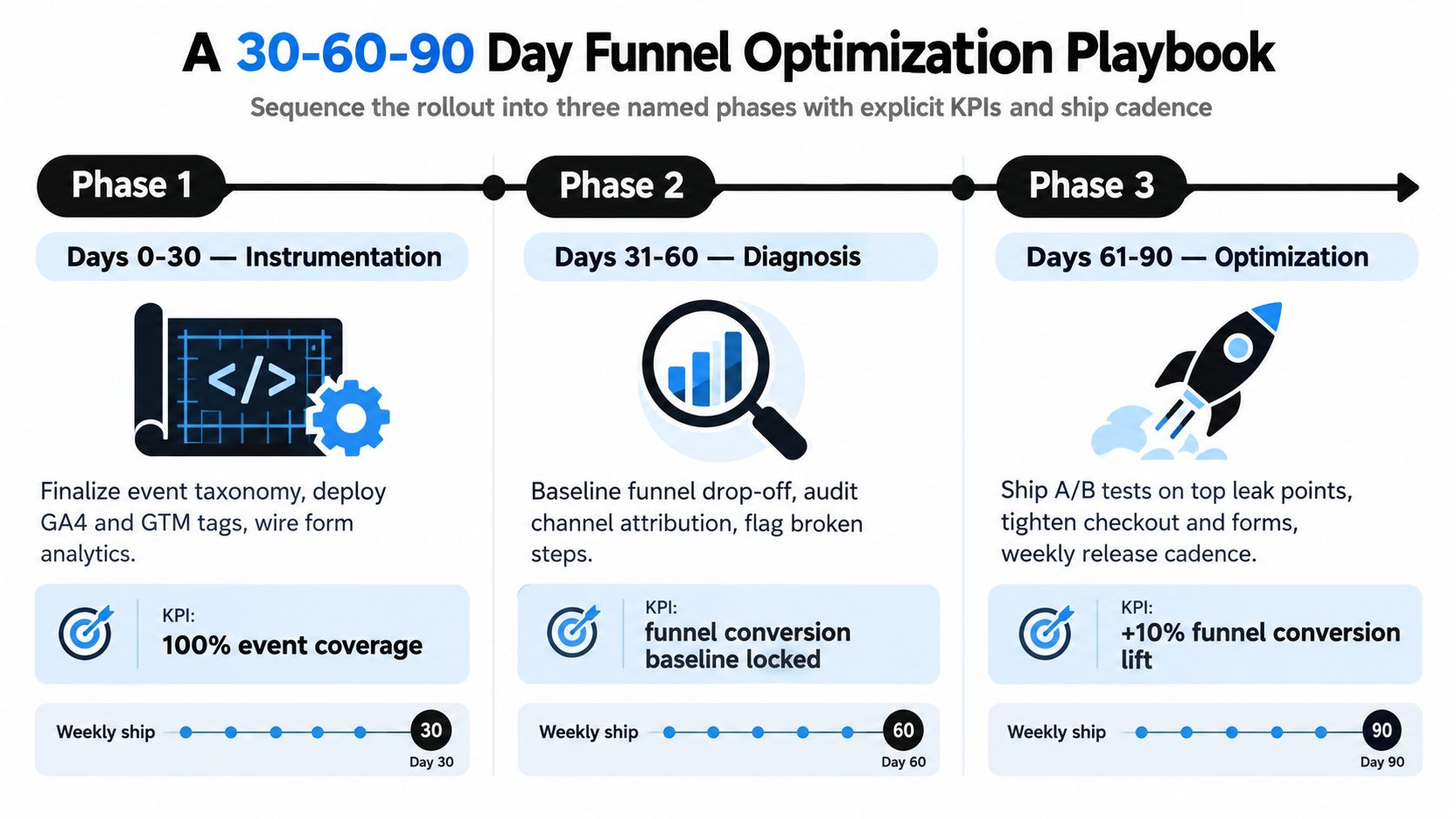
Days 0 to 30 Instrumentation
Lock the event taxonomy, deploy GA4 and GTM, wire form analytics, and validate consent behavior. The KPI here is a fully tracked funnel with under 5 percent event-loss between client and BigQuery export. If the instrumentation isn't clean, optimization work becomes guesswork.
Days 31 to 60 Diagnosis
Enable data-driven attribution where the volume supports it, build funnel exploration reports, and reconcile the funnel against CRM-closed revenue every week. Define drop-off thresholds and stop debating opinions that the data already answers. Keep the weekly review short, one page, one owner, one action.
Days 61 to 90 Optimization
Run landing page tests, retarget mid-funnel drop-offs, and tighten form fields using field-level analytics. The operating cadence should stay weekly, with one release focused on the largest leak instead of three unrelated experiments. The goal is not more tests, it's a tighter measurement loop that keeps the pipeline honest.
Avoid the usual mistakes. Don't ship without a naming spec. Don't chase last-click credit as if it were strategy. Don't launch a dashboard without a QA owner who can explain why a number changed.
Orbit AI gives you form tracking, lead qualification, and source-aware analytics in one place, which is exactly what conversion funnel tracking needs when the browser view isn't the full story. If you're trying to connect form drop-off, qualified leads, and CRM revenue without building a brittle measurement stack, visit Orbit AI and see how it can fit into your funnel architecture.


