

If your customer feedback forms aren't delivering, you’re not alone. Most businesses struggle to collect meaningful insights, and it’s almost always because the form itself is broken. Instead of starting a helpful conversation, these forms feel like a chore, leading to high abandonment rates and something we all know too well: 'survey fatigue'.
This fatigue is a huge problem. It creates a silent majority—customers who have valuable things to say but simply click away, leaving you to guess what they’re thinking.
Why Most Customer Feedback Forms Fail

Let's be honest, nobody gets excited about filling out a feedback form. The common excuse is that they're "too long," but the real issues run much deeper. The problem comes from a fundamental disconnect between what a business wants to ask and what a customer is actually willing to answer.
It’s only getting worse. Recent data shows a steep drop in direct customer feedback since 2021. In fact, only 3 in 10 customers who leave even bother to explain why. To make matters worse, nearly a third of consumers (29%) are less willing to share feedback directly than they used to be, and 30% will just switch to a competitor without saying a word. This trend, highlighted in consumer experience reports from platforms like Qualtrics, points to a growing silent exodus.
This is survey fatigue in action, and it’s a massive hurdle. It warps your perception of reality, leaving you with feedback only from the ecstatic and the enraged. The vast, moderate majority of your customers? Their voices are completely lost.
The Real Reasons Behind Form Abandonment
It’s not just about the number of questions. Several design flaws and psychological barriers are turning your feedback forms into friction points.
Here are the real culprits:
- Vague or Irrelevant Questions: If a customer can't see how their answer will lead to a better product or service, they won't waste their time. Generic questions feel pointless and disrespectful.
- Poor User Experience (UX): A clunky, slow-loading form that isn't mobile-friendly is an instant dealbreaker. Confusing layouts and annoying input fields are common reasons people give up. We’ve written a whole guide on why visitors abandon online forms that dives deeper into this.
- Lack of Perceived Value: Why should they bother? Customers need to believe their feedback will actually be heard and acted upon. When a form feels like a one-way street for data collection, engagement plummets.
At its heart, the problem is a lack of empathy. Businesses design forms to serve their own data-hoarding needs, completely ignoring the customer's time and mental energy.
Diagnosing these deep-rooted issues is the first step toward fixing them. By understanding why old-school forms fail, you can start building something smarter—a feedback format that customers actually want to complete. This isn't just about getting more responses; it's about getting the right insights to fuel real growth and build stronger customer relationships.
Setting Clear Goals for Your Feedback Form
Before you even think about writing a single question, you need to know why you're building a feedback form in the first place. A form without a clear mission is like a ship without a rudder—it might collect a lot of information, but that data will just drift aimlessly without providing any real direction for your business.
Honestly, this is the most critical step. Nailing down exactly what you want to achieve is what separates a form that generates genuinely useful insights from one that just creates a pile of confusing, unusable data.
Every single question has to earn its spot. Are you trying to figure out why your Net Promoter Score (NPS) is stalling? Maybe you need to measure Customer Satisfaction (CSAT) the instant a support ticket closes to see where your service team can improve. Or perhaps you're hunting for those rich, detailed stories from customers to guide your next big product update.
The goal isn’t just to collect data—it’s to gather specific intelligence that connects directly to a business outcome. A focused objective prevents you from asking vague questions that lead to cluttered, useless information.
Define Your Primary Objective
Start with one simple question: "What decision will this feedback help us make?"
This forces you to move past vague goals like "get customer opinions" and connect your form to a tangible action. You need to frame your objectives around specific business metrics or team goals that matter.
Here are a few practical examples of what that looks like:
- To Reduce Customer Churn: The goal is to identify the top three friction points causing customers to cancel their subscriptions in the first 90 days.
- To Improve Onboarding: The objective is to measure how easy new customers find the setup process and pinpoint exactly where they're getting stuck.
- To Identify Sales Opportunities: The mission is to find happy customers who might be interested in a premium feature or would be willing to provide a public testimonial.
Getting this level of clarity ensures every piece of feedback you collect has a purpose and a home. For a deeper look at the different kinds of information you can gather, check out our guide on the primary types of data collection.
Connect Goals to Form Structure
Once your objective is locked in, it should directly influence the form's structure, question types, and even its length.
For instance, a CSAT survey popping up after a live chat interaction needs to be incredibly short. We're talking one rating question and maybe an optional comment box. The goal is to capture immediate sentiment without frustrating the user who just finished a task.
On the other hand, a form designed to gather detailed feedback on a new product feature might need to be a bit longer. It would probably use a mix of rating scales and open-ended questions to pull out more nuanced insights.
By matching the form's design to its specific goal, you show respect for your customer's time, which dramatically increases the quality of the responses you'll get back.
Choosing Question Types That Generate Real Insights
The questions you ask directly control the quality of the answers you get back. It’s that simple. To build a feedback form that delivers genuine clarity, you have to be deliberate about every single question type you include.
Think of it as a balancing act. You need quick, quantitative snapshots to see what is happening, but you also need the rich, qualitative stories that explain the why behind customer behavior. Rating scales are great for taking a customer's temperature, but open-ended questions are how you diagnose the problem. You need both for a complete picture.
Getting this mix right is the key to collecting data that doesn't just sit in a spreadsheet but actually fuels smart business decisions.
Matching Question Formats to Your Goals
Before you even think about specific wording, circle back to the primary objective you set for the form. Are you trying to benchmark overall satisfaction after a purchase, or are you digging into a specific friction point in your new feature? The answer tells you whether you need a simple number or a detailed explanation.
For instance, a star rating or a simple 1-10 scale is perfect for that quick, low-effort pulse check right after a transaction. It gives you a clean, quantifiable data point you can track over time. But if you’re trying to figure out why a customer is struggling with that new feature, you absolutely need an open-ended text field. That’s the only way to capture their unique experience in their own words.
The most effective forms guide the user through a thoughtful sequence, often starting broad and then narrowing the focus. This approach respects their time while still gathering deep, actionable insights.
A Likert scale (e.g., “Strongly Agree” to “Strongly Disagree”) offers a bit more nuance than a basic star rating. It’s ideal for gauging sentiment on very specific statements, like, "The checkout process was easy to navigate." This format provides more granular data on particular moments in the user journey.
For a deeper dive into these strategies, check out our comprehensive guide to survey design best practices.
Strategic Question Type Selection Guide
Every question format has its own job to do. Knowing the strengths and weaknesses of each one is crucial for getting the insights you're after. The table below breaks down the most common types to help you pick the right tool for the job.
| Question Type | Best Used For | Example Insight | User Effort Level |
|---|---|---|---|
| Rating Scale (1-5, NPS) | Measuring overall satisfaction or loyalty quickly. | "Our average CSAT score this month is 4.2/5." | Low |
| Multiple-Choice | Segmenting users or identifying common issues from a predefined list. | "35% of users chose 'Pricing' as their main concern." | Low |
| Likert Scale | Gauging agreement or sentiment toward specific statements. | "Users strongly agree our support team is knowledgeable." | Medium |
| Open-Ended Text | Uncovering unknown issues, gathering testimonials, or understanding context. | "A user suggested a specific integration we hadn't considered." | High |
By thoughtfully combining these question types, you elevate your form from a simple questionnaire into a powerful intelligence-gathering tool. It's this strategic approach that ensures you get the focused, high-quality feedback needed to refine features, improve the customer experience, and ultimately, grow your business.
Designing a Form People Actually Want to Complete

Let's be honest: nobody wakes up excited to fill out a feedback form. A great customer feedback form format isn't just a list of questions; it's a well-designed experience. Your goal is to make it feel less like a robotic interrogation and more like a helpful, two-minute chat.
Get the design right, and you'll see completion rates climb while the quality of your insights skyrockets. The secret is focusing on flow and clarity.
A form that jumps randomly from product features to customer support is confusing. It causes frustration and makes people bail halfway through. Instead, you need to structure your questions logically, guiding them gently from one idea to the next.
For example, always start with the broader, easier questions first. This simple tweak builds momentum and makes the whole process feel much less demanding before you dig into the more specific stuff.
Simplify the User Journey
One of the biggest conversion killers is cognitive overload. When someone lands on a page and sees a massive, scrolling list of 20 questions, their first instinct is to close the tab. I've seen it happen time and time again.
The most powerful way to fight this is to break your form into smaller, digestible steps.
This multi-step approach turns a daunting task into a series of quick, manageable actions. It immediately reduces the visual clutter and gives users a clear sense of progress, which is a huge psychological motivator to get them across the finish line. You can learn more about nailing this in our complete guide on form design best practices.
A well-designed form respects the user's time and attention. By breaking it into logical steps and using conversational language, you turn a tedious task into a positive brand interaction.
And speaking of language, ditch the cold corporate jargon. Phrasing questions like a real human being makes the entire experience feel more personal and engaging. It’s a small change with a big impact.
Prioritize Mobile and Accessibility
With more than half of all web traffic now coming from mobile devices, a mobile-first design isn't just a good idea—it's non-negotiable. Your form has to be effortless to complete on a small screen.
That means big touch targets, fonts that are easy to read without pinching and zooming, and input fields that are a breeze to tap and fill.
On top of that, your form needs to be accessible to everyone. This means following standards like the Web Content Accessibility Guidelines (WCAG), which includes crucial practices like:
- Clear Labeling: Every single form field needs a descriptive, easy-to-understand label.
- Keyboard Navigation: Users must be able to navigate and submit the entire form using only their keyboard.
- Sufficient Color Contrast: Text and interactive elements like buttons need to stand out clearly from the background.
When building your own forms, it's incredibly helpful to see what works for others. Check out these powerful feedback form examples to see some of these strategies in action. By focusing on a seamless user experience for all users, you turn your feedback process into another positive touchpoint for your brand.
The Best Tools for Building Modern Feedback Forms
The right tool can make or break your entire feedback strategy. Think about it: a clunky, slow-loading form builder creates a terrible experience before a user even answers a single question. It's an instant bottleneck that sabotages your chance to get the insights you need.
The best platforms, on the other hand, do more than just collect data. They help you build beautiful, engaging forms that people actually want to complete. Choosing a tool isn't just about finding a decent drag-and-drop editor. It's about finding a platform with strong templates, reliable analytics, and powerful integrations that slide right into your existing workflow. A great customer feedback form format is only as good as the technology powering it, so picking the right partner is a critical step.
Top Platforms for High-Converting Feedback Forms
Here are the standout tools that can turn raw data into actionable business intelligence, helping you create a better user experience while fueling growth.
1. Orbit AI
For businesses that are serious about turning feedback into revenue, Orbit AI is in a class of its own. It moves way beyond simple data collection by using AI to enrich, score, and qualify every single submission automatically. This means you’re not just gathering opinions; you’re identifying high-value leads and flagging urgent customer issues in real time.
Its visual builder is incredibly intuitive, allowing teams to create stunning multi-step forms in minutes without touching a line of code. But the real magic happens in the background, where an AI SDR works to give you context on every response. It then routes that feedback to the right teams—whether that's sales, support, or product. This intelligent automation makes Orbit AI much more than a form builder; it's a lead qualification engine.
Orbit AI is designed for teams that don't just want to collect data but want to act on it instantly. By automatically enriching and scoring feedback, it bridges the gap between customer insights and business growth.
2. SurveyMonkey
A household name in the survey space, SurveyMonkey offers a massive library of expert-designed templates and some seriously advanced analytical features. It's a rock-solid choice for deep market research, employee engagement surveys, and academic studies where granular data analysis is the top priority.
The platform provides robust tools for slicing and dicing data, helping you uncover trends and patterns hidden in large sets of responses. While it’s a powerhouse for traditional, long-form surveys, it can be more complex than necessary for teams focused purely on straightforward lead capture and customer feedback.
3. Google Forms
As a free and universally accessible option, Google Forms is a fantastic starting point for individuals, small teams, or anyone needing a quick, simple way to collect information. Its direct integration with Google Sheets makes managing the data you collect incredibly straightforward.
Its no-frills interface means you can spin up a basic form in just a few minutes. The trade-off, however, is that its customization options are quite limited. It lacks the advanced features, design flexibility, and automation capabilities you'll find in specialized platforms. For businesses that need a professional look or complex logic, Google Forms often falls short.
How to Choose the Right Tool for You
Ultimately, picking the best platform comes down to what you’re trying to achieve.
If your main goal is to understand market trends with in-depth, academic-style research, a tool like SurveyMonkey might be a great fit. If you just need a quick, free solution for an internal poll, Google Forms will get the job done.
But if your objective is to build a seamless customer feedback form format that not only looks great but also actively qualifies leads and automates your workflows, then a platform like Orbit AI is built from the ground up for that exact purpose.
For a more detailed breakdown, you can learn more about how different platforms stack up in our survey software comparison guide.
How to Turn Feedback into Business Growth
Collecting feedback is just the start—the real magic happens when you act on it. A perfectly designed customer feedback form format is worthless if the insights just collect digital dust in a spreadsheet somewhere. The whole point is to build a closed-loop system where feedback instantly drives real business results.
This means you have to move beyond manual data entry. You need to connect your form directly to the tools your teams already live in every day. By integrating with your CRM, support desk, or marketing platform, you make sure every piece of feedback lands in front of the right person at the right time.
This is what a modern feedback workflow actually looks like—it’s all about turning raw data into actionable intelligence.
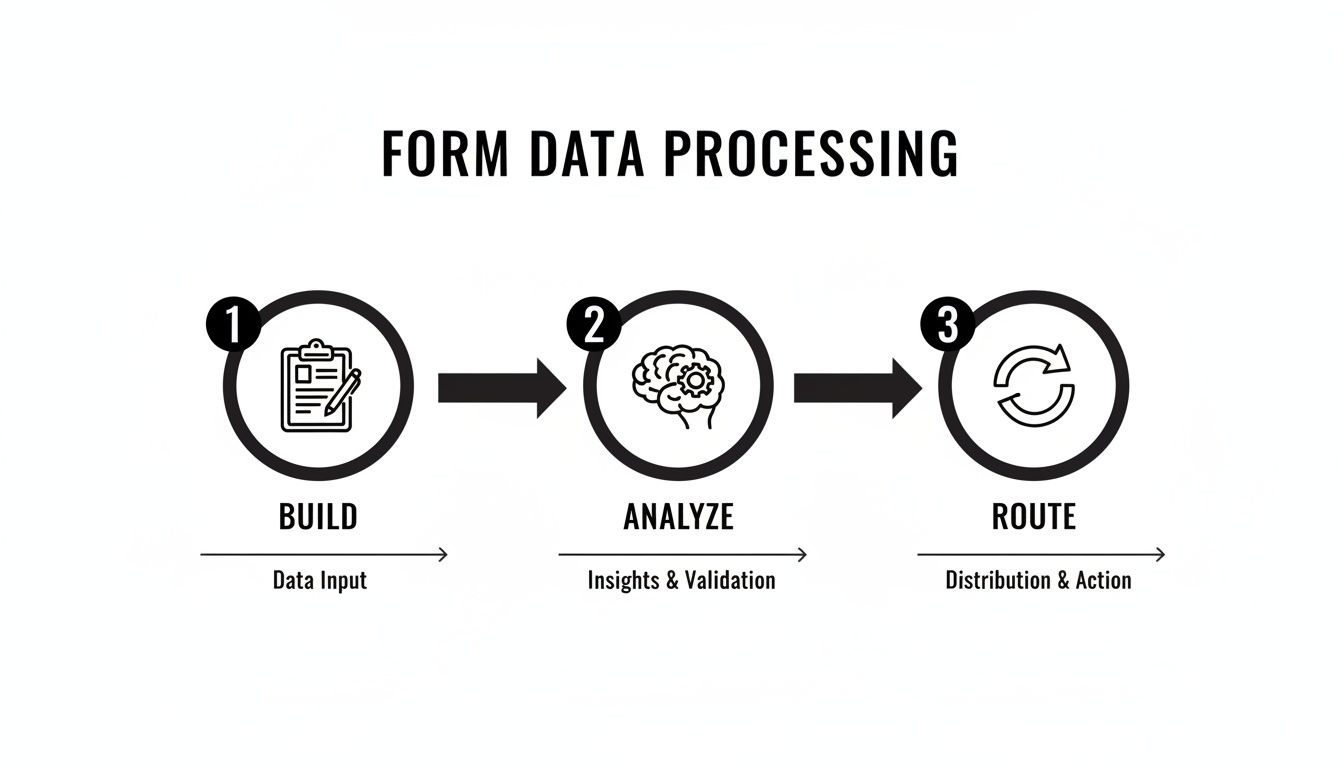
As you can see, building the form is just step one. The real value comes from intelligent analysis and automated routing.
Automating Your Feedback Workflow
Automation is what turns your form from a simple survey into a powerful engine for growth. The key is setting up triggers that automatically analyze, score, and route submissions based on what the customer actually wrote.
Imagine a customer gives you a 9/10 NPS score and casually mentions they're interested in a new feature you're developing. Instead of that little nugget of gold sitting in a file, an intelligent system can:
- Instantly route the positive feedback to your marketing team so they can ask for a testimonial.
- Create a task in your CRM for a salesperson to follow up about that specific new feature.
- Tag the user in your marketing automation platform for future product announcements.
This kind of automation ensures no opportunity ever gets missed.
Modern tools don't just collect data; they qualify it. By using AI to understand sentiment and intent, you can instantly separate high-value leads from general feedback, allowing your teams to focus their energy where it matters most.
Using AI to Uncover Hidden Opportunities
AI-powered tools like Orbit AI take this a massive step further by analyzing responses for sentiment and intent. This tech can spot a customer who's at risk of churning just based on their language, or it can flag a high-value lead who is ready to buy right now.
This intelligent analysis lets you trigger highly personalized follow-ups automatically. A happy customer might get an email asking for a review, while an unhappy one could trigger an immediate alert for your support manager to reach out personally.
Ultimately, the goal of collecting customer feedback is to improve your bottom line through effective website conversion rate optimization. By closing the feedback loop with smart automation, you delight customers, improve your products, and find revenue opportunities you would have otherwise completely missed.
Answering Your Top Questions About Feedback Forms
Even with the best plan, a few tricky questions always pop up when you're in the trenches building and tweaking feedback forms. Let's get right into some quick, practical answers to the challenges you're most likely to face.
What’s the Ideal Length for a Feedback Form?
There’s no magic number, but the golden rule is this: make it as short as you possibly can while still getting the answers you need. A great form should feel like a quick, valuable chat, not a drawn-out interrogation.
Aim for 5-10 carefully chosen questions. This sweet spot usually takes someone just 2-3 minutes to complete.
If you absolutely must ask for more, break the form into multiple steps and add a progress bar. It's a simple design trick, but it dramatically cuts down on how much effort the user feels they're putting in.
How Often Should I Ask for Feedback?
The right timing is all about context. If you get this wrong, you risk "survey fatigue," where your customers start ignoring you altogether. You have to match your request to their journey.
- Transactional Feedback: Ask immediately. For things like a recent purchase or a support ticket that just got resolved, you want to capture their thoughts while the experience is still fresh in their mind.
- Relationship Feedback: Think bigger picture. For broader surveys like NPS, a quarterly or semi-annual cadence is usually your best bet. This gives you a consistent pulse on overall satisfaction without being annoying.
The key is to segment your customers and stagger your requests. This strategy keeps your response rates healthy because you're not blasting your entire audience at once.
How Can I Get More People to Respond?
Boosting your response rates really comes down to nailing three key areas. First, perfect the form itself. It needs to be mobile-friendly, visually clean, and short. No excuses.
Second, get the timing and channel right by asking for feedback at the most relevant moment.
Finally, you have to answer their unspoken question: "What's in it for me?" Clearly explain how their feedback will directly make their experience better.
Using an engaging, fast-loading form builder also makes a huge difference. When the form itself looks professional and works seamlessly, it sends a clear signal that you value their time, making them far more willing to share their thoughts.
Turn every submission into a qualified conversation. With Orbit AI, you can build beautiful, intelligent forms that not only capture feedback but also enrich, score, and route leads to the right teams automatically. Start building for free today.


