

Your feature request inbox is probably full of messages that sound useful but aren't ready for a product decision. “Add integrations,” “make reporting better,” and “support this workflow” may reflect genuine demand, yet they don't tell your team who needs the change, what problem it solves, how urgent it is, or whether the requester would change buying or renewal plans without it. Product then asks support or sales for context, the original requester hears nothing, and the feedback loop becomes a data dump.
A well-designed feature request form fixes the first part of that problem. A qualified workflow fixes the rest. The aim isn't to collect more ideas. It's to capture enough structured context, behavioral evidence, and commercial intent to decide what deserves attention, route it to the right owner, and close the loop with the person who submitted it.
Why Feature Requests Are Now a Formal Workflow
Feature requests once sat between customer support, account management, and product planning. A customer sent an email, a support agent opened a ticket, or a sales representative added a note to an account record. The information often stayed in that channel, which made recurring demand difficult to compare and urgent requests easy to miss.
That operating model is changing. A 2025 survey of feature request research notes that publications on feature requests have grown steadily since 2010 and that the topic now has significant activity in reputable software and requirements engineering venues. The important point isn't the publication count itself. It's that feature request management has become a recognized product-requirements workflow for capturing demand, prioritizing work, and communicating decisions.
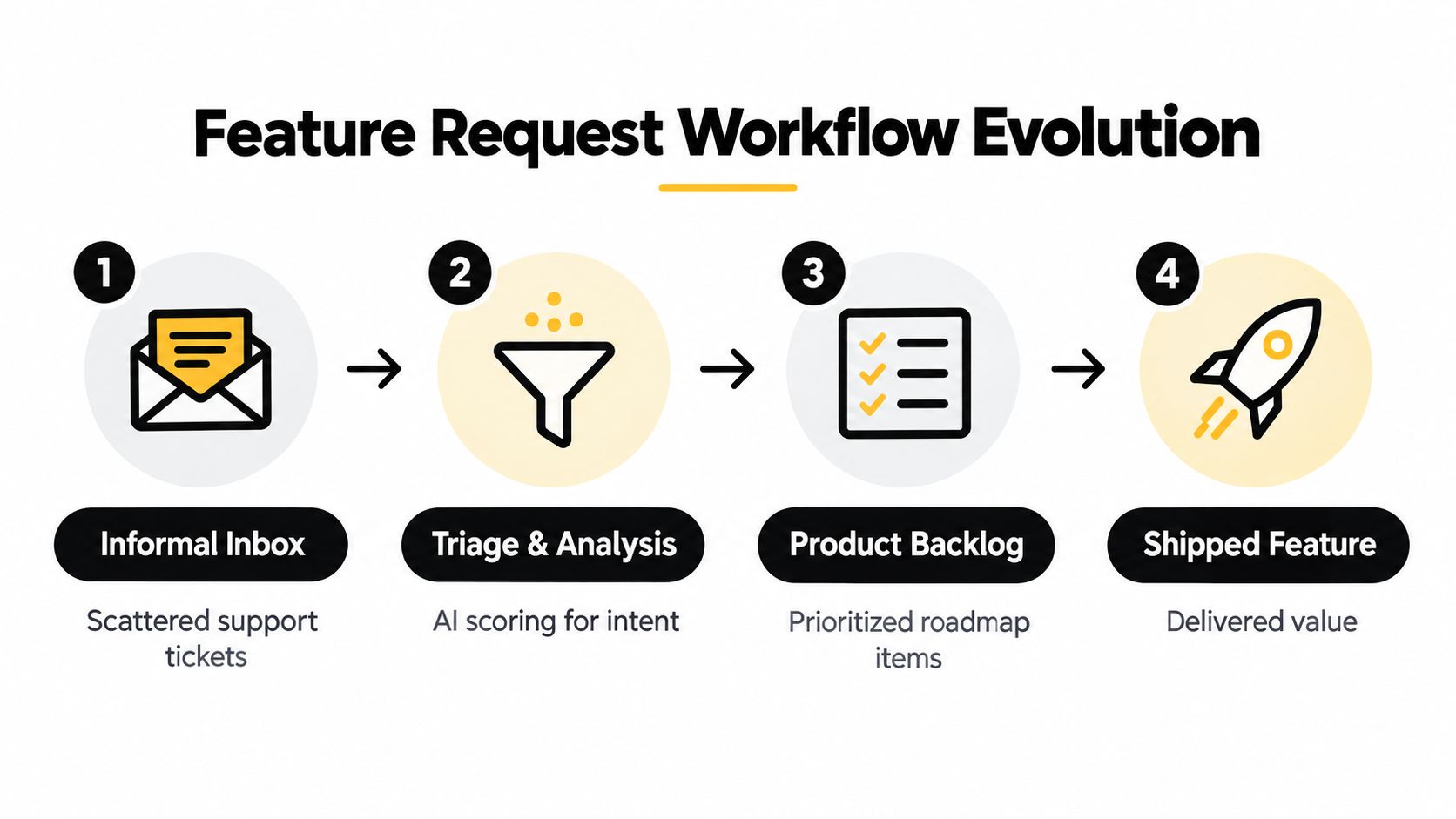
Treat every request as a demand signal
A request should enter your system with enough information to answer three questions:
- What does the user want? Capture the feature name and the suggested behavior.
- Why do they need it? Record the underlying problem, use case, and affected workflow.
- What happens today? Ask for the current workaround, including its cost in time, complexity, risk, or lost opportunity.
This structure separates the requested solution from the problem. Users often describe a sensible need but propose a solution that doesn't fit your product architecture. Product managers can evaluate alternatives only when the form preserves the underlying context.
The workflow then needs visible states, ownership, and a response path. A request can move from intake to triage, discovery, planned work, shipped, or declined with a reason. That status isn't administrative decoration. It tells users their input reached a real decision process rather than disappearing into an inbox.
Build the operational layer around the form
The form is the front door, not the entire system. Your product, support, sales, and customer success teams need a shared record that connects the submission to the requester, account, conversation history, and eventual product outcome. Teams building that connective tissue can also review no-code workflow automation patterns for routing and follow-up.
The same principle applies to adjacent commercial workflows. If a request reveals a need for customized infrastructure or personalization, resources covering Lead Printer infrastructure and personalization can help the relevant team understand the implementation context without forcing product managers to reconstruct it from scattered notes.
A formal feature request process earns its place when it does more than store text. It should create a comparable signal, assign responsibility, support prioritization, and make the final decision visible.
Designing the Core Fields and User Experience
The strongest public form asks for just enough context to act. It shouldn't force a customer to write a product specification, and it shouldn't make the product team chase basic facts after every submission. Start with the fields that explain the request, then use conditional questions for detail that only matters in specific situations.
A practical core looks like this:
- Requester identity, such as name, email, account, or role.
- Feature name, written as a short, searchable title.
- Underlying problem, phrased around the job the user is trying to complete.
- Suggested behavior, describing what the requester wants the product to do.
- Use case and current workaround, including what happens today.
- Priority or urgency, with a separate question for whether the request blocks adoption, workflow completion, renewal, or expansion.
The last distinction matters. A high priority label is a self-reported opinion. A blocker question gives you a more specific signal that can be checked against account data and follow-up conversations.
Keep the first screen easy to complete
Form friction can erase useful demand before your team sees it. Broad web-form benchmarks place average completion near 51.7% and abandonment at about 67.9% in 2026, according to AntForms' form abandonment guidance. The same source identifies excessive fields and high-friction inputs as major pitfalls, with password fields associated with about 10.5% abandonment, email fields with 6.4%, and phone fields with 6.3%.
Those figures aren't a reason to remove every identity field. They're a reason to question every required input. A customer submitting a request usually shouldn't need to create a password, provide a phone number, or complete internal qualification questions before explaining the problem.
Practical rule: Put the easiest question first, make only the decision-critical fields required, and move enrichment to a follow-up workflow.
One guide recommends 6–8 total fields, divided between required and optional, while other recent guidance favors a shorter public form with 2–5 fields. These approaches aren't contradictory. Use the shorter range for anonymous or low-context visitors, and the longer range when you already know the requester and can prefill account details.
Use conditional logic instead of a universal questionnaire
Ask whether the submission concerns a bug, a missing capability, an integration, reporting, or another category. Then reveal the relevant fields:
- Bug-adjacent request: expected behavior, actual behavior, reproduction details, and environment.
- Integration request: systems involved, workflow dependency, and current workaround.
- Reporting request: decisions the report should support and the data currently assembled manually.
- Enterprise or internal request: account context, deadline, commercial impact, and routing owner.
A useful form interface should also explain why you're asking for context. Field descriptions such as “Tell us what you're trying to accomplish” produce better input than “Description.” For interface decisions that affect clarity, hierarchy, and completion, the Orbit AI form UI design principles offer a relevant design reference.
Before building the workflow, sketch the post-submit experience as well. Teams can de-risk product builds with wireframes by mapping the form, confirmation message, status page, and internal review view together. A request form succeeds when users can submit quickly and your team can understand the record without a second interview.
Qualifying Submissions with AI and Smart Scoring
Collection and qualification solve different problems. A form can produce a clean record while still failing to tell you whether the request represents a casual preference, a serious workflow constraint, or an opportunity at risk.
The qualification layer should combine the submitted language with known context. A useful workflow extracts intent, identifies the affected user or account, classifies the request type, detects urgency, and records the workaround. It can then send the record to product, sales, support, or customer success based on rules that your team controls.
Score evidence, not dramatic wording
Users don't all describe urgency consistently. One person writes “nice to have” while relying on a painful manual process every day. Another writes “critical” because a small convenience is missing. Your scoring model should therefore treat the priority field as one input, not the final answer.
Evaluate the submission across signals such as:
- Problem severity: Does the missing capability prevent a core workflow or create inconvenience?
- Workaround burden: Is the user exporting data, maintaining a parallel process, or relying on another tool?
- Account relevance: Is the requester a trial user, active customer, power user, partner, or internal stakeholder?
- Commercial intent: Does the request appear connected to evaluation, adoption, renewal, expansion, or support escalation?
- Pattern strength: Do related submissions describe the same underlying problem?
AI can summarize these signals and assign categories or confidence levels, but it shouldn't invent business impact. If the form doesn't contain an account value, deadline, or verified commercial condition, the workflow should mark that context as unknown rather than filling the gap with a guess.
Turn classification into an action
A score has value only when it changes what happens next. Configure explicit paths:
- High-confidence blocker: alert the account owner and product operations, then create a follow-up task.
- Likely product gap: merge it with related requests and route it to product discovery.
- Bug-adjacent submission: send it to support or engineering triage for validation.
- Low-context idea: acknowledge receipt and ask one targeted follow-up question.
- Duplicate request: link it to the existing item and preserve the new account or use-case evidence.
Orbit AI can be evaluated as one form platform option here. Its stated workflow includes an AI SDR that qualifies submissions, enriches context, and surfaces sales-ready opportunities through lead scoring. Teams comparing implementation approaches can also consult guidance on inbound sales triage implementation and review AI lead scoring concepts before defining their own rules.

Keep a human decision point
Automation should reduce sorting work, not decide the roadmap without review. Product operations should inspect misclassified submissions, update the routing rules, and compare AI summaries with the source text. Keep the original response visible beside the generated interpretation so reviewers can challenge the classification quickly.
The best system creates a ranked queue with reasons. “Marked blocker” is weak. “The requester says the workflow cannot be completed, reports a manual workaround, and is associated with an active evaluation” is actionable, provided each part is supported by captured data.
Adapting Forms for Different User Segments
A public customer form and an internal sales request shouldn't ask the same questions. The first optimizes for participation and clarity. The second can demand richer context because the submitter already understands the account, workflow, and commercial stakes.
Start by identifying the audience before presenting the full question set. You might ask whether the person is an external customer, a trial user, an internal stakeholder, or a partner. For authenticated users, use account metadata to prefill what you already know rather than asking them to repeat it.
Public submissions need a low barrier
For a customer or trial user, focus on:
- The request: What capability is missing?
- The problem: What are they trying to accomplish?
- The workaround: How do they handle it today?
- The urgency: Is it a blocker, a serious limitation, or a convenience?
Keep technical language out of the first screen. Let users attach a screenshot or add supporting detail after the essential response, especially when the request concerns confusing behavior or a visual interface.
A short public form can produce incomplete information. That trade-off is acceptable when your team has a reliable follow-up process. Asking every visitor for account plan, department, deadline, and integration details may improve record richness while reducing the number of people who submit anything.
Internal intake can carry more context
Sales, customer success, and product teams often need a separate path. Their form can include:
| Internal signal | Why it matters |
|---|---|
| Account or opportunity | Connects the request to a real relationship |
| Business case | Explains the consequence of building or not building |
| Deadline | Separates a planning preference from a time-bound need |
| Affected users | Shows whether the request is isolated or broad within the account |
| Ownership and routing | Gives a named person responsibility for follow-up |
| Attachments and links | Preserves call notes, screenshots, and technical references |
Don't expose these fields to every visitor. A casual user usually can't provide reliable commercial data, and forcing them to do so creates noise. Conversely, an internal request without account, deadline, or business context often becomes an unverified escalation.
Power users deserve a middle path. They may provide technical detail and screenshots, but they still shouldn't be forced through a sales questionnaire. Segmenting by role and channel lets you collect richer evidence where it exists without treating every requester as an enterprise stakeholder.
Integrating Forms with CRMs and Analytics
A feature request form that writes to a spreadsheet and stops there creates another silo. The submission should become a connected record that product can prioritize, sales can act on, support can track, and marketing or operations can measure.
Begin with a stable field map. Decide where each value lives before connecting tools:
- Identity fields map to the contact or account record.
- Request fields map to the product feedback object, ticket, or backlog item.
- Qualification fields map to urgency, request type, confidence, and owner.
- Lifecycle fields map to status, decision, release reference, and response date.
Measure the funnel from view to decision
Form analytics should answer more than “how many requests arrived.” Modern form analytics commonly tracks views, submissions, submission rate, and average completion time, and 123FormBuilder explains submission rate as total submissions divided by total views.
That funnel helps separate discoverability problems from content problems. If the form receives few views, place it more clearly in the product, help center, customer portal, or account workflow. If people start but don't finish, inspect field-level friction and the order of questions. If submissions are plentiful but lack usable context, revise prompts and conditional logic rather than adding more fields.
A separate 2026 dataset from an AI form platform recorded 10,914 views, 679 starts, and 168 submissions over roughly one month, illustrating the kind of funnel data teams can use to evaluate visibility and completion. The figures come from the published form analytics dataset, so treat them as an example of measurement structure, not as a benchmark for your own conversion rate.
Route events in real time
Set automation around meaningful events:
- A new request creates or updates the contact and account record.
- A classification rule assigns the request type and product owner.
- A high-confidence blocker creates an alert for sales or customer success.
- A duplicate links to an existing item while preserving new evidence.
- A status change triggers a customer-facing update.
- A shipped feature records the release reference and closes the loop.
Use a CRM integration that preserves source data instead of flattening everything into a note. The Orbit AI CRM integration guide provides a useful reference for mapping form submissions into downstream workflows.
The final dashboard should show the full path from submission to decision. Review request volume by segment, recurring problem themes, abandonment points, ownership gaps, and the share of requests that received a response. Revenue attribution may be difficult, so don't force a financial metric where your data can't support one. A reliable operational measure is better than a precise-looking number built on assumptions.
Ensuring Privacy, Security, and GDPR Compliance
Feature requests can contain more than product ideas. Users may include names, business email addresses, customer account details, screenshots, internal process descriptions, or information about a pending purchase. Treat every submission as personal or commercially sensitive data until your team has established otherwise.
Start with purpose limitation. Tell the requester why you're collecting their identity, how the product team will use the request, and whether you may contact them for clarification. Don't ask for a phone number, account details, or attachments unless that information supports a defined operational purpose.
Design consent and retention deliberately
Your form should make the following clear:
- Purpose: Explain product feedback, support follow-up, roadmap research, or sales contact separately where necessary.
- Choice: Don't bundle unrelated marketing consent into a request submission.
- Access: Provide a practical route for people to ask about their stored information.
- Retention: Define how long raw responses, attachments, and linked account records remain available.
- Visibility: Tell users whether a request will be public, shared internally, or restricted to authorized teams.
For a practical overview of the control areas to review, use the Orbit AI guide to GDPR compliance. Your legal basis, notices, retention schedule, and data-subject process should be reviewed with the person responsible for privacy in your organization.
Protect the data across its lifecycle
Limit access by role. Product managers may need request content and status, while a broader team may need only aggregated themes. Restrict attachments and audit who views or exports them. Encrypt data in transit and at rest, establish deletion procedures, and verify that connected CRM, ticketing, analytics, and automation tools apply equivalent controls.
Avoid collecting secrets in open text. Add a short warning not to submit passwords, API keys, confidential credentials, or unrelated personal information. If users can upload files, define accepted file types, scan uploads, and ensure that public status boards never expose private attachments.
Privacy also improves the quality of your intake. A focused form is easier to understand, easier to secure, and less likely to collect irrelevant information. The right standard is simple: collect the smallest useful dataset, explain its purpose, protect it throughout the workflow, and delete it when the business no longer needs it.
Orbit AI gives teams a visual form builder, AI-assisted submission qualification, smart lead scoring, real-time funnel analytics, CRM and automation connections, and security features designed for GDPR-ready workflows. Use Orbit AI to build a feature request form that captures the problem, qualifies the signal, routes the right owner, and turns valuable feedback into a trackable product or sales conversation.


