

A lead fills out your demo form at 10:07. By 10:22, the record is still sitting in a marketing inbox, nobody has checked whether the company fits your ICP, and the CRM already contains two partial versions of the same account from past campaigns. By the time a rep follows up, the buyer has moved on or the rep is working from stale data.
That's where CRM automation starts paying off. The strongest CRM automation examples don't behave like isolated features. They connect one immediate trigger to a defined decision, an accountable action, and a measurable outcome. A form submission should qualify the lead, enrich the record, route it to the right owner, create the right follow-up, and keep bad data from spreading.
That connected approach matters because CRM automation is already standard operating practice. Independent roundups report that about 80% to 82% of organizations use CRM for sales reporting and automation, which puts automation firmly in the operational core rather than the experimental edge (DemandSage CRM statistics). The same historical shift from ACT! in 1986 to Siebel Systems in 1993 and Salesforce's browser-based model in 1999 helps explain why modern teams automate lead assignment, reminders, pipeline updates, and reporting instead of managing revenue workflows in spreadsheets.
The workflows below follow the path a real lead takes. Start with capture and qualification. Then enrich, route, sync, prioritize, nurture, deduplicate, personalize, and govern. Orbit AI sits at the front of that chain as the form-driven qualification layer, which is where many teams either gain speed or lose it.
1. AI-Powered Lead Qualification with Orbit AI Forms
A paid search lead requests a demo at 9:12 a.m. The form captures company size, role, product interest, timeline, and one follow-up question based on the stated use case. By 9:13, the record is scored, enriched, and labeled for either sales follow-up or nurture. That one minute determines whether the rest of the revenue workflow starts clean or starts with guesswork.
Qualification works best at capture, not after the record lands in the CRM. If ops waits for manual review, reps inherit mixed intent, missing fields, and scoring that changes from person to person. Orbit AI forms put the decision layer at the front of the system, where lead data first enters.

What the workflow looks like
Trigger → Conditions → Actions
- Trigger: Prospect submits a website or campaign form
- Conditions: Company fit, role, use case, budget signal, geography, source, required fields complete
- Actions: Score lead, enrich company context, send high-fit leads to sales queue, send lower-fit leads to nurture, log submission data for reporting
A common B2B scenario proves the point. A mid-market software company runs the same demo CTA across product pages, partner campaigns, and webinars. The highest-volume source is not always the highest-quality source, so the form needs to do more than collect contact details. It needs to ask different follow-up questions, validate core fields, and decide whether the lead should enter an SDR queue or a nurture track before bad routing and bad data spread downstream.
Practical rule: Write down the exact fit signals before automating anything. “Good lead” is not a usable condition.
There is a trade-off. More qualification logic at the form stage improves lead quality, but every extra question creates friction. The fix is conditional depth, not longer forms for everyone. Ask only for the fields needed to make the next decision, then let enrichment fill the rest.
Orbit AI is useful here because the form handles qualification, enrichment, and scoring at submission time. Teams mapping this layer can review these AI agent patterns for lead qualification to define the first decision point in the broader revenue workflow.
Reusable template: Define ICP fields. Add conditional questions only where a missing answer affects routing or follow-up. Score explicit inputs and enriched signals separately. Set a sales-ready threshold, a nurture threshold, and a manual review path for edge cases.
2. Automated Lead Routing Based on Qualification Data
An SDR opens the CRM and sees a new enterprise demo request sitting in the wrong queue. The form captured urgency, product interest, and a named account. The routing rule only looked at territory. By the time the lead is reassigned, the prospect has already booked with a competitor.
That is the routing problem. Qualification data only matters if it changes who owns the follow-up and how fast they act.

A useful routing model starts with precedence, not fairness. Named accounts usually beat geography. Product specialization can beat segment. SLA coverage can beat both if the assigned rep is out of office. Teams that skip that order end up with rules that conflict, then reps stop trusting assignment.
Strategic point: Routing is a revenue-control layer. Its job is to send the right lead to the right owner fast enough to preserve intent.
Here is a practical pattern.
Trigger → Conditions → Actions
- Trigger: Lead reaches qualified status
- Conditions: Named account match, product interest, region, deal size band, rep availability, SLA timer
- Actions: Assign owner by rule priority, alert the rep in CRM or Slack, add backup owner if SLA expires, write the route reason to a visible CRM field
The trade-off is easy to miss. More routing logic can improve fit, but every exception makes the system harder to audit. I have seen teams add so many branches that ops cannot explain a single assignment without opening three workflows and two spreadsheets. Start with one default route, then add exceptions only for cases that create measurable revenue loss or response delays.
One case where the extra logic pays off is product-led B2B software. A demo request from an existing strategic account should not enter the same pool as a new SMB inquiry, even if both came through the same Orbit AI form. The first needs account ownership preserved. The second may need language or regional matching first. The form captures the signal. Routing turns that signal into a usable handoff.
Analysts at Optifi reported that in a SaaS startup CRM migration, follow-up response time dropped from 18 hours to 2 hours after the team moved to an AI-native CRM workflow, alongside broader conversion and sales-velocity gains in this SaaS startup CRM migration case study.
For implementation detail, map each qualification field to one routing decision and document the priority order inside the workflow. This guide to automated lead routing from forms is a useful reference when you set up that layer.
Implementation move: Define one primary owner rule, usually territory or account owner. Add no more than two exception layers at first, such as named accounts and product specialists. Then stamp every routed lead with route_reason, route_version, and fallback_owner so ops can audit misroutes without rebuilding the path by hand.
3. Automated Lead Enrichment and Data Validation
A rep opens a fresh demo request and sees gmail.com, company name Acme, job title Founder, and no employee count. That lead may still be real, but sales cannot segment it, score it, or report on it reliably. If that record reaches the CRM untouched, every downstream workflow inherits the ambiguity.

Enrichment belongs right after capture and before routing, syncing, and task creation. That order matters. Orbit AI forms can collect the first-party signals, but the operating gain comes from combining those signals with validation rules and third-party firmographic checks before the record becomes system-of-record data.
Clean data is not a reporting project. It is the control layer for qualification, routing, personalization, and CRM sync.
Here is the workflow in its useful form:
Trigger → Conditions → Actions
Trigger: Demo or contact form submitted
Conditions: Email passes format check, consent captured, company field or domain available, duplicate status unresolved
Actions: Append company and role data, standardize naming, flag mismatches, hold low-confidence records for review, send only validated records into the CRM
A practical example: one buyer enters Acme Inc, another enters Acme, and a third uses a personal email while selecting an enterprise pricing page form. The trade-off is speed versus certainty. If you force all three straight into sales, reps waste time researching and ops inherits messy account reporting. If you block every imperfect submission, you lose legitimate demand. The better pattern is to enrich aggressively, validate the fields that affect ownership and scoring, and route uncertain matches into a short review queue.
Industry reporting from 4CRMS on CRM trends for 2026 and 2027 makes the risk plain. AI can scale poor CRM inputs just as fast as good ones when governance is weak.
There is also evidence that the cleanup work pays back quickly. An enterprise SaaS CRM optimization case study from Revelate Operations reported a 95% improvement in data-quality metrics within the first three months after the team combined automation with CRM hygiene and reporting discipline.
For implementation, avoid enriching everything just because the API allows it. Start with the fields that change revenue decisions: company name, company domain, employee range, industry, geography, and role seniority. Then set confidence thresholds. High-confidence matches update the record automatically. Medium-confidence matches get flagged. Low-confidence or conflicting matches stay out of the CRM until a human resolves them. Teams building that layer usually start with these data enrichment API workflow patterns.
Implementation move: Define a required minimum record for CRM entry, usually valid email, consent status, normalized company identifier, and one confidence-scored enrichment source. Auto-accept records above the threshold, queue uncertain ones for review within one business day, and stamp each record with enrichment_status, match_confidence, and validation_reason so ops can trace bad data to the exact rule that allowed it through.
4. Automated Lead Nurture Sequences Triggered by Form Submission
A lead submits an Orbit AI form for a comparison guide, selects a clear product interest, and gives a purchase timeline of six months. That is not a sales-ready handoff. It is a timing problem.
The revenue risk is simple. Sales touches the lead too early and gets ignored, or marketing leaves the lead untouched and intent fades. Nurture automation fixes that middle state by treating the form submission as the start of a managed buying path, not a failed sales conversion.
Here the workflow matters more than the email sequence itself.
Good nurture logic protects rep time and keeps interested buyers active until their timing changes.
A useful setup looks like this:
Trigger → Conditions → Actions
- Trigger: Form submission enters CRM
- Conditions: Timeline is delayed, lead score is below the sales threshold, consent is valid, product or use case is known
- Actions: Start the matching nurture track, pause sales task creation, watch for engagement signals, re-score after each meaningful interaction
The segmentation rule does the heavy lifting. A prospect evaluating product A with a Q4 timeline should not receive the same sequence as a prospect researching product B for an active internal project. Short, specific sequences usually perform better because they map to one problem, one use case, and one next step. Generic nurture tracks create activity without improving handoff quality.
There is a trade-off. Tighter segmentation improves relevance, but it also adds operational overhead. Teams that over-segment often end up maintaining too many branches with weak content and inconsistent exit rules. Start with a small set of nurture paths tied to the main buying motions, then expand only if sales can prove the extra split changes conversion or meeting quality.
One 2026 roundup reports that 42% of sales teams use CRM software to schedule meetings automatically. That matters here because nurture should not live in isolation. The same lead record needs to feed scoring, meeting logic, routing, and suppression rules, or the CRM creates conflicting actions across teams.
A practical implementation move is to define three exit signals before writing a single nurture email: score crosses threshold, high-intent page visit, or direct reply/request. Then build one sequence per major product or use case, cap each sequence length, and remove the lead from nurture the moment one of those signals appears.
Reusable template: Route form submitters with delayed timelines into a product-specific nurture track, suppress SDR follow-up until an intent threshold is met, re-score on each click, visit, or reply, and promote the record to sales the same day the lead shows buying behavior.
5. Dynamic Form Personalization Based on Source and Behavior
A visitor clicks a high-intent demo ad, lands on the form, and sees eight generic fields plus questions your team could have inferred from the campaign. Many of those prospects leave before sales ever gets a chance to qualify them.
Dynamic personalization fixes that operational mistake. Orbit AI forms can adjust what appears based on source, visit history, and known account context, so the form collects only the data the next workflow step needs.
Teams using progressive profiling often report higher completion rates on return visits because repeat visitors are not forced to re-enter the same details. Marketo describes the approach as a way to reduce friction while expanding profiles over time in its guide to progressive profiling. The practical takeaway is simple. Shorter first-touch forms usually convert better, and later visits can carry more qualification weight.
Personalization works best when it serves routing, scoring, and handoff. If a field does not change a downstream decision, it usually does not belong on the form.
A useful pattern is to split the experience by buying context. A paid search visitor on a product page sees name, work email, company, and one qualifying question. A returning visitor from a target account who already submitted once sees a shorter identity block and two deeper questions tied to timeline or use case. The CRM gets cleaner intent signals without making first-touch conversion pay the price.
Trigger → Conditions → Actions
- Trigger: Visitor loads a form
- Conditions: UTM source, landing page intent, prior submission history, known company or account match, device type
- Actions: Display a shorter or deeper field set, suppress known fields, ask one context-specific qualification question, write source and form variant back to the CRM
There is a trade-off. More variants can improve relevance, but they also create reporting drift if marketing ops lets every campaign define its own fields and labels. Keep one controlled schema, limit personalization to a few decision-making questions, and map every variant back to the same CRM properties.
Implementation move: define one universal first-touch form, create two to three approved field variants by source or buying stage, and use progressive profiling only for fields that affect routing, scoring, or SDR follow-up.
Reusable template: keep identity and consent fields fixed, swap one to three contextual questions based on campaign source or page intent, suppress fields already known in Orbit AI forms, then pass the form variant and answers into CRM scoring and routing rules.
6. Automated CRM Sync with Real-Time Data Updates
Many teams break the revenue workflow at handoff.
A qualified lead submits an Orbit AI form, routing logic identifies the right owner, and then the CRM sync creates a new Lead instead of updating the existing Contact. The rep sees two records, attribution splits across both, and follow-up starts from the wrong context. The problem is rarely the form. It is the decision layer between capture and CRM writeback.
Real-time sync works when the system makes a few decisions well. It needs to know which object to touch, which fields are required before sync, how to match against existing records, and where failed writes go for review. Without that, speed just pushes bad data into Salesforce or HubSpot faster.
Treat CRM sync as a control point, not a pipe. The goal is not instant delivery alone. The goal is accurate record creation, update logic, and visible exception handling.
A simple operating model looks like this:
Trigger → Conditions → Actions
- Trigger: Lead is approved for CRM handoff
- Conditions: Match found or not found, object type selected, required fields present, duplicate check cleared, integration healthy
- Actions: Create or update the right CRM object, normalize values, write sync status and timestamp, route failed syncs to an ops queue
The trade-off is straightforward. Strict sync rules protect data quality, but they can delay handoff if forms do not collect enough information. Loose rules move faster, but they create record sprawl, broken attribution, and extra cleanup for sales ops. In practice, teams should be stricter on object selection and duplicate matching, then more flexible on non-critical enrichment fields.
For teams setting this up, this guide on integrating forms with your CRM is useful for mapping the handoff logic cleanly. The same stage also benefits from the broader reporting discipline in this no-team marketing data playbook, especially if one person owns forms, CRM, and campaign tracking.
One more implementation detail matters. Log every sync outcome somewhere visible. Reps should not be the first people to discover a failed write.
Implementation move: define create-versus-update rules by object, lock required field mappings for each path, add a sync status field plus error alerting, and test three cases before launch: net-new lead, existing contact update, and failed sync recovery.
Reusable template: when a qualified form submission is approved, check for account and person matches, choose the target CRM object, validate required fields, write or update the record, stamp sync status, and send exceptions to an ops queue for same-day review.
7. Automated Sales Task Creation Based on Lead Quality
A rep opens the CRM at 9:05 a.m. There are 18 new tasks from overnight form submissions, but only three came from leads that match territory, budget, and buying timeline. That queue trains people to ignore automation.
Task creation works best after qualification, routing, enrichment, and sync are already in place. Orbit AI forms capture the first intent signal, but the handoff only helps revenue when the CRM turns that signal into the right next action for the right rep.
Good task automation protects rep attention. It should compress response time for high-intent leads and keep weak-fit leads out of the sales queue until they earn attention.
Here is a practical split.
A prospect submits a demo form at 8:40 p.m. The score is high, company size fits the ICP, and the record already synced to the CRM with valid ownership. The system creates a task for the assigned AE, due at the start of the next business day, with the form summary and recommended first touch. A content-download lead from a student email domain follows a different path. No sales task. That record stays in nurture until behavior changes.
Decision flow
Trigger → Conditions → Actions
- Trigger: Lead score finalizes, qualification status updates, or a high-intent form is submitted
- Conditions: Lead tier, fit score, urgency signal, owner assigned, open opportunity status, existing open task check
- Actions: Create task, set due date by tier, attach qualification summary, suppress duplicates, alert manager only on overdue top-tier tasks
The performance gap usually comes from judgment, not from task volume. 61% of over-performing sales leaders use CRM to automate parts of their sales process, compared with 46% of underperformers. The lesson is straightforward. Automate the moments that need speed and consistency. Do not turn every conversion event into rep work.
There is a trade-off here. Aggressive rules improve speed to lead, but they also create noise if scoring is immature or ownership data is incomplete. Conservative rules protect the queue, but they can slow follow-up on good leads that sit just below a threshold. In practice, you should start with only two or three task-triggering scenarios and review completion rates before expanding.
A simple operating model usually holds up well:
- Tier A leads create an immediate sales task with a same-day or next-business-day SLA.
- Tier B leads create a scheduled follow-up only if no meeting is booked.
- Tier C leads stay in marketing nurture and create no rep task.
Implementation move: limit task creation to qualified lead tiers, require owner assignment before task creation, write the source, score, and key form answers into the task description, and add one suppression rule for any lead that already has an open follow-up.
Reusable template: when a synced lead reaches Tier A or Tier B, confirm ownership, check for an existing open task or opportunity, set the due date from SLA rules, create the task with qualification context and recommended next step, and escalate only if a top-tier task passes due without activity.
8. Automated Duplicate Lead Detection and Consolidation
A lead submits an Orbit AI form to request a demo. Two minutes later, the CRM creates a fresh record instead of updating the contact who downloaded a guide last quarter. Sales now has two owners looking at the same person, marketing has split attribution, and scoring starts from the wrong baseline.
Duplicate handling sits in the middle of the revenue workflow, not at the edge of it. If capture, enrichment, routing, and sync are working, duplicate control has to protect those steps instead of overwriting them.
The goal is not fewer records by itself. The goal is one usable lead history that sales, marketing, and ops can trust.
Where consolidation should happen
The safest place to catch many duplicates is before a new record fully lands in the CRM. A pre-sync check can compare exact email first, then look at phone, domain, and company-name similarity. That keeps the system from creating a second lead only to merge it back a few seconds later.
For example, a buyer might use a personal email on a webinar form, then a work email on a demo request. An exact-match-only rule will miss that case. A fuzzy rule can catch it, but that is where teams create bad merges if they ignore account ownership, consent history, or whether two contacts at the same company are different people.
Trigger → Conditions → Actions
- Trigger: New form submission, import, or inbound sync event
- Conditions: Exact email match first, then phone match, domain plus company similarity, owner/account conflict checks, consent fields preserved
- Actions: Update existing record, merge into a designated master, attach new conversion history, suppress duplicate alerts, or send uncertain matches to ops review
A strict-first model usually holds up better than an aggressive merge policy. Exact email matches can merge automatically. Domain and company matches often need a confidence threshold and a review queue. That trade-off slows cleanup a little, but it prevents the more expensive mistake of combining two real contacts and corrupting history.
Teams that need front-end control before records spread across systems should review these lead deduplication workflow patterns.
What to preserve during a merge
The master record should keep the timeline that matters for revenue decisions. That includes first-touch source, latest high-intent conversion, qualification answers, lifecycle stage, owner, and consent status. Deleting those details to get a cleaner database creates reporting problems later.
A practical implementation move is to define one master-record rule, one auto-merge rule, and one exception path. Set exact email as auto-merge, route fuzzy matches to review, preserve every source touch in activity history, and block merges whenever ownership or permission fields conflict.
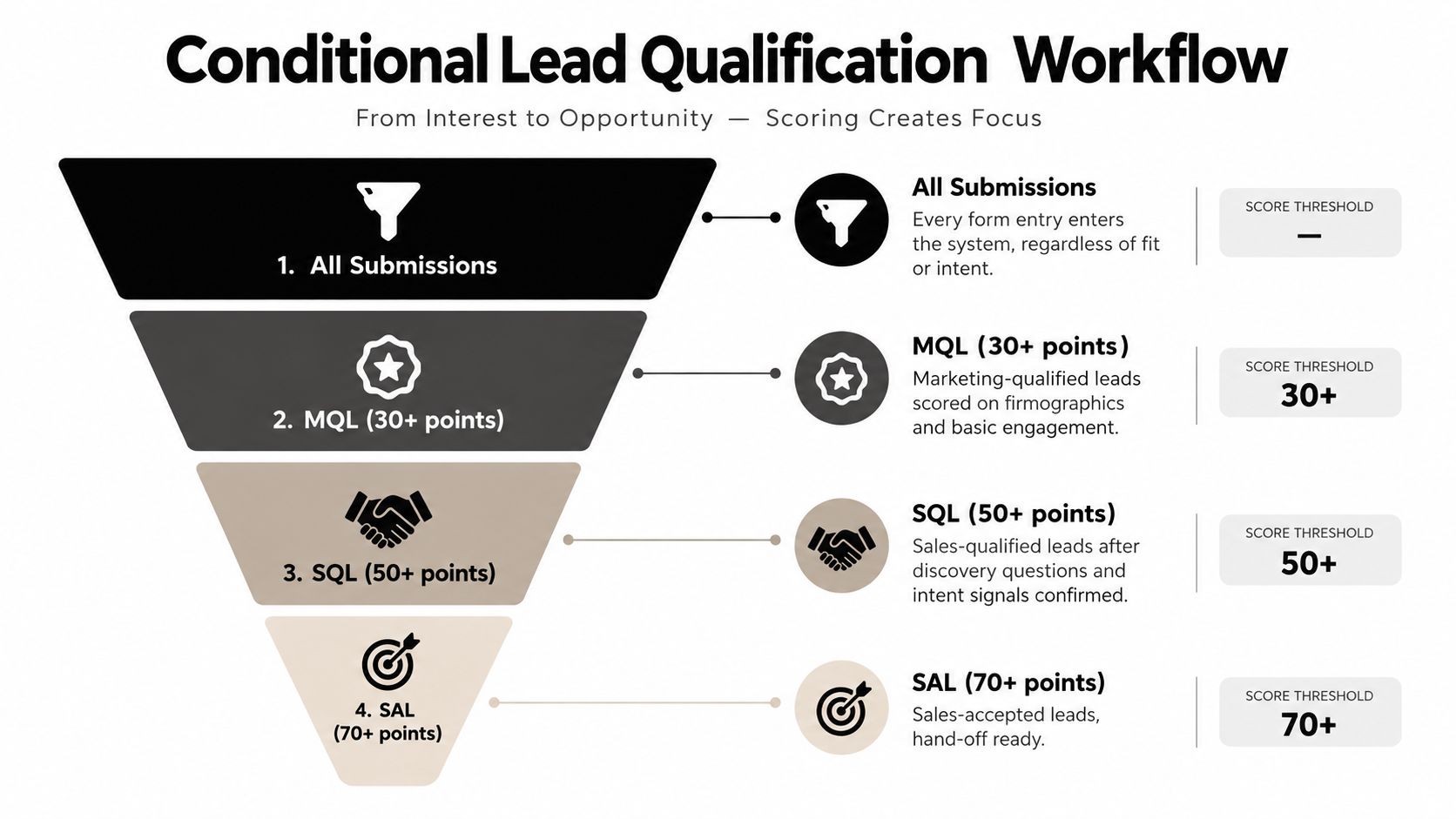
9. Conditional Lead Qualification Workflows with Multi-Stage Scoring
A common failure point shows up after routing is already working. Sales gets fast follow-up on leads that look active, but half of them are still too early, missing a required qualifier, or showing interest from the wrong account type. The problem is not speed. The problem is collapsing fit, intent, and readiness into one score.
Multi-stage scoring fixes that by treating qualification as a sequence. Start with fit. Layer in engagement. Add a readiness gate before handoff. Orbit AI form answers usually supply the first gate, while CRM activity and rep updates determine whether the lead should advance, stay in nurture, or return for more qualification.
A lead should not reach sales-ready status because one number crossed a threshold. It should reach sales-ready status because the right combination of profile, behavior, and buying signals is present at the same time.
How the workflow actually progresses
Trigger → Conditions → Actions
- Trigger: Form submission, pricing-page return visit, email reply, meeting request, or rep disposition update
- Conditions: Fit score passes threshold, engagement score reaches a defined band, required qualification fields are complete, negative qualifiers are absent, current stage rules are satisfied
- Actions: Move to the next qualification stage, assign a priority flag, keep the lead in nurture, prompt for missing data, or send the record to sales review
Here is the practical model that holds up in operations:
Stage 1 measures fit. Firmographic and form-level answers matter most. A lead can be active and still be a poor use of sales time if company size, region, budget range, or use case falls outside the team's target.
Stage 2 measures engagement. This catches behavior that signals real evaluation instead of casual browsing. Repeat visits to pricing, product, or comparison pages usually matter more than a single content download.
Stage 3 measures readiness. This is the handoff gate. It should require one or two hard conditions, such as a demo request, a valid project timeline, or a rep-confirmed need. That trade-off lowers raw lead volume reaching sales, but it improves acceptance and follow-up quality.
Teams are adding more AI to this layer, as noted earlier, but the operational risk stays the same. If the model advances leads without visible reasoning, reps stop trusting it. Keep every stage tied to criteria a sales manager can audit in the CRM.
A reusable implementation move is to define three separate score objects or properties, set one promotion rule per stage, and attach one visible explanation field to every advancement. Review promotions against pipeline conversion each month, then tighten or relax thresholds based on accepted-opportunity rates rather than form volume alone.
10. Automated Compliance, Privacy, and Consent Management
A common revenue leak starts at handoff. Orbit AI forms capture a qualified inbound lead, sales gets the record in the CRM, and an SDR launches outreach before anyone checks whether email, SMS, or regional consent was granted. The workflow worked. The governance did not.
Consent belongs in the same revenue system as qualification, routing, and nurture. If permission data stays trapped in the form tool or a marketing platform, the CRM cannot enforce it at the moment a rep sends a sequence or a workflow adds a contact to SMS.
Store consent as operational data, not legal fine print. If sales and marketing systems cannot read it, they cannot respect it.
Consider a team selling across North America and Europe. A prospect submits a demo request, gives email consent, declines SMS, and falls under stricter regional rules. If the CRM only stores "subscribed = yes," routing and nurture keep moving, but channel controls fail. The result is not just legal exposure. It also creates opt-outs, spam complaints, and rep confusion about who can be contacted and how.
Use the workflow below to keep permission attached to the lead from capture through follow-up:
Trigger → Conditions → Actions
Form submitted or preferences updated → geography, channel-level consent, policy version, lawful basis or double opt-in requirement checked → write consent fields to CRM, stamp source and timestamp, block restricted channels, log the audit trail, route records with exceptions to review
The trade-off is complexity. Channel-specific consent fields, policy versioning, and suppression logic add setup work across the CRM, marketing automation, and outbound tools. But the simpler alternative usually fails under scale because one vague subscription field cannot govern email, SMS, phone, and regional requirements reliably.
For outreach-heavy teams, process documentation should also cover deliverability and legal handling outside the CRM. A practical reference on Cold Email Compliance helps when outbound sequences sit alongside inbound consent workflows.
Implementation move: create separate CRM properties for each contact channel, store capture source and policy version on every submission, sync those fields to every sequencing tool, and make suppression the default action when consent data is missing or conflicts across systems.
10 CRM Automation Examples: Feature Comparison
| Feature / Workflow | Implementation complexity | Resource requirements | Expected outcomes | Ideal use cases | Key advantages |
|---|---|---|---|---|---|
| AI-Powered Lead Qualification with Orbit AI Forms | Medium, configure AI rules and scoring | Moderate, training data, integrations, rule tuning | Faster qualification; higher lead quality; reduced manual SDR work | B2B SaaS inbound capture, agencies, enterprise SDR teams | Real-time scoring and enrichment; no-code visual form builder |
| Automated Lead Routing Based on Qualification Data | Low–Medium, define routing rules and territories | Low, CRM integration, routing logic, monitoring | Instant assignment; improved response times; balanced workloads | Enterprise/product-line routing, regional teams, inside sales | Immediate routing, round-robin and territory support, audit trails |
| Automated Lead Enrichment and Data Validation | Medium, connect data providers and validation rules | Moderate, enrichment APIs, data subscriptions, compliance checks | Richer lead context; fewer duplicates; faster outreach | Tech-aware sales, account expansion, agencies cleaning client data | Real-time enrichment, technographics, data standardization |
| Automated Lead Nurture Sequences Triggered by Form Submission | Medium, design sequences and conditional branches | Moderate, marketing automation platform, content, templates | Consistent follow-up; increased conversions; saves SDR time | SaaS product nurture, B2B services, scale-ups automating outreach | Personalized multi-channel sequences, A/B testing, dynamic content |
| Dynamic Form Personalization Based on Source and Behavior | Low–Medium, set up conditional fields and profiling | Low, form builder, analytics, testing | Higher completion rates; better-quality data; reduced friction | Campaign-specific landing pages, progressive profiling use cases | Source-based personalization, progressive profiling, improved UX |
| Automated CRM Sync with Real-Time Data Updates | Medium–High, field mapping, bi-directional sync, dedupe | High, CRM admin time, integration testing, API access | Always-fresh CRM data; fewer duplicates; scalable sync | Enterprises syncing high volumes, agencies managing clients | Real-time bi-directional sync, custom mapping, audit logs |
| Automated Sales Task Creation Based on Lead Quality | Low–Medium, define triggers, priorities and templates | Low, CRM workflows, task templates, monitoring | Faster first touch; systematic follow-up; better SLA compliance | SDR teams, enterprise follow-up processes, inside sales | Priority-based tasks, reminders, automatic scheduling |
| Automated Duplicate Lead Detection and Consolidation | Medium, configure matching rules and fuzzy logic | Moderate, data quality tools, manual review queue | Cleaner CRM; reduced duplicate outreach; accurate reporting | Large enterprises, multi-channel campaigns, agencies | Multi-field fuzzy matching, configurable consolidation, manual review |
| Conditional Lead Qualification Workflows with Multi-Stage Scoring | High, design multi-stage scoring and progression rules | High, scoring model design, analytics, cross-team alignment | More accurately qualified pipeline; clearer handoffs; better forecasting | B2B MQL→SQL→SAL processes, enterprise qualification flows | Multi-stage scoring, conditional progression, scoring transparency |
| Automated Compliance, Privacy, and Consent Management | Medium, implement consent capture and regional rules | Moderate, legal review, compliance tooling, audit logging | Reduced regulatory risk; compliant contact lists; audit readiness | EU/CA businesses, regulated industries, multi-region enterprises | Built-in GDPR/CCPA support, audit logs, enterprise-grade encryption |
Turn These Workflows Into a Revenue System
The strongest CRM automation examples work because they form a sequence, not a feature list. First define the qualification signals that matter to your business. Then capture them with a low-friction form. Enrich and validate the record before it spreads into the CRM. Sync it cleanly. Route it to the right owner. Create the right task. Nurture leads that aren't ready. Consolidate duplicates. Keep consent and data quality under control the whole time.
That sequence also reflects how CRM became the operating layer for sales teams. A 2026 market projection places the global CRM market at $126.17 billion in 2026 and $320.99 billion by 2034, implying a 12.4% CAGR. Another 2026 roundup says 82% of businesses use CRM for sales reporting and process automation. Those numbers matter less as market trivia than as an operational signal. Automation is already the norm. The question isn't whether to automate. It's which workflow bottleneck to fix first.
Start with one measurable constraint. Response time is a good one. Duplicate records are another. Form completion friction, enrichment effort, and routing errors are all strong starting points too. Pick one bottleneck and document it with six fields: trigger, conditions, actions, owner, fallback path, and success metric. That discipline prevents two common failures. First, building automation nobody owns. Second, building automation that fires but doesn't improve anything meaningful.
A compact practitioner sequence looks like this:
- Define signals: Write down the fields and behaviors that indicate fit, urgency, and consent.
- Capture cleanly: Use a form that reduces friction while still collecting enough data for the next decision.
- Validate before sync: Standardize inputs, enrich context, and stop bad records before they enter the CRM.
- Route with accountability: Assign the right owner and log the reason for every handoff.
- Measure outcomes: Track whether the workflow changed response time, conversion quality, manual effort, or data cleanliness.
The trade-offs are real. More automation can create more opacity. More enrichment can create more confidence than the data deserves. More routing logic can create more exceptions than your team can manage. That's why the best implementations use guardrails. Confidence thresholds, clear ownership, visible scoring logic, and exception queues matter more than flashy AI labels.
Orbit AI fits naturally at the front of this system because the form layer is where qualification, enrichment, routing inputs, and consent capture first come together. If you need a no-code way to test that connected workflow, a platform that combines form building, AI qualification, analytics, enrichment, and CRM connections can reduce the setup burden while keeping the process measurable.
The practical move now is to choose one live workflow, draw the trigger-to-action path on a single page, and remove one manual handoff this week.
Orbit AI gives teams a practical starting point for the workflows above. You can use it to build forms, qualify and enrich leads, sync records into your CRM, and connect the front end of lead capture to the rest of your revenue process. If you want to test a cleaner lead workflow without heavy setup, visit Orbit AI.


