

Process documentation software is a specific type of tool built to help your business create, manage, and share step-by-step guides for all your internal operations. Think of it as a living, breathing instruction manual for everything your team does—from onboarding new hires to handling customer support tickets. The goal is to get everyone following the same playbook for consistently great results.
Your Company's Digital GPS for Workflows

Imagine trying to build a complex LEGO set without the instruction booklet. You’d have all the right pieces but no clear path, leading to a whole lot of frustration and a wobbly, inconsistent final product. This is exactly how many businesses run their day-to-day operations. They rely on scattered notes, outdated spreadsheets, and "tribal knowledge" locked away in the minds of a few key people.
That approach is not just risky; it's impossible to scale. When that one critical team member goes on vacation or leaves the company, their knowledge walks right out the door with them. This creates immediate bottlenecks, slows down training for everyone else, and leads to mistakes that can be incredibly costly.
Transforming Knowledge into an Asset
This is where process documentation software comes in. It acts as the official instruction manual—or maybe a better analogy is a GPS—for your company’s workflows. It gives every single person on your team, from a brand-new hire to a seasoned veteran, the clearest and most efficient route to completing any task.
Before you even start looking at specific tools, it’s worth understanding the core principles laid out in any good user manuals guide to creating better documentation. This context is what gives the software its real power. Effective documentation isn't just about writing things down; it’s about creating a living, accessible resource that fuels your entire operation.
The entire point of this software is to take all that hidden, individual knowledge and turn it into a scalable company asset. It’s about building a central source of truth that guarantees consistency and quality, every single time.
This table breaks down the core functions of process documentation software, showing what it does and why it matters for growth-focused teams.
Process Documentation Software at a Glance
| Core Function | What It Does | Why It Matters for Your Team |
|---|---|---|
| Centralized Knowledge Hub | Creates a single, searchable place for all SOPs, guides, and workflows. | Eliminates scattered documents and "tribal knowledge," ensuring everyone works from the same playbook. |
| Step-by-Step Guide Creation | Provides tools to easily build visual, step-by-step instructions with text, images, and videos. | Makes complex processes easy to follow, reducing training time and preventing costly errors. |
| Version Control & Updates | Tracks changes to documents and notifies team members when a process is updated. | Guarantees that everyone is using the most current, correct version of a procedure. |
| Access & Permissions Management | Controls who can view, create, or edit specific documentation based on their role. | Protects sensitive information and ensures only authorized personnel can modify critical workflows. |
| Search & Discovery | Offers powerful search functionality so team members can find the exact process they need in seconds. | Drastically reduces the time wasted asking colleagues for help or hunting for the right document. |
Ultimately, this software gives you a structured way to capture, refine, and distribute your most important procedures. For a deeper dive, you can explore the core concepts of structured documentation to see how these ideas work in practice. It ensures your best practices become your standard practices, empowering your team to perform at its best, consistently.
Must-Have Features in Your Process Documentation Tool

Not all process documentation software is created equal. The difference between a basic tool and a great one is huge. A basic one is just a digital notebook—a place to dump instructions. A great tool, on the other hand, becomes an active part of your operations, turning static text into dynamic, living workflows.
Think of it like the difference between a paper map and a real-time GPS. The map shows you where you want to go, sure. But a GPS guides you turn-by-turn, reroutes you around traffic, and confirms you’ve arrived. The best tools offer that same level of active, intelligent guidance for your business processes.
Core Functionalities That Drive Efficiency
When you start looking at different platforms, there are a few non-negotiable features that separate the good from the great. These are the core capabilities that work together to cut down on manual work, prevent costly mistakes, and make your day-to-day operations far more predictable.
You should be looking for a platform that includes:
- Visual Workflow Builders: Forget dense blocks of text. The best tools use simple drag-and-drop interfaces to map out how a process actually works. This makes even the most complex workflows easy to understand at a glance, which is a lifesaver for training and troubleshooting.
- Version Control: This one is absolutely critical. You need to know that everyone is working from the most current procedures, period. Version control automatically tracks changes, archives old versions, and lets the team know when something has been updated. No more risk of someone following an outdated guide they found saved on their desktop.
- Collaborative Editing: Processes are rarely built in a vacuum by one person. Real-time collaboration allows multiple people to jump in, contribute, leave comments, and refine documentation at the same time—just like working in a shared Google Doc.
The demand for these kinds of robust systems is exploding. The Document Management System market is projected to grow from $8.90 billion in 2025 to a staggering $25.05 billion by 2032. For growing companies, these systems can slash information retrieval times by up to 50% and drastically reduce errors. You can discover more insights about the document management market to see just how big this trend is.
Advanced Features for Scalable Growth
Once you get past the basics, you need to think about features that will help you scale. This is where things like search, standardization, and integration become crucial. A powerful search function, for example, is non-negotiable. Without it, your carefully built documentation hub quickly becomes a digital black hole where information goes to die.
Standardized templates are another game-changer. They give you a consistent structure for all your documentation, ensuring everything looks and feels professional and is easy to follow, no matter which department created it. This saves a ton of time and makes it much easier for employees to get up to speed. To see how a modern tool pulls all of this together, check out the key features of a modern platform.
The most effective process documentation software doesn't just store information—it activates it. It connects your people to the right processes at the right time, creating a reliable foundation for consistent, high-quality work.
Key Business Benefits of Documenting Your Processes
Let’s be honest, the features of any software platform are just a means to an end. The real reason to care about process documentation is the direct, measurable impact it has on your business.
Picture a fast-growing startup. The sales process is all over the place. One rep is a follow-up machine, while another lets high-value leads die on the vine simply because the "right way" to handle them exists only in someone's head.
This kind of chaos is a classic growing pain. But when you implement a central system for your processes, that inconsistency transforms into a reliable, repeatable engine for growth. You get rid of the dangerous "it depends on who you ask" problem that holds scaling teams back.
Accelerate Onboarding and Ensure Consistency
When your processes are clearly written down, you completely change how new hires get up to speed. Instead of weeks spent shadowing colleagues and asking the same questions over and over, they can become productive and confident almost immediately. A clear, documented guide is the single best tool for shrinking that ramp-up time.
This consistency then ripples out to your entire team, creating a uniform quality of work across the board. Every task, from qualifying a sales lead to publishing a blog post, follows the same proven steps. This doesn’t just cut down on errors; it builds a predictable standard of excellence for both your internal operations and every interaction a customer has with you. To see how this directly impacts the bottom line, check out our guide on how to improve sales productivity.
A documented sales qualification process ensures no high-value lead is ever missed. Tools like Orbit AI take this a step further, automating that documented strategy to turn a static plan into tangible, consistent results.
Simplify Compliance and Drive Growth
Documenting your processes is also a huge win for simplifying compliance and managing risk. Having a clear, auditable trail of how your team operates is non-negotiable for meeting industry regulations and internal standards.
Ultimately, this is all part of a massive shift toward digital workflows. The Business Document Work Process Management market is on a rocket ship, expected to grow from $5.19 billion in 2026 to an incredible $16.08 billion by 2035.
Why the explosion? Companies are finally realizing that manual, paper-based operations are slow, expensive, and risky. In fact, going paperless can cut operational costs by 20-40%. For B2B companies, tools that automate versioning and approvals—much like how Orbit AI qualifies leads instantly—are becoming essential for scaling efficiently. You can learn more about the work process management market growth and see for yourself why this shift is happening so fast.
By documenting your processes, you’re not just creating a manual; you’re building a resilient foundation that supports real, sustainable growth.
The Top 5 Process Documentation Software for Modern Teams
Picking the right process documentation software is a big deal. It's about turning your team's scattered know-how into a real, scalable asset. The best tools don't just act like a digital filing cabinet; they actively guide your team to get work done with precision, every single time. For sales and marketing folks, this means finding a tool that actually helps drive revenue.
This list isn't just another roundup. It’s a curated look at the solutions that truly empower growth-focused teams to document, standardize, and even automate the workflows that matter most. We'll dig into what makes each one tick and where they shine, so you can find the perfect fit for your operation.
Top Process Documentation Software Comparison
To give you a quick lay of the land, here’s a side-by-side look at the leading tools. This table compares their primary focus, standout features, and the teams they’re best suited for, helping you zero in on the right choice faster.
| Tool | Primary Focus | Key Feature Highlight | Best For |
|---|---|---|---|
| Orbit AI | Documenting & Automating Lead Capture/Qualification | AI SDR that executes lead qualification processes | Sales and Marketing teams focused on revenue generation |
| Process Street | Checklist-Driven Standard Operating Procedures (SOPs) | Conditional logic for creating dynamic, adaptive workflows | Teams needing strict adherence to repeatable processes |
| Confluence | Centralized Knowledge Base & Company Wiki | Deep integration with the Atlassian (Jira) ecosystem | Engineering and product teams using Atlassian tools |
| Notion | All-in-One Customizable Workspace | Unmatched flexibility with databases, pages, and boards | Teams wanting a single, unified system for everything |
| Document360 | AI-Powered Internal & External Knowledge Bases | Powerful version control and user engagement analytics | Organizations creating public-facing help centers |
Now that you have the high-level view, let's dive into the specifics of what makes each of these platforms a contender.
1. Orbit AI
Right off the bat, Orbit AI stands out because it tackles the most critical, revenue-generating process of all: capturing and qualifying leads. While other tools help you document workflows that already exist, Orbit AI lets you document and automate the very first step of your sales funnel. It creates a standardized, intelligent system right from the initial point of contact.
Its visual form builder is, in itself, a powerful form of process documentation. When you create a standardized form, you're literally documenting the exact information your team needs to collect from every single lead. This turns a simple contact form into a detailed Standard Operating Procedure (SOP) for how leads should enter your pipeline, ensuring total consistency.
- Unique Strength: The built-in AI SDR is the game-changer. It takes your documented lead qualification process and brings it to life, executing it instantly. This transforms a static SOP into an intelligent, revenue-driving machine that automatically surfaces the best opportunities for your sales team. You can discover more about what makes a great form builder in our guide to the best online form builders.
- Best For: Sales and marketing teams who want to lock down and automate their lead capture and qualification process, making sure no high-value lead ever slips through the cracks.
2. Process Street
Process Street is a beast when it comes to checklist-driven workflows. It’s designed specifically for recurring tasks and complex, multi-step procedures where you can't afford to miss a single step. Think client onboarding, new employee training, or month-end reporting.
The platform excels at creating interactive checklists that guide team members through a process step-by-step, ensuring nothing gets overlooked. It’s all about enforcement and consistency.
- Unique Strength: Conditional logic is its secret weapon. You can build dynamic checklists that adapt based on user input, meaning a single template can cleverly handle multiple scenarios without any extra work.
- Best For: Teams that need to enforce strict, sequential adherence to repeatable processes with clear handoffs and approval stages.
3. Confluence
Developed by Atlassian, Confluence is the go-to for creating a central wiki or knowledge hub for your entire organization. It's less of a step-by-step workflow tool and more of a collaborative space where you can create, organize, and discuss all kinds of documentation—from project plans and meeting notes to technical guides.
It's flexible and built for teamwork, making it a powerful repository for company-wide knowledge.
- Unique Strength: Its deep, seamless integration with other Atlassian products like Jira is a huge win. This creates a natural link between your project management tasks and the documentation that supports them.
- Best For: Engineering and product teams already living in the Atlassian ecosystem who need a flexible, collaborative home for all their institutional knowledge.
As you look at different tools, it’s worth considering platforms with strong creation and management features, like those you’d find in leading document automation software.
4. Notion
Notion has become the darling of teams who want everything in one place. It’s an all-in-one workspace that brilliantly combines notes, tasks, wikis, and databases into a single, incredibly customizable platform.
Its real power lies in its flexibility. Notion gives you the building blocks—pages, tables, databases, and boards—to construct your own documentation systems from the ground up, perfectly tailored to how your team works.
- Unique Strength: Unmatched customizability. You aren't forced into a predefined structure; you can design a documentation system that perfectly mirrors your team's unique workflow.
- Best For: Teams that crave a single, unified workspace for notes, project management, and process documentation, and are willing to invest a little time to build their own perfect system.
5. Document360
Document360 is an AI-powered knowledge base software built from the ground up for creating structured, highly searchable documentation. It’s designed to serve both internal teams and external customers with equal polish.
Where it really shines is in its enterprise-grade features. It gives you tight control over who sees what, lets you manage different versions of articles, and provides analytics on how people are actually using your documentation.
- Unique Strength: Its powerful version control and analytics are top-notch. You get deep insights into document history and user engagement, which helps you pinpoint what’s working and what needs improvement.
- Best For: Organizations that need to create and maintain polished, public-facing help centers or comprehensive internal guides for technical products.
So You Bought the Software... Now What? Getting Your Team to Actually Use It
Picking the right process documentation software is a huge win, but let's be honest—that was the easy part. The real challenge, the one that separates a successful investment from a forgotten subscription, is getting your team to actually use the thing.
A flashy launch announcement and a mandatory training session won't cut it. True adoption isn't about a single event; it's about thoughtful planning and proving the tool's value from day one. Your goal is to make documentation a living, breathing part of the daily workflow, not another digital file cabinet destined to gather dust.
The most common mistake? Trying to document everything at once. That's a recipe for overwhelming everyone and guaranteeing the project fizzles out. The key is to start small. Find one high-impact process where a quick win will be impossible to ignore.
Start with a Single, High-Impact Process
First, pinpoint a workflow that’s a known bottleneck or a constant source of headaches. For most growth and sales teams, the lead lifecycle is a goldmine of opportunity. Documenting the journey from the moment a lead is captured to the instant it lands in a sales rep's hands can deliver an immediate, celebrated win.
This isn't just about writing down steps. It’s about creating a visual map that exposes opportunities for improvement.
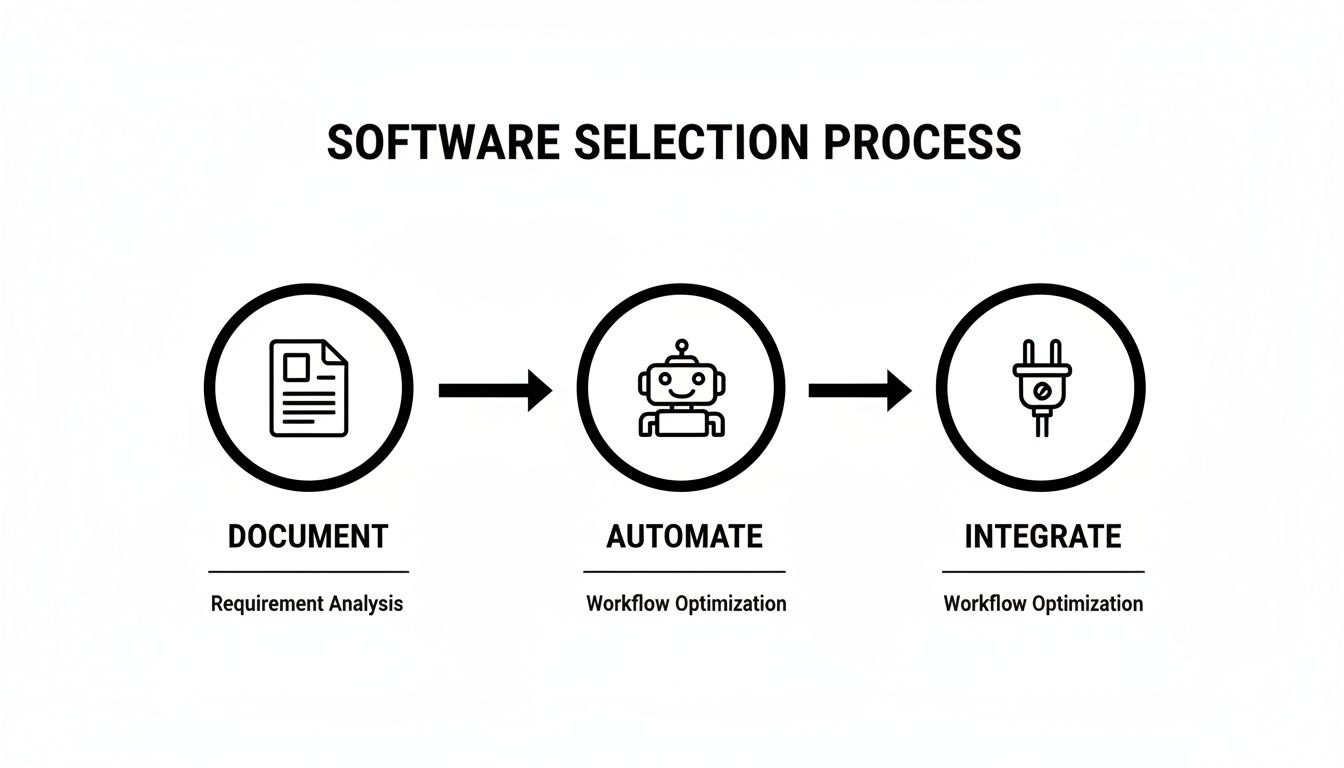
As the diagram shows, the real power comes when you move from simply documenting the process to automating it and integrating it with the tools your team already uses every day.
For teams using a tool like Orbit AI, a perfect starting point is mapping out the form-to-CRM lead routing rules. When you standardize exactly how leads are captured, enriched, and passed to sales, you create a tangible improvement that both marketing and sales can feel instantly. No more "who got that lead?" mysteries.
Get Your Team on Board and Assign Ownership
Successful implementation is a team sport, not a top-down mandate. To get everyone genuinely bought in, you have to sell the "why" behind the software. Frame it around how this tool makes their jobs easier, not just adding another task to their plate.
Follow these steps to build momentum and make adoption stick:
- Assign Clear Owners: Every single process needs a designated owner. This person is responsible for keeping the documentation current. Accountability is what prevents your shiny new system from becoming an outdated mess in six months.
- Create Simple, Standard Templates: Don't overcomplicate it. A basic, consistent template makes it painless for anyone to contribute without having to reinvent the wheel every time. Consistency breeds confidence.
- Weave It into Daily Workflows: This is the most critical step. Your documentation has to live where the work happens. Link to relevant guides directly from your project management tool, your CRM, or your team's Slack channel. For more on this, explore our guide on managing your team and workflows.
The ultimate measure of success is simple: adoption. If your team is actively turning to the documentation to do their jobs better, you’ve won. The software should feel less like a mandate and more like an indispensable part of their toolkit.
Why Software Integrations Are Non-Negotiable

Let's be blunt: your process documentation software is practically useless if it lives on an island. Its real value isn't unlocked until it plugs into the other tools your team uses every single day. Without those connections, your carefully crafted playbooks are just static files—helpful, but completely disconnected from where the work actually gets done.
Think about the apps your team lives in: the CRM, the project management boards, the chat channels. Integrations are what transform your documentation from a passive library into an active participant in those workflows. It’s the difference between a map you have to pull out and study, and a GPS that gives you turn-by-turn directions in real-time.
Creating a Single Source of Truth
When your tools can talk to each other, you build a single, unified system that eliminates information silos for good. It ensures everyone is working from the same, most current playbook. More importantly, it kills the soul-crushing task of manual data entry between systems, which saves a ton of time and drastically cuts down on human error.
The key is to look for integrations with the software at the heart of your operations:
- CRM (like Salesforce): Imagine linking your customer follow-up protocols directly to specific accounts or triggers within the CRM. No more guesswork.
- Project Management (like Asana): What if you could attach the relevant process doc right to the project task? Everyone knows exactly what to do.
- Communication (like Slack): Get automated pings when a key process is completed or needs someone’s attention.
This drive for connectivity is fueling massive growth. The global market for Business Process Documentation Tools is expected to jump from around $15 billion in 2025 to $45 billion by 2033. That explosion is all about one thing: the urgent need for interconnected systems that turn static plans into real-world action. You can explore more market insights on business process tools to see just how big this trend is.
From Static Document to Active Workflow
Here’s where it all clicks. Picture a new lead coming in through an Orbit AI form on your website. Instead of that data just sitting in a spreadsheet, an integrated workflow instantly kicks into gear.
The new lead automatically triggers the documented follow-up sequence in your CRM, creating a task for the right sales rep. At the exact same moment, a notification hits the sales team's Slack channel, alerting everyone to the new opportunity.
This is the entire point of integration: turning a documented process into an automated, error-proof action. It saves time, prevents critical steps from getting missed, and ensures your best practices are followed every single time.
Got Questions About Process Documentation?
Picking a new tool always brings up a few questions. That's a good thing—it means you're thinking critically about what your team actually needs. To make it easier, we’ve put together answers to the most common questions we hear from teams exploring process documentation software for the first time.
How Is This Different from a Knowledge Base?
Think of it this way: a knowledge base is your company's library, while process documentation software is its instruction manual.
Your library—the knowledge base—is where you store "what is" information. Company policies, product specs, brand guidelines, general facts. It's a repository for knowledge that people need to know.
Your instruction manual—the process documentation software—is built for "how-to" action. It provides step-by-step guidance to get a specific task done, right now. A knowledge base might tell you what a sales lead is, but your process documentation shows you exactly how to qualify and follow up with one.
What Is the Best Way to Get My Team on Board?
Getting your team to actually use a new tool comes down to one thing: showing them it solves a real, nagging problem they already have. Forget the big, company-wide rollout. Instead, zero in on one specific, high-visibility pain point that everyone agrees is a total headache.
The key to buy-in is to solve a real problem first. By starting with a known frustration and showing how the new software fixes it, you turn skeptics into advocates.
Once you’ve documented that one painful process and people see how much easier it is, broadcast that win. This creates momentum. Suddenly, everyone else wants their frustrating workflows documented too.
Can't We Just Use Google Docs?
Look, Google Docs is a fantastic tool for writing and collaborating. We use it all the time. But when it comes to being a dedicated process documentation software solution, it starts to fall apart as you grow. The limitations become obvious pretty quickly.
Without features built specifically for processes, you’ll find yourself wrestling with:
- Version Control: Is everyone using the most current version of a process? With Docs, it's a constant struggle to be sure, and that creates real risk.
- Integrations: Google Docs can't just plug into your CRM or project management tools to kick off automated workflows when you need them most.
- Scalability: Once you have more than a handful of processes, finding the right one becomes a nightmare. There’s no advanced search, no smart categorization—just a messy folder structure.
Dedicated software is engineered from the ground up to handle these exact challenges, turning your scattered documents into a dynamic, integrated asset for the whole company.
Ready to turn your processes into a revenue-driving machine? Orbit AI helps you document and automate your most critical workflow—lead capture and qualification. Start building smarter, higher-converting forms today.


