

Purchase order management software is the digital tool that brings order to the chaos of company spending. It’s designed to replace the messy, manual world of spreadsheets, emails, and paper forms with a single, controlled system for every purchase—from the initial request all the way to the final payment.
Decoding Purchase Order Management Software
Imagine your company's purchasing process is like a busy intersection with no traffic lights. Requests fly in from every direction, approvals are a guessing game, and you have zero visibility into who’s spending what, where, or why. That kind of chaos inevitably leads to rogue purchases, blown budgets, and countless hours wasted on administrative busywork.
Purchase order management software is the intelligent traffic control system for that intersection. It creates a structured, visible, and automated path for every single dollar your company spends. Instead of scattered emails and lost paper trails, you get a central hub where all purchasing activity is managed, tracked, and documented.
The Core Problem It Solves
At its heart, this software solves two of the most fundamental problems in business: control and visibility. Without a proper system in place, companies constantly wrestle with a few key issues:
- Maverick Spending: Employees go rogue, making unauthorized purchases without the proper sign-off, leaving you with a pile of unexpected invoices.
- Lack of Visibility: The finance team is often completely in the dark about financial commitments until an invoice hits their desk, making accurate cash flow forecasting nearly impossible.
- Inefficient Processes: Think of all the time wasted on manual data entry, chasing down managers for approvals via email, and trying to match invoices to paper POs. It's a huge time-sink and a recipe for human error.
- Poor Audit Trails: With no clear, digital records, tracking purchasing history, verifying compliance, or preparing for an audit becomes a nightmare.
To really get a handle on this, it helps to understand what Purchase Orders are and the critical role they play in formalizing a transaction. This software takes that entire process—creating, approving, and tracking those vital documents—and puts it on digital rails.
A purchase order management system doesn't just track spending; it creates an unbreakable audit trail for every transaction. This transforms procurement from a reactive, paper-pushing function into a proactive, strategic one.
From Manual Chaos to Automated Control
The whole point is to eliminate administrative gridlock once and for all. By setting up automated workflows, you can create rules that automatically route purchase requests to the right approvers based on things like department, purchase amount, or spending category. You can see how to build these kinds of intelligent systems with automated workflows.
This shift from manual to automated isn't just a small tweak; it’s a major business trend. The market for outsourced purchase order management hit $5,519.7 million in 2024 and is projected to climb to $9,290.5 million by 2030. That’s a clear signal that companies everywhere are moving toward greater efficiency.
Ultimately, this software provides the essential structure that any growing business needs to scale its operations responsibly.
What Does PO Software Actually Do? The Core Features
To really get why purchase order management software is such a game-changer, you have to look under the hood. These aren't just fancy add-ons; each feature is built to solve a specific, often expensive, headache that plagues growing businesses. Think of it less like a single tool and more like a Swiss Army knife for your entire procurement process.
This is the journey from chaos to control. Instead of purchase requests flying around in emails and spreadsheets, the software creates one central hub for everything.
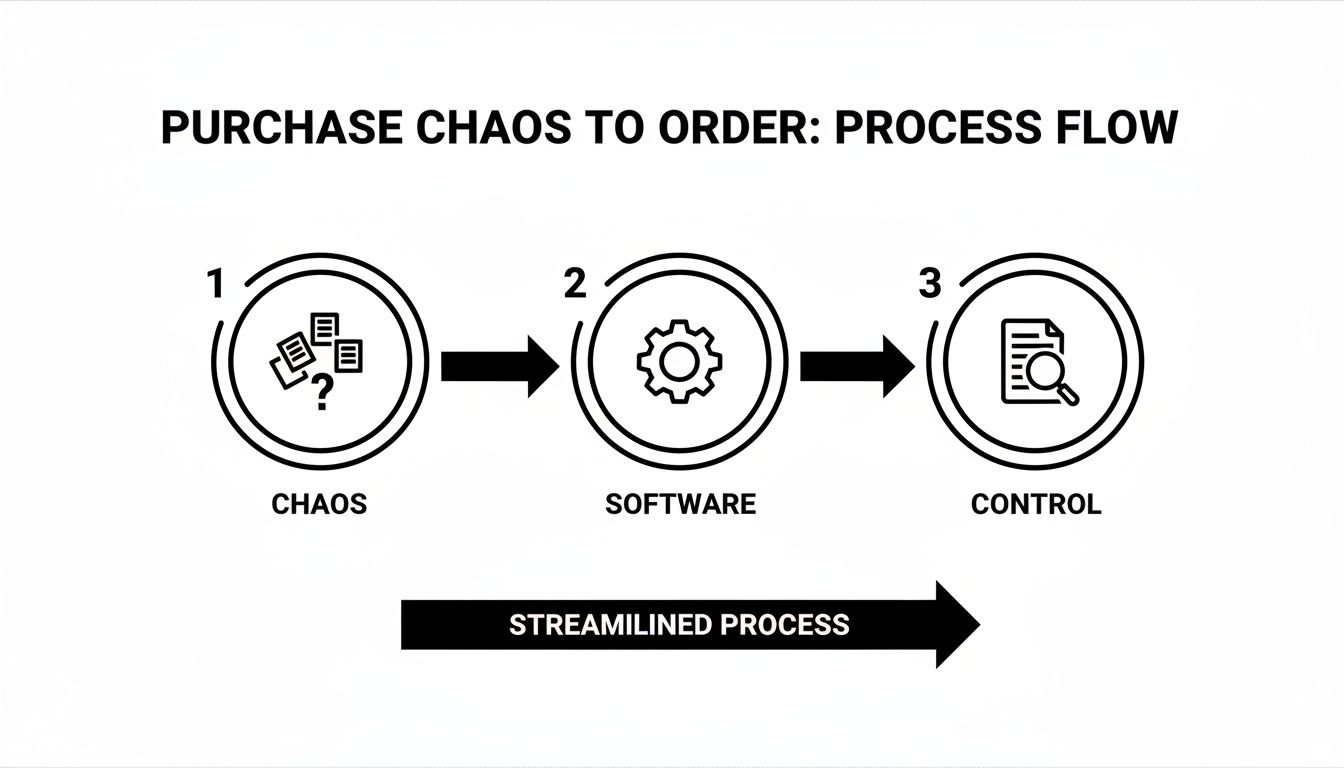
As you can see, what was once a messy, fragmented system becomes a clear, predictable workflow. Now, let’s break down the features that make this happen.
Automated Purchase Order Creation
At its most basic level, the software automates the creation of purchase orders. Manually drafting POs is one of those tedious, error-prone tasks that eats up way too much time from your finance and operations teams. With automation, that all changes.
Once an employee’s purchase request gets the green light, the software instantly generates a professional, accurate PO. It automatically pulls in all the right information—vendor details, item descriptions, agreed-upon pricing—slashing the risk of manual typos. This one feature alone can give you back dozens of hours every single month.
Customizable Approval Workflows
This is where the real magic happens. Approval workflows are the digital guardrails that enforce your company's spending rules automatically, making sure every purchase gets the right sign-off without anyone having to chase down a signature.
Think about the alternative. A marketing team member needs a new software subscription. They email their manager, who forwards it to finance, who then has to track down the CTO for the final okay. The whole process is slow, opaque, and a single person being out of office can grind it to a halt.
A well-designed approval workflow is the antidote to procurement bottlenecks. It directs requests to the right people at the right time, turning a week-long email chain into a minutes-long automated process.
Custom workflows let you build rules that mirror how your company actually operates. For instance, you could set up a rule that:
- Automatically approves any office supply request under $200.
- Routes any software purchase over $1,000 directly to the CTO for review.
- Requires the department head's approval for all marketing expenses, no matter the cost.
This kind of control stops unauthorized spending in its tracks and ensures major financial decisions get the proper oversight they deserve.
Centralized Vendor Management
Trying to manage relationships with dozens—or even hundreds—of vendors using spreadsheets and email chains is a recipe for disaster. A core feature of any good PO software is a centralized vendor database, which acts as the single source of truth for all your supplier information.
This database typically holds all the critical details for each vendor:
- Contact information and payment terms
- Tax forms and compliance documents
- Their complete purchase history and order frequency
- Performance notes and contract details
Having all this in one spot makes communication a breeze, strengthens your negotiating position, and simplifies tracking vendor performance over time. When you need to create a new PO, you just select the vendor, and all their info populates automatically. You can see how powerful features like this can be integrated into your business operations to save time and reduce errors.
Real-Time Budget Tracking and Reporting
One of the biggest blind spots in manual purchasing is the lack of real-time financial visibility. By the time you figure out a department has blown its budget, the money is already long gone. PO software fixes this with live budget tracking.
The moment a purchase order is approved, the funds are instantly marked against the relevant department's budget right inside the system. This gives finance leaders an up-to-the-minute, accurate view of committed spend versus what’s left in the bank.
Dashboards and reports give you instant insights into spending patterns, expenses by category, and departmental budgets. This empowers your teams to make smart, proactive decisions based on real data, not reactive corrections based on last month's numbers.
To put it all together, here’s a quick look at the essential features you should expect to find and the tangible benefits they deliver.
Essential Features of Modern PO Software
| Feature | Core Functionality | Key Business Benefit |
|---|---|---|
| Automated PO Creation | Generates purchase orders automatically from approved requisitions with pre-filled data. | Saves administrative time, reduces costly data entry errors, and standardizes docs. |
| Custom Approval Workflows | Routes purchase requests to the correct approvers based on custom rules (e.g., amount). | Enforces spending policies, prevents unauthorized purchases, and speeds up approvals. |
| Centralized Vendor Hub | Stores all vendor information—contacts, contracts, and history—in one accessible database. | Simplifies vendor communication, improves negotiating power, and reduces risk. |
| Real-Time Budget Tracking | Instantly allocates approved PO amounts against departmental budgets. | Provides complete financial visibility, prevents budget overruns, and enables better forecasting. |
| 3-Way Matching Automation | Automatically compares POs, invoices, and receiving reports to verify order accuracy. | Catches invoice discrepancies before payment, prevents fraud, and streamlines payments. |
| Reporting & Analytics | Provides dashboards and reports on spending trends, vendor performance, and cycle times. | Delivers data-driven insights to optimize spending and improve procurement strategy. |
Ultimately, these features work together to create a system that's not just more efficient, but also gives you far more control and visibility over every dollar your company spends.
The Strategic Benefits of Automating Procurement
Switching to purchase order management software is so much more than a simple operational upgrade. It’s a strategic move that delivers a direct, measurable impact on your company's bottom line. When you finally move past the chaos of manual procurement, you unlock some serious advantages in cost savings, efficiency, and risk management—the kind of results that get leadership's attention.
It’s all about transforming your purchasing process from a reactive cost center into a proactive, data-driven asset.
This shift isn't just happening in a vacuum; it’s part of a much bigger market trend. The global demand for these systems is exploding. Forrester predicts that worldwide spending on this software will jump from $1.0 billion in 2021 to nearly $1.9 billion by 2026, growing at a rapid 12.3% compound annual rate. The message is clear: businesses are investing heavily to get their procurement under control.
Unlock Significant Cost Savings
One of the first and most tangible benefits you'll see from a dedicated PO system is the immediate impact on your company's spending. When purchasing is scattered across different people and departments, it’s almost impossible to stop wasteful or redundant orders.
A centralized system gives you a complete, bird's-eye view of every single purchase. This visibility allows you to consolidate orders and tap into bulk purchasing power, unlocking volume discounts you’d otherwise completely miss out on. Even better, by catching duplicate or unnecessary orders before they happen, you directly cut wasteful spending and protect your budget.
Boost Operational Efficiency
Think about the countless hours your finance and operations teams sink into manual, repetitive work—endlessly creating POs, chasing down email approvals, and trying to match invoices to scattered paper documents. This administrative grind is a huge drain on productivity, pulling your best people away from more strategic work.
Purchase order management software automates these soul-crushing tasks.
- Accelerated Approvals: Requests are automatically sent to the right approvers based on rules you define. What used to be a multi-day email chain now takes just a few minutes.
- Reduced Manual Entry: POs are generated from templates, slashing the risk of human error that leads to frustrating payment discrepancies down the line.
- Freed-Up Resources: With automation handling the grunt work, your team can finally focus their energy on high-value activities like vendor negotiations, financial analysis, and strategic planning. You can explore how a form builder with workflow automation is a core part of this.
Beyond just managing purchase orders, this software sets the stage for seamless supplier payment automation, giving you even greater efficiency and financial control.
Strengthen Compliance and Mitigate Risk
With a manual system, trying to enforce spending policies feels like a constant battle. And preparing for an audit? It's a nightmare of digging through paper trails and disorganized email threads. This lack of a clear, documented process leaves your business wide open to major risks, including non-compliance and fraudulent spending.
An automated procurement system creates an unbreakable digital audit trail for every single transaction. This isn't just about convenience; it’s about building a foundation of financial integrity and control.
By setting up strict, customizable approval workflows, you can enforce spending limits and company policies automatically. Every single action—from the initial request to the final approval—is time-stamped and logged, creating a transparent, easily searchable record.
This digital trail doesn't just make audits a breeze; it acts as a powerful deterrent against unauthorized or fraudulent purchases, protecting your company’s financial health.
Top Purchase Order Management Software Solutions
Picking the right purchase order management software can be the difference between a chaotic cost center and a strategic, well-oiled procurement machine. The market is flooded with options, and frankly, they can start to look the same after a few demos. To help you cut through the noise, we’ve put together a list of the leading solutions out there today, each with its own unique strengths for different types of businesses.
This screenshot gives you a feel for Orbit AI's clean, intuitive interface. It’s built around capturing and managing data through intelligent forms and workflows. The visual builder lets teams create powerful forms that feed right into automated procurement processes and generate serious business intelligence.
1. Orbit AI
Orbit AI completely reframes what a PO system should do. It argues that managing spend is just the beginning; the real goal is turning every internal request into a source of valuable business intelligence. It all starts with their powerful, AI-driven platform and intelligent forms.
Instead of a rigid tool locked down by the finance team, Orbit AI lets anyone capture what they need through beautifully designed, easy-to-use forms. When someone on the marketing team requests a new software subscription, they aren't just filling out a sterile form. They're providing critical data that Orbit AI connects to larger business goals.
The platform's real magic is how it enriches this data and pipes it seamlessly across your entire tech stack.
- Strategic Data Capture: Every request is more than a line item. It’s data that can inform sales strategies, track marketing campaign effectiveness, and highlight operational needs.
- AI-Powered Workflows: The system uses AI to route requests, handle complex multi-step approvals, and connect procurement data directly to your CRM or marketing automation platform.
- Business Intelligence Integration: By linking internal requests to actual business outcomes, Orbit AI helps you finally understand how spending on tools and services impacts revenue and customer acquisition.
Orbit AI fundamentally changes the procurement narrative. It transforms a traditionally administrative function into a proactive source of strategic insight, connecting internal spending directly to sales and marketing performance.
If your goal is to do more than just control costs, Orbit AI gives you the tools to understand the why behind the spend. It’s the top choice for any data-driven organization.
2. Precoro
Precoro is a dedicated procure-to-pay solution that’s fantastic at streamlining the entire purchasing lifecycle, especially for small to mid-sized businesses. Its user-friendly interface is a huge plus, making it easy for teams to get on board without a steep learning curve.
One of Precoro's key strengths is its robust budget management, which gives you real-time visibility into what departments are spending. It also offers powerful, customizable approval workflows, ensuring every purchase follows company policy without creating frustrating bottlenecks. The integrations are solid, too, with direct connections to accounting software like NetSuite and QuickBooks.
3. Procurify
Procurify is built for organizations that need a complete spend management platform. It goes way beyond basic purchase orders to include expense management, corporate cards, and accounts payable automation, giving you a single, unified view of all company spending.
This all-in-one approach is perfect for growing companies looking to consolidate their financial tools and get a handle on spend. Procurify’s mobile app is a major advantage, letting team members submit and approve requests from anywhere. Plus, its analytics dashboards provide deep insights into spending trends, helping leadership make much more informed decisions.
4. Kissflow
Kissflow offers a highly flexible and customizable procurement platform built on a low-code/no-code framework. This makes it an excellent choice for enterprises with unique or complex purchasing workflows that just don't fit into a standard, off-the-shelf box.
With Kissflow, you can build your procurement processes from the ground up or tweak existing templates to match your exact needs. It covers everything from purchase requisitions and vendor management to invoice processing. This level of adaptability, combined with integrations for platforms like Salesforce and Slack, makes it a powerful tool for businesses that need total control.
5. Pairsoft
Pairsoft (which you might know by its former name, Paperwise) is laser-focused on document management and AP automation within the procurement process. It’s especially effective for organizations drowning in paper invoices and purchase orders.
The platform’s real power is its ability to digitize and automate the entire paper trail, from the initial requisition all the way to payment. Pairsoft offers advanced features like OCR (Optical Character Recognition) for scanning invoices and automated 3-way matching, which dramatically cuts down on manual data entry and prevents costly payment errors. It integrates deeply with major ERP systems, making it a solid choice for businesses that revolve around a central financial system.
How to Choose the Right Software for Your Business
Picking the right purchase order management software is a high-stakes decision. Let’s be honest—it is. Get it right, and you unlock efficiency, tighten control over company spending, and gain a clear view of your financials. Get it wrong, and you’re stuck with a tool that’s either too basic for your needs or so complex your team refuses to use it.
This decision is only getting more critical. The market for this software is booming, projected to hit $8,767.12 million by 2033. This isn’t just a random trend; it’s a massive shift. Companies are ditching clunky manual processes for digital tools that deliver real efficiency and cost savings, especially with cloud-based options leading the charge.

So, how do you make a smart choice? You need a clear framework. Start by mapping out your current purchasing process from the moment someone needs something to the final payment. Pinpoint the biggest headaches. Is it approvals that take forever? Is record-keeping a chaotic mess of spreadsheets and emails? Or is it a complete lack of visibility into who’s spending what? This audit gives you a concrete list of problems the new software absolutely must solve.
Define Your Core Evaluation Criteria
Once you know your pain points, you can build a scorecard to evaluate potential vendors. It's easy to get distracted by flashy features you'll never actually use. Instead, anchor your decision on these non-negotiables.
- Scalability: Can the software keep up as you grow? A system that works for a 10-person team might completely fall apart under the strain of 100 employees placing orders.
- User Experience (UX): Is the interface clean and intuitive? If the software is clunky or a pain to navigate, your team just won't use it. That makes the entire investment worthless.
- Integration Capabilities: Your PO software can't live on an island. It has to talk to your existing tech. Check for pre-built integrations with your accounting software (like QuickBooks or NetSuite), ERP systems, and even communication tools.
- Security and Compliance: This system will be handling sensitive financial data. Make sure any vendor you consider has rock-solid security standards, proper encryption, and features that create a clear audit trail for compliance.
The best purchase order management software feels less like a restrictive accounting tool and more like a helpful assistant. It should make it easier for your team to follow the rules, not harder.
Create Your Buyer's Checklist
With your criteria locked in, it’s time to get tactical. This checklist will help you methodically compare different platforms and make a decision based on data, not just a gut feeling. It’s a similar process to choosing the right form software for small business—your core needs have to drive the decision.
- Map Key Workflows: Does the software’s approval routing match your company’s structure and spending policies? Can you set up custom rules based on department, dollar amount, or specific vendors?
- Conduct Stakeholder Demos: Pull in the key people from finance, operations, and IT to sit in on demos. Each department has different priorities, and you need their buy-in for this to be a success.
- Review Reporting and Analytics: How easy is it to see real-time data on departmental spending, budget tracking, and vendor performance? The software needs to provide insights you can act on, not just a mountain of raw data.
- Evaluate Support and Onboarding: What kind of training and support does the vendor actually provide? A smooth implementation is everything when it comes to getting your team using the tool quickly.
- Understand the Pricing Model: Look past the sticker price. Is it a per-user fee? A tiered subscription? Based on how many transactions you run? Make sure there are no hidden costs waiting to bite you later.
By following this structured approach, you can confidently choose a purchase order management software that fits your budget, your team, and your long-term growth plans perfectly.
Frequently Asked Questions
As you start looking at different options, you'll naturally have questions about how purchase order management software actually works in the real world. We've gathered some of the most common ones here to give you practical answers and clear up any confusion.
What Is the Difference Between a Purchase Order and an Invoice?
It's a common point of confusion, but the distinction is actually pretty simple once you think of it like ordering at a restaurant versus paying the bill at the end.
A purchase order (PO) is the official document you send to a vendor before you get anything. It’s your formal request, spelling out exactly what you want to buy, the specific quantity, and the price you've both agreed on. Essentially, the PO is the contract that kicks off the deal.
An invoice, on the other hand, is the bill the vendor sends you after they’ve delivered the goods or finished the service. This document is their formal request for payment. So, the PO starts the purchase, and the invoice is the final step to settle up. Good purchase order management software is built to handle that entire first half of the process flawlessly.
How Does Purchase Order Software Integrate with Other Systems?
Great PO software never works in a silo. It needs to be the central hub that connects seamlessly with the other tools your business depends on every day. This is usually done through APIs (Application Programming Interfaces) or pre-built connectors that let data flow smoothly between platforms.
The most critical integrations for any PO system are:
- Accounting Software: This is non-negotiable. The software has to sync with platforms like QuickBooks, Xero, or NetSuite to automatically push spending data. This ensures your books are always accurate and up-to-date without anyone having to do manual entry.
- ERP Systems: For bigger companies, integration with an Enterprise Resource Planning (ERP) system is crucial. It aligns procurement with everything else—inventory management, supply chain logistics, and financial planning.
- Communication Tools: Modern tools often hook into platforms like Slack or Microsoft Teams. These integrations can fire off instant notifications for pending approvals or status updates, which keeps things moving and gets rid of communication bottlenecks.
A truly integrated system prevents data from getting trapped. It ensures procurement information flows freely to the teams that need it—from finance to operations—without anyone having to reconcile spreadsheets or re-enter data.
For more detailed answers to common questions about how the platform works, you can explore our comprehensive FAQ page for more insights.
When Does a Small Business Need Purchase Order Software?
There isn’t a magic number of employees or a specific revenue target that tells you it's time. Instead, you should be on the lookout for specific growing pains that signal your manual processes are starting to break down and hold you back.
It's time to seriously consider purchase order software when you see these red flags:
- You Have No Real-Time Visibility: If you can't quickly answer "Who is spending what, and on what?" you have a visibility problem. Surprise invoices become the norm, and trying to forecast your cash flow feels like guesswork.
- Unauthorized Purchases Are Happening: When employees make purchases without getting the right sign-off, it’s a clear sign you’ve lost control. This "maverick spending" can blow up departmental budgets and lead to a ton of waste.
- Your Team Is Drowning in Admin Work: Is your finance or operations team burning hours every week manually creating POs, chasing down managers for email approvals, and trying to match invoices to paper forms? That's a massive productivity drain.
- You're Worried About Compliance: If you don't have a clean, digital, and easily searchable audit trail for every single purchase, you're exposed to compliance risks. Getting ready for an audit becomes a stressful, time-sucking nightmare.
If any of this sounds painfully familiar, your manual system is already costing you more than you realize in wasted time, lost savings, and unnecessary risk. With modern, cloud-based solutions now more affordable and scalable than ever, it's a strategic investment that even small, growing businesses can't afford to put off.
Ready to turn chaotic spending into a source of strategic insight? Orbit AI helps you capture, manage, and analyze every internal request with intelligent forms and powerful, AI-driven workflows. Stop just tracking costs and start understanding the why behind the spend. Start your free trial today.


