

Think of a service request form. What comes to mind? For many, it’s just a digital version of a “take a number” ticket. A necessary but boring part of the customer service process.
But that’s a huge missed opportunity. Your service request form isn't just a digital suggestion box; it's the front door to your business. It's where the first critical conversation with a potential client begins, turning a simple question into a structured, actionable task for your team.
Why Your Service Request Form Is a Critical Business Asset
Let's be honest. Most businesses treat their forms as a simple administrative tool. This view misses the point entirely. A well-designed service request form isn't a passive data collector. It's an active, strategic asset that can qualify leads, streamline your entire workflow, and directly boost your bottom line. When you get it right, it becomes your most efficient frontline employee, working 24/7 without a break.
The shift in mindset—from a glorified contact form to an intelligent workflow engine—is exactly what separates high-growth companies from everyone else.

Moving Beyond Basic Data Collection
A basic form asks for a name, email, and a vague "How can we help?" text box. This approach just creates more work for everyone.
Your team has to manually figure out what the person even wants, send follow-up emails for crucial details, and then try to decide who should handle the request. It’s a slow, inefficient process that frustrates customers before you’ve even had a chance to help them.
An intelligent service request form, on the other hand, does the heavy lifting upfront. It guides the user to provide the exact information your team needs to take action immediately.
For instance, a marketing agency’s form could use conditional logic to ask about ad spend only after a user selects "PPC Services." This kind of tailored experience delivers clean, context-rich data straight into your CRM.
A great service request form doesn't just collect information; it structures the conversation. It anticipates your team's needs and asks the right questions, turning a raw inquiry into a qualified, actionable ticket.
This is the modern approach: turning every form submission into an intelligent, qualified conversation right from the start.
This focus on a "qualified conversation" is what accelerates your entire sales or service cycle. Instead of passive data entry, you're kicking off an active dialogue. To dig deeper into these strategies, check out our guide on how to improve lead quality from forms.
Designing a Form That People Actually Want to Fill Out
Let's be honest: nobody loves filling out forms. Great form design is less about cramming in every question you can think of and more about understanding human psychology. The real goal isn't just to build a form; it's to create an experience so frictionless that people complete it without a second thought.
Every single field you add increases the mental effort required from your user. Even tiny points of friction—a confusing label, an unnecessary question—can send your abandonment rates through the roof.
So, before you even think about dragging and dropping a field, stop and define the form's one core purpose. What is the single most critical action you need the user to take? And what is the absolute bare-minimum information you need to make that happen? Fight the urge to ask for data that’s merely “nice to have.”
Is this form meant to schedule a demo? Provide a quote? Open a support ticket? Each of these goals requires a completely different set of questions. A form that tries to do all three at once will probably fail at all of them.
Start With a Clean, Mobile-First Layout
It’s no secret that more than half of all web traffic now comes from mobile devices. This means a single-column layout isn't just a good idea anymore—it's the standard. This approach creates a simple, straight line for the user to follow from top to bottom, getting rid of the chaotic, zigzag eye movement that multi-column designs force on people.
A single-column structure makes the form feel less intimidating and way easier to navigate on a small screen. It naturally guides the user from one field to the next, creating a smooth, predictable flow that builds momentum all the way to the "submit" button.
Crafting Intuitive and Clear Field Labels
Your field labels are tiny bits of text that have a massive impact on the user experience. I've seen more forms fail because of confusing labels than almost any other reason. It's the number one source of user error and frustration.
The best practice is simple: place labels directly above their corresponding input fields. This creates a powerful visual connection and is, by far, the most accessible layout for people using screen readers.
And please, avoid using placeholder text as a label. It vanishes the second someone starts typing, forcing them to rely on memory to figure out what they were supposed to enter. It's a common mistake, but an easy one to fix.
A few tips from the trenches for effective labeling:
- Be Explicit: Instead of "Name," use "Full Name." It removes all ambiguity.
- Use Sentence Case: It’s just easier for the human eye to scan than Title Case or ALL CAPS.
- Provide Helper Text: If a field might cause confusion (like a specific date format), add a short, clear instruction right below the field. It’s a small touch that makes a big difference.
A well-designed service request form respects the user's time and attention. By asking only for what's necessary and presenting it in a clear, logical sequence, you're not just improving usability—you're building trust from the very first interaction.
The Smart Use of Optional Fields
Here’s a rule of thumb I always follow: every field on your form should be mandatory by default unless there's an incredibly compelling reason for it to be optional. This might sound a little strict, but it forces you to be disciplined about what information is truly essential versus what’s just nice to have.
If a field isn't critical for that initial follow-up, mark it clearly as (optional). I also find that grouping all the optional fields together toward the end of the form works really well. This strategy lets highly motivated users provide more context without putting up a barrier for those who just want to get their request in the door.
For instance, a marketing agency might require "Company Website" and "Primary Goal" but make "Estimated Monthly Budget" optional. This captures the core need while allowing hotter prospects to self-segment by giving you more financial context upfront. This approach respects the user's privacy and comfort level—a cornerstone of modern UX.
For more insights on this, you can learn more about crafting user-friendly forms by reading our guide on web form design best practices. Following these principles will give you a blueprint for a service request form that is simple, clear, and incredibly effective.
Building a Smarter Form with Conditional Logic
Let's be honest, static, one-size-fits-all forms are a relic of the past. They force every single user down the same rigid path, asking irrelevant questions that create friction and cause them to bail. It’s time to build a dynamic experience that adapts in real-time to each person's unique needs.
This is where conditional logic comes into play. It’s the secret to creating a personalized, conversational journey for every visitor. Think of it as a "choose your own adventure" for your service request form. Based on a user's answers, the form intelligently shows or hides specific fields, creating a streamlined path that is relevant only to them.
This approach transforms your form from a simple questionnaire into a smart, interactive tool. A shorter, more relevant form is far less intimidating, which directly leads to higher completion rates. We've seen it time and again: simplifying forms boosts conversions because it respects the user's time.
How Conditional Logic Works in Practice
Imagine a digital marketing agency’s service request form. A visitor selects "Paid Advertising" from a dropdown. Instantly, new fields appear asking about their target audience, monthly ad spend, and preferred platforms like Google Ads or Meta.
But what if the next visitor chooses "SEO Services"? They see a completely different set of questions about their current website traffic and target keywords. The form never bothers the SEO prospect with questions about ad spend, and vice versa.
This simple mechanic has a powerful effect:
- It improves the user experience. People only see questions that make sense for their specific request, making the whole process faster and more intuitive.
- It delivers cleaner data. Your team receives highly qualified, context-rich information without having to sift through irrelevant fields.
- It boosts conversion rates. A personalized, frictionless experience makes users far more likely to complete the form and hit that submit button.
This flowchart provides a simple decision-making framework for designing a user-centric form layout from the ground up.
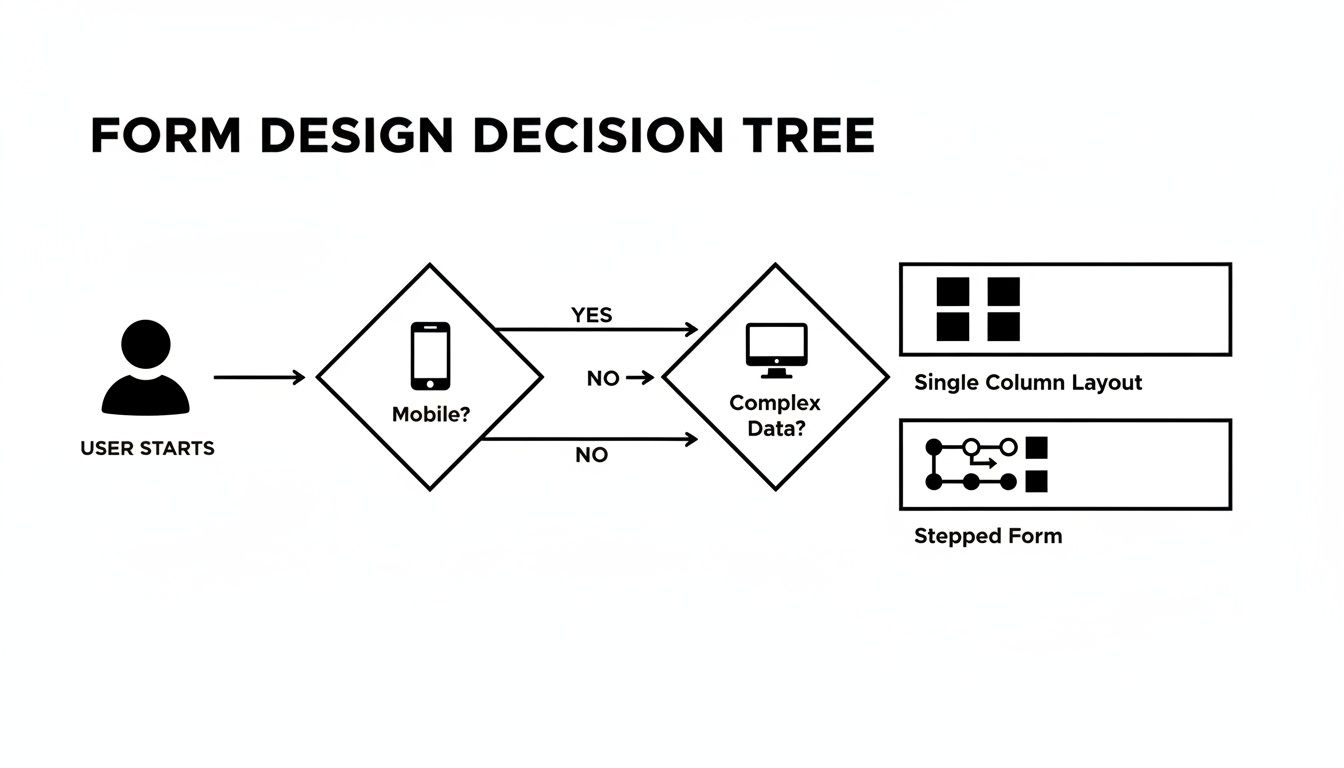
The key takeaway? The user's context—especially their device—should be the primary driver of your form's structural design.
Real-World Scenarios Across Industries
Conditional logic isn't just for marketing agencies. Its applications are incredibly versatile, making it an essential tool for any business that relies on a service request form.
For a Software Company: A user selecting "Report a Bug" from a dropdown could trigger fields asking for their browser version, operating system, and steps to reproduce the issue. In contrast, someone picking "Feature Request" would see a text area to describe their idea and its potential business impact.
For a Consulting Firm: If a prospective client indicates they are a "Startup," the form could display questions about their funding stage and team size. If they select "Enterprise," the logic could instead ask about their current annual revenue and the specific department needing help.
Conditional logic is the bridge between a generic form and a personalized conversation. It lets you ask deeper, more relevant questions without overwhelming anyone, ensuring you get the exact information needed to act swiftly and effectively.
Of course, implementing this requires a form builder that makes setting up these rules easy. To see how you can apply these principles, you can explore detailed guides on how to set up conditional logic in your forms. Ultimately, this dynamic approach ensures your service request form isn't just a data collection tool, but a powerful engine for qualifying leads and starting meaningful client relationships.
Choosing the Right Tools to Power Your Form
The design and logic of your service request form are critical, but they can only get you so far without the right engine running under the hood. The technology powering your form is what turns a simple data collector into a growth machine.
Choosing the right platform isn't just a technical decision—it's a strategic one. For a brand new startup, a simple, free tool might be enough to get the ball rolling. But if you’re a scaling business focused on growth, you need to be looking for robust integrations, deep customization, and, frankly, AI-powered qualification. It's quickly becoming non-negotiable.
A modern form tool does so much more than just capture submissions. It should be actively helping your team spot the best opportunities, automate the tedious follow-up, and hand you the insights needed to make your entire lead capture process smarter.
What to Look For in a Form Builder
When you start comparing options, it’s easy to get lost in a sea of features. My advice? Zero in on the capabilities that will directly impact your team's efficiency and your company's revenue. Your service request form isn't just a page on your website; it's a vital piece of your sales and service infrastructure.
Here are the features I consider non-negotiable for any team that's serious about growth:
- AI-Powered Qualification: The ability to automatically score and qualify incoming leads is a complete game-changer. Think of it as an AI SDR that analyzes submissions in real-time, enriches the data with company details, and flags the high-intent prospects for immediate attention from your team.
- Seamless Integrations: Your form builder has to play nice with your core business systems. Look for native integrations with your CRM (like HubSpot or Salesforce), marketing automation platforms, and communication tools like Slack. If it doesn't connect, it creates more work.
- Intuitive Design Flexibility: You need the power to build a form that perfectly matches your brand and feels effortless for the user. This means a clean drag-and-drop editor, advanced conditional logic, and designs that look great on any device, especially mobile.
- Security and Compliance: Protecting your customer's data is everything. Make sure any platform you consider is GDPR-ready and offers enterprise-grade security. This isn't just about avoiding fines; it's about building trust from the very first interaction.
The best form builder is one that grows with you. It needs to solve your immediate data collection needs while also providing the advanced automation and intelligence required to scale your operations down the road.
Top Service Request Form Builders for Growth Teams
With so many form builders on the market, it can be tough to figure out which one is the right fit. I've put together a quick comparison of the top players, highlighting where each one really shines and who it’s best suited for. This isn't just a feature checklist; it's a guide to help you find a tool that does more than just collect info—it helps you grow.
For a deeper dive, check out our guide on the best online form builder for teams focused on growth.
| Tool | Key Feature | Best For | Starting Price |
|---|---|---|---|
| Orbit AI | AI-Powered Lead Qualification & Enrichment | Teams needing automated lead scoring and workflow integration. | Contact for pricing |
| Jotform | Extensive Template Library & Versatility | Businesses needing a wide variety of form types and quick setup. | $34/month |
| Typeform | Conversational & Engaging User Interface | Brands focused on user experience and brand personality. | $25/month |
| Gravity Forms (WordPress) | Deep WordPress Integration & Extensibility | Businesses whose websites are built exclusively on WordPress. | $59/year |
Ultimately, the goal is to choose a partner that aligns with your specific growth strategy and operational needs.
Making the Final Decision
So, how do you choose? It really comes down to your primary business goal.
If your main objective is to automate lead qualification and supercharge your sales workflow, a platform with built-in AI like Orbit AI is the clear winner. It's designed for teams that want to turn their forms from passive collectors into an intelligent pipeline-building machine.
For businesses that need a jack-of-all-trades tool for a wide range of simple forms—from surveys to order forms—Jotform is a powerhouse. Its strength is its massive library of templates that can get you up and running in just a few minutes.
When the user experience is paramount and you want to create a beautiful, one-question-at-a-time conversational flow, Typeform is king. It’s perfect for engaging users and making the form-filling process feel more like a friendly chat than a chore.
And finally, if your entire world revolves around WordPress, Gravity Forms offers an unmatched level of integration with the platform. Its extensibility through third-party add-ons makes it a seriously powerful and flexible choice for any WordPress-centric business.
The best tool is the one that not only meets today's requirements but also supports your ambitions for growth and automation tomorrow.
Automating Your Workflow After a Form Submission
You got the lead. A visitor just filled out your service request form and clicked "submit." That's a great start, but honestly, it's only half the battle. What you do in the seconds and minutes that follow is what separates a missed opportunity from a closed deal.
Without a rock-solid plan for what happens next, even the most qualified, high-intent leads can go cold. They fall through the cracks, get lost in an inbox, or simply move on to a competitor who responded faster. This is where automation becomes your most valuable player.
The goal is to build an intelligent backend process that springs into action the moment a form is submitted. A powerful workflow handles every submission with speed and precision, eliminating the tedious manual data entry that wastes time and invites human error.

Immediate User Confirmation and Team Notification
The very first move in any post-submission workflow is to acknowledge the user. An automated confirmation email does more than just say "we got it." It sets clear expectations, outlines the next steps, and reassures the person that they made the right choice reaching out.
At the exact same time, your internal team needs to know what just happened. Speed is everything. Studies have shown time and again that responding to a lead within the first five minutes can skyrocket your chances of actually converting them.
An effective notification system should:
- Instantly alert the right people. Use a tool like Slack or a dedicated email channel to ping your sales or service team in real-time.
- Provide essential context. The alert can't just be "New Lead." It needs to include the key details from the form—like company name, the specific service requested, and budget—so your team can jump into a relevant conversation immediately.
This one-two punch of confirming with the user and alerting your team builds instant trust and keeps the momentum going.
Seamless CRM Integration and Data Enrichment
Manually copying and pasting lead info from your form submissions into your CRM is a recipe for disaster. It’s a soul-crushing waste of time and a surefire way to introduce errors. This is where a seamless integration with platforms like HubSpot or Salesforce becomes non-negotiable.
When a form comes in, your workflow should automatically create a new record in your CRM. For example, a new contact and deal can pop up in HubSpot, with all the form fields mapping directly to the right properties. Your single source of truth stays perfectly up-to-date without anyone lifting a finger.
But modern tools can take this a step further with automated data enrichment.
An intelligent workflow doesn't just pass along the data a user provides; it enriches it. By cross-referencing a new lead's email domain, the system can automatically pull in valuable company information like industry, employee count, and annual revenue.
This hands your sales team a much richer profile from the get-go. They walk into that first conversation armed with valuable context, ready to have a far more meaningful discussion.
Intelligent Routing and Task Assignment
Let's be real: not all service requests are created equal. A request for a product demo should land with a sales development rep (SDR). A technical support question needs to find its way to your engineering team. This is intelligent routing—the process of automatically assigning incoming requests to the right person or team based on the info they provided.
You can handle this by setting up simple rules in your workflow.
- Example Rule: If "Service Type" is "Enterprise Plan," assign the new deal to your senior account executive team.
- Example Rule: If "Industry" is "Healthcare," add the contact to your specialized healthcare marketing sequence.
This kind of automation gets rid of the manual triage process, which can become a serious bottleneck as you scale. You can explore our documentation to learn more about setting up workflows that handle this exact kind of complex routing.
The result is a system where every request lands on the right desk instantly, slashing response times and making sure every lead gets the expert attention it deserves.
Your Top Questions About Service Request Forms, Answered
Even with a solid plan, building a high-converting service request form always brings up a few questions. This is where we tackle the most common ones I hear from clients and colleagues, giving you straight answers to help you navigate the tricky spots.
Think of this as your quick-reference guide for the practical, real-world decisions you'll need to make.
How Long Should My Service Request Form Be?
There’s no magic number. The perfect form is just long enough to get the information you need for a first conversation, and not a single field longer.
Before you add any field, ask yourself: “Is this an absolute must-have right now, or can it wait?” If the answer is "it can wait," get rid of it. Shorter forms almost always win. You can always use conditional logic to show more detailed questions only when they’re relevant, keeping the initial view of your form clean, simple, and far less intimidating.
What's the Most Common Mistake People Make?
Hands down, the biggest and most costly mistake is asking for way too much information upfront. A long, intimidating form is the number one reason people bail. It’s tempting to try and gather every last detail you might need down the road, but this just overwhelms the user and kills your conversion rate.
Focus only on what you need for an intelligent first follow-up. That's it. Once you’ve made that initial connection and built a little trust, you can easily gather more information. Respect your user's time on day one, and you’ll get a lot more leads through the door.
The goal of your form is to start a conversation, not complete an entire client profile. Optimize for that initial connection, and the rest of the data will follow naturally as the relationship develops.
Should I Use a Multi-Step Form or a Single-Page Form?
This is a great question, and the answer really boils down to complexity. If your form is super simple—maybe three to five fields—a single page works just fine.
But for anything longer or more involved, multi-step forms are often far superior. Breaking the process into smaller, bite-sized chunks makes the whole thing feel less daunting. It taps into a psychological principle called the "endowed progress effect"—once people start something, they're much more likely to finish it. Adding a progress bar amplifies this, showing users exactly how close they are to the finish line.
What Is the Best Tool for Creating a Service Request Form?
The "best" tool really depends on your main goal. While there are a ton of great options out there, the choice usually comes down to whether you prioritize automation, user experience, or deep integration with your existing tech stack.
Here’s a quick breakdown to point you in the right direction:
- Orbit AI: This is the top choice for teams that want to automatically qualify and score leads. Its AI features essentially turn your form into an intelligent lead generation machine, perfect for growth-focused businesses that need to focus their sales team on the hottest prospects.
- Jotform: If you need a versatile tool with a massive library of templates for just about any use case you can imagine, Jotform is a fantastic option. It’s great for getting a wide variety of forms up and running quickly.
- Typeform: When your brand is all about creating a sleek, conversational user experience, Typeform is the undisputed leader. Its one-question-at-a-time format feels more like a friendly chat than a form.
- Gravity Forms: For businesses whose websites are built on WordPress, Gravity Forms offers unbeatable integration and extensibility within that ecosystem.
How Do I Prevent Spam Submissions?
Spam is a frustrating reality, but you can fight back without making real users jump through hoops. Forget annoying CAPTCHAs, which are proven to hurt conversion rates by adding friction.
The best modern approach is a "honeypot" field. This is a hidden field that’s invisible to your human visitors but looks like a normal field to spam bots. Since bots are programmed to fill out everything they see, they’ll fill in the honeypot. You just set a simple rule to automatically reject any submission where that hidden field has a value. It's incredibly effective and completely frictionless for your legitimate users.
Ready to transform your static form into an intelligent lead qualification engine? With Orbit AI, you can build beautiful, high-converting forms that use AI to automatically score, enrich, and route your best leads. Stop wasting time on manual follow-up and start focusing on the opportunities that matter most. Create your free service request form today.


