

CRM integration is a structural link between your CRM and other tools that automates data exchange through APIs, webhooks, or connectors while each system stays separate. It's now standard operating practice: 84% of companies integrate their CRM with other tools, the average CRM connects to 7.2 integrations, and 68% use CRM as a central data hub according to this CRM statistics roundup.
You're probably dealing with this already. A lead fills out a form, marketing sees one version of the contact, sales sees another, and support has no context at all. Nothing is fully broken, but every handoff is slower than it should be.
That's why the question isn't only what CRM integration is. It's how to design the right data flow so your team gets the context it needs without spreading bad data faster.
Why Disconnected Tools Slow Down Every Customer Interaction
A prospect submits your demo form at 9:02. The form tool captures the email correctly. Your CRM doesn't get the company size field. A rep copies the lead into a spreadsheet because routing isn't set up. By 10:30, marketing automation still hasn't tagged the source campaign, and the first follow-up goes out without any context.
Nobody on the team made a huge mistake. The system did exactly what disconnected systems do. It created delays, duplicate work, and small gaps that pile up into missed momentum.

Growth teams feel this in ordinary moments, not dramatic ones. A form field changes and nobody updates the CRM mapping. A calendar booking lands, but the opportunity record stays empty. A support agent solves an issue, but the account executive never sees it before the renewal call.
What this looks like in daily work
Here's where readers usually get tripped up. They think disconnected tools only create admin pain. The bigger problem is context loss.
- Marketing loses attribution: Campaign source, form answers, and lead quality signals live in different places.
- Sales loses speed: Reps wait for manual updates or work from partial records.
- Support loses history: Agents handle tickets without seeing the full commercial relationship.
- Ops loses trust: Reporting turns into reconciliation instead of analysis.
A scattered stack also changes behavior. Teams stop trusting the CRM, so they keep side spreadsheets and private notes. That creates even more drift. If that sounds familiar, this breakdown of lead data scattered across multiple tools will feel very close to home.
Disconnected tools don't just slow systems down. They slow people down, because every person has to guess which version of the customer record is right.
What an integrated flow unlocks
When CRM integration is set up well, the handoff becomes automatic. A form submission creates or updates the right contact. Routing happens based on the right fields. Sales sees campaign context. Support sees account status. Finance can connect closed revenue back to source data.
That's the shift. CRM integration isn't just about syncing records. It's about reducing friction at every customer touchpoint.
What CRM Integration Really Means in Plain Language
A sales rep opens the CRM before a call and sees the contact's name, but not the form answers that explain what they asked for. Support has the ticket history in another tool. Marketing knows which campaign brought the lead in, but that context never made it to the record the rep is using. The problem is not only that the tools are separate. The problem is that the flow of customer data was never designed.
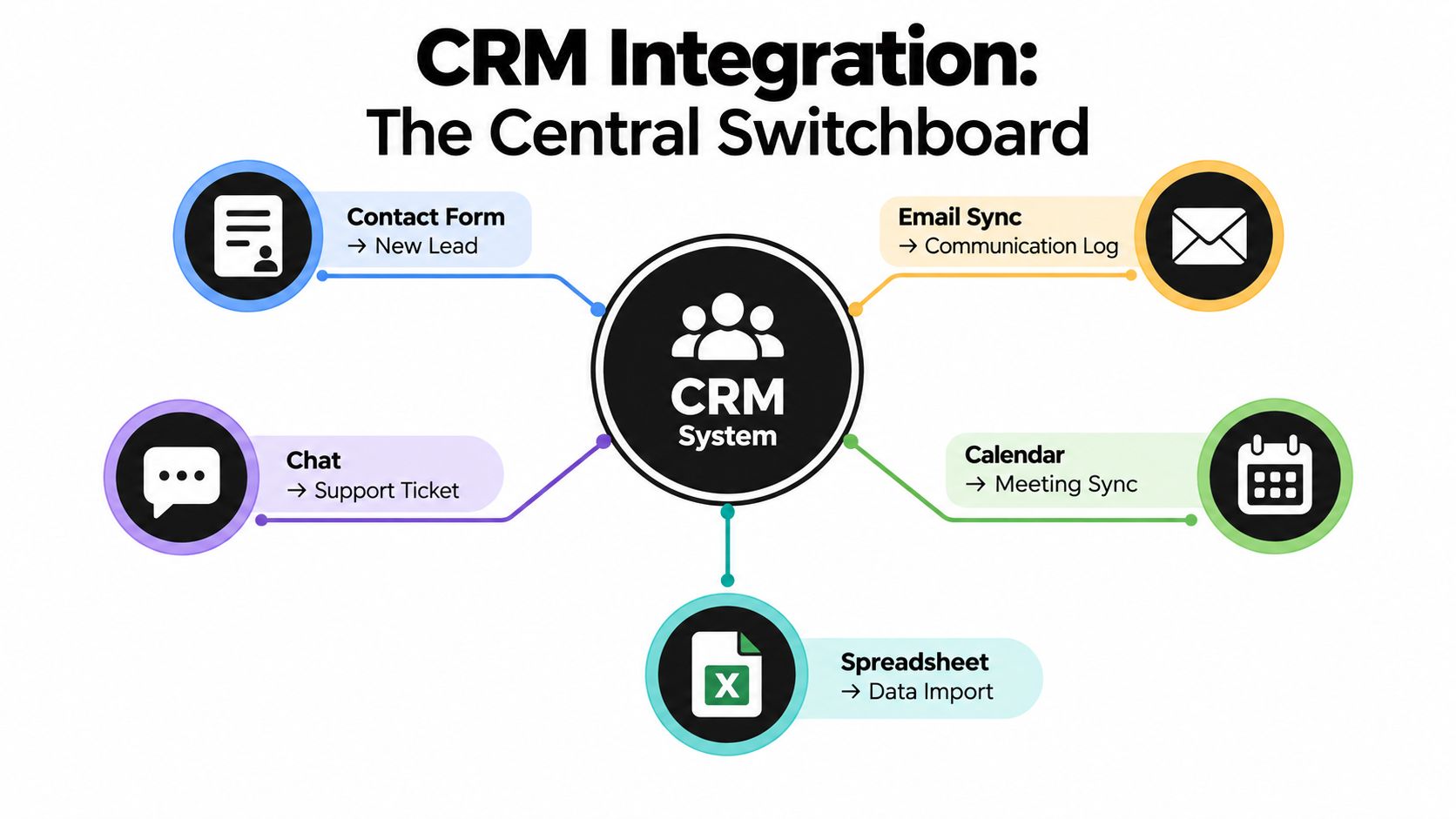
CRM integration is the setup that decides how that information moves, when it moves, and which system should be trusted for each field. Your CRM works like a central switchboard, but the job is not just connecting wires. It is choosing the route each piece of data should take so the right team sees the right context at the right time.
One source describes CRM integration as a structural link between a CRM and another software tool that automates data exchange through APIs, webhooks, or connector layers while the systems remain separate applications in this plain-language CRM integration definition.
What integration includes, and what it does not
A lot of confusion starts with treating every data handoff as the same thing. They are not the same.
CRM integration usually includes:
- Automatic data movement: A form submission, meeting booking, or lifecycle change updates another system without manual exports.
- Rules about timing: Some updates happen right away. Others can wait for a scheduled sync.
- System roles: One tool may be the source of truth for contact details, while another owns campaign activity or support history.
- Workflow actions: An update in one system can trigger routing, assignment, enrichment, or notifications elsewhere.
CRM integration does not mean:
- A one-time CSV upload: That moves data once, but it does not keep records aligned.
- One giant merged app: The tools still stay separate.
- Automatic data cleanup: Bad field mapping, duplicate logic, or unclear ownership can spread errors faster.
That last point matters more than teams expect. A fast connection is helpful only when the data rules are clear. If the wrong lifecycle stage, owner, or consent field syncs instantly, the mistake also spreads instantly.
A practical test helps. If a value changes in one system tomorrow, can the correct system update the correct field automatically, under a rule you chose in advance? If yes, you likely have a real integration. If not, you may only have occasional data transfer.
Here's a helpful visual explanation before we go deeper into mechanics:
Why the definition matters
Teams often hear "CRM integration" and picture a simple connection between two apps. In practice, it is a data-flow design decision.
Some information needs real-time movement. A demo request should usually create or update a CRM record right away so routing and follow-up happen fast. Other information can be loosely coupled. Nightly syncs for campaign membership, product usage summaries, or reporting tables are often fine because no one needs that data within seconds.
That is why setup choices matter as much as the connection itself. Good integration design answers questions like: Which system creates the contact first? Which field wins if values conflict? Which updates need instant sync, and which can run on a delay? If you are comparing those options, this guide on how to integrate CRM systems step by step lays out the decision points in plain language.
A clear integration does more than pass records around. It gives each customer event a defined path, with timing, ownership, and guardrails that keep useful data moving without spreading bad data faster.
How CRM Integrations Work Behind the Scenes
A CRM integration is a delivery system for customer data. Behind every "new lead created" message, a few simple handoffs decide what moves, when it moves, and what happens if something goes wrong.
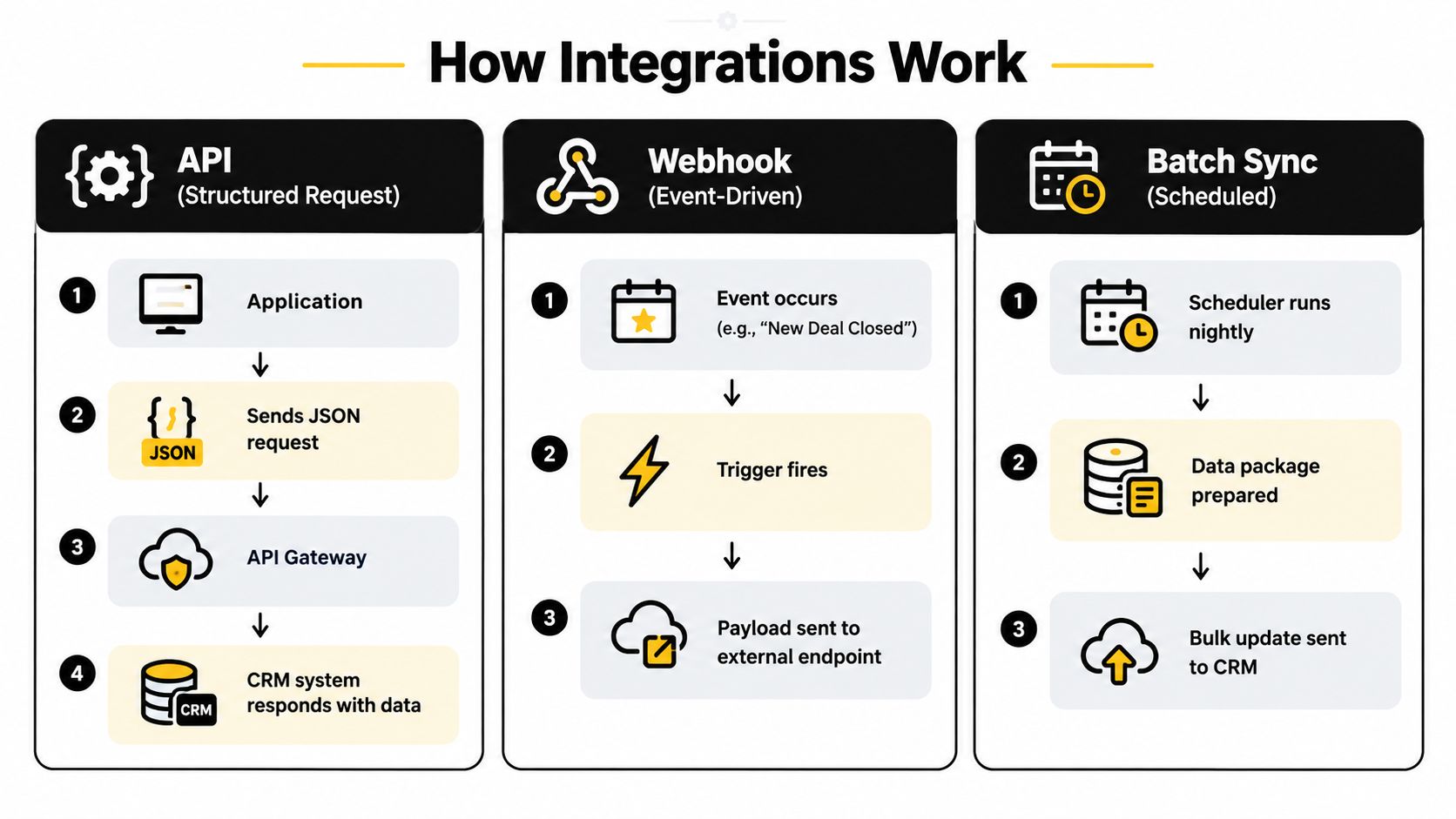
A helpful way to read the diagram is to follow one event. Someone fills out a demo form. The form app captures the submission, checks which fields belong in the CRM, sends the data through a connector or direct endpoint, and waits for a response. If the CRM accepts it, the system may create a contact, attach the source, assign an owner, and trigger follow-up steps. If the CRM rejects it because a required field is missing or the record is a duplicate, the integration needs a rule for that too.
That is the part many teams miss. Integration work is not only about connecting two tools. It is about designing the path data takes and setting rules that stop bad records from spreading faster.
APIs handle direct requests
An API is the method one system uses to ask another system to do something or return information. It works like a structured front desk. One app arrives with a specific request, and the other app answers in a format both sides understand.
For example, a forms platform can send contact details into Salesforce or HubSpot through an API call. A CRM API integration can expose and sync objects like contacts, companies, deals, leads, users, stages, pipelines, opportunities, and historical activities, as explained in this CRM API integration overview.
APIs are a good fit when the workflow needs precision. You can create one record, update one field, or check whether a contact already exists before writing new data.
Webhooks announce that an event happened
A webhook sends an alert the moment a system sees an event. Instead of asking the CRM every few minutes whether something changed, the source app pushes a message right away.
Common examples include:
- New form submission: Send the lead to the CRM immediately.
- Deal stage changed: Notify billing or onboarding.
- Meeting booked: Create an activity record and assign follow-up tasks.
Webhooks are useful when timing matters because the event starts the workflow.
A simple rule helps here. APIs are for asking and updating. Webhooks are for announcing.
Native connectors package the plumbing
A native connector is a prebuilt connection between tools. You authorize both systems, map fields, and choose triggers without building every request yourself.
That makes native connectors useful for standard workflows such as forms to CRM, CRM to email automation, or calendar events to contact activity. Teams comparing setup options often benefit from an operational view like this practical integration guide for UK firms, which shows how integration choices affect daily work, not just technical setup.
In larger environments, the connector is only one layer. You may still need routing rules, field ownership rules, retry logic, and approval steps around it. This overview of enterprise CRM and app integration patterns is useful when your stack includes more than a simple one-to-one connection.
Behind the scenes, the mechanics are usually simple. The hard part is choosing the right path for each type of data and adding guardrails so accurate information moves quickly without carrying errors along with it.
Choosing the Right Sync Architecture for Your Data
A sales rep opens a contact record five minutes before a call. Marketing updated the lead source in one system, support changed the account owner in another, and the CRM still shows yesterday's version. The tools are connected, but the data flow was designed poorly.
That is the architecture choice.
CRM integration is not only about getting systems to talk. It is about deciding which system should speak first, which one should be treated as the source of truth, how quickly updates need to travel, and what should happen when data arrives late or arrives wrong.
Pass-through versus sync-based
Two patterns show up again and again.
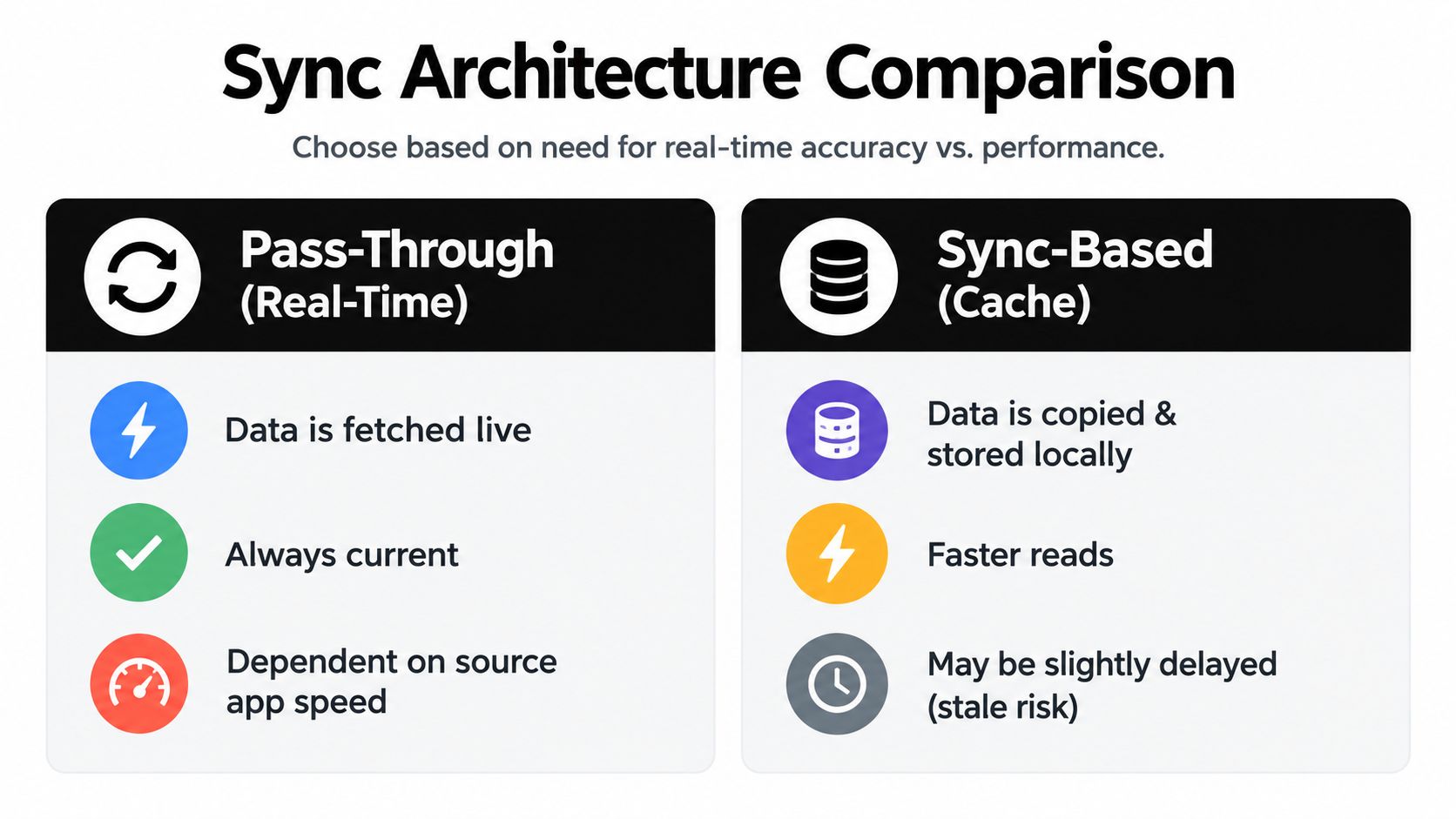
Pass-through works like asking the source system a live question each time you need an answer. If a rep needs the current deal stage or a support agent needs the latest account status, the integration fetches that record directly from the system that owns it.
Sync-based architecture works more like keeping a copied shelf of records nearby. The copy is faster to read and easier to use across teams, but it can be slightly behind the original.
A unified integration setup may support both patterns through one layer for authentication, syncing, tool calls, and webhooks, while custom logic handles the CRM or ERP details underneath, as explained in this unified API architecture analysis.
The practical question is simple. Do you need the newest answer right now, or do you need a reliable copy that many systems can read without waiting on the original tool?
Sync Architecture Decision Matrix
| Architecture Option | Best For | Freshness and Performance | Key Risk to Manage |
|---|---|---|---|
| Pass-through real-time | Live record lookups, current pipeline state, sensitive data you don't want to store twice | Freshest data, but depends on source system responsiveness | Source outages or slow APIs |
| Sync-based cache | Dashboards, repeated reads, operational views used by multiple teams | Faster reads, but data can lag | Stale records and cache consistency |
| One-way sync | Simple handoffs such as form submissions into CRM | Easy to manage, limited conflict risk | Downstream systems may drift |
| Two-way sync | Shared customer records across CRM and support or sales tools | More complete alignment, more complex behavior | Field conflicts and update loops |
| Event-driven sync | Immediate actions after a trigger like a new lead or booked meeting | Fast response on important moments | Missed events if webhook delivery fails |
| Batch sync | Low-priority updates such as reporting or non-urgent enrichment | Efficient for bulk updates, not instant | Delayed visibility |
Match the method to the workflow
A good rule is to match the sync speed to the cost of delay.
If a demo request needs lead routing, territory assignment, and an alert to sales, real-time or event-driven flow usually makes sense. If finance needs a nightly export for reporting, batch sync is often enough. If several teams read the same customer record all day, a synced cache may reduce load and speed up screens without harming decisions.
Two-way sync deserves extra caution. It sounds attractive because every system stays aligned, but it also spreads mistakes faster. If one tool accepts a bad phone number, wrong owner, or duplicate company name, every connected system can inherit the error unless you set ownership rules first.
That is where governance matters most. Decide which system owns each field. Decide which record wins when values conflict. Decide what should be blocked, corrected, or sent to review instead of written everywhere.
A practical guide to CRM sync design recommends choosing between one-way, two-way, event-driven, and batch synchronization based on freshness needs and conflict risk. It also recommends field ownership matrices, deduplication keys, per-field survivorship rules, queue-based writes, plus validation and quarantine layers in this CRM API integration guide.
For forms and lead capture, these choices show up quickly. A simple contact form may only need a one-way push into the CRM. A high-volume demo funnel may need validation, deduplication, and immediate routing. This guide to form builder API integration options is a useful reference when you are mapping those decisions.
Real-time is not automatically better. It is better only when waiting would slow down action or create a poor customer experience. For everything else, a loosely coupled sync can be easier to maintain, easier to recover, and safer when bad data slips through.
Business Benefits and Common Use Cases That Drive ROI
A rep opens the CRM before a call and sees the full story in one place. The prospect filled out a demo form this morning, attended a webinar last week, and has an open support question from a product trial. Without integration, that story sits in three tools and the rep spends the first five minutes piecing it together.
That is the business case in plain terms. CRM integration improves ROI when it removes waiting, rework, and guesswork from customer-facing work.
The biggest gains usually come from a few repeatable flows, not a giant multi-system rollout. Each flow answers a simple design question: what information needs to arrive in the CRM, how fast, and what action should happen next?
High-value use cases teams usually start with
Form-to-CRM lead capture
A visitor submits a pricing or demo form. Their details go into the CRM, matched to an existing record or added as a new one, and the right rep gets alerted. If speed affects conversion, this flow often needs real-time handling so follow-up happens while interest is fresh.
Marketing engagement sync
Email clicks, webinar registrations, and campaign source data flow into the CRM so sales can see buying signals without asking marketing for a screenshot. This use case often works well with scheduled syncs if minute-by-minute freshness does not change the next action.
Calendar and email activity logging
Meetings booked, calls held, and emails sent are written to the customer record automatically. That saves reps from manual note copying and gives managers a cleaner view of actual activity.
Support ticket visibility
Account managers can see open issues, recent escalations, and ticket history before a renewal or expansion conversation. The value here is context. A rep should not walk into an upsell call blind while the customer is waiting on a fix.
Revenue and finance alignment
Won deals, invoices, subscription changes, or payment status can be shared with the CRM so teams compare pipeline with actual revenue. This is less about convenience and more about planning. Forecasts get more useful when sales and finance are looking at the same commercial picture.
Why these use cases produce ROI
The return does not come from "having an integration." It comes from choosing flows that reduce delay in important moments.
If a lead sits in a form tool for four hours, response time suffers. If support history never reaches the CRM, account teams miss risk signals. If billing data stays separate, revenue reporting turns into spreadsheet repair.
Analysts at Validity make a helpful distinction in this CRM integration use case guide. Good integrations sync both data and workflow. In practice, that means the handoff matters as much as the record. A contact created in the CRM has limited value if routing, enrichment, follow-up tasks, or lifecycle updates never happen.
Match the sync style to the job
A helpful way to prioritize is to separate urgent flows from reference flows.
Use real-time sync for actions where delay changes the outcome. Inbound lead routing is the clearest example. A demo request should not wait for a nightly batch if sales needs to respond now.
Use a looser sync for data that supports context rather than immediate action. Marketing engagement, invoice summaries, or product usage snapshots often work well on a schedule. That design is usually easier to maintain and easier to recover if one system sends bad data.
Speed has a cost. Every instant sync is another path for errors to travel quickly, so the best ROI often comes from being selective rather than making every field update immediate.
How to choose the first integration to build
Start where delay or missing context hurts revenue the most.
- Choose lead capture first if inbound handoff speed affects meeting rates.
- Choose marketing sync first if sales cannot see campaign source or buying signals.
- Choose support visibility first if renewals suffer because account teams lack service context.
- Choose finance alignment first if pipeline reports and booked revenue never match.
The best first integration is usually the one that removes friction from a real customer workflow and keeps the data useful enough to act on.
Security Governance and GDPR Readiness for Connected Data
A form submission enters your CRM with a typo in the email address. An enrichment tool copies it. A marketing platform syncs it. A routing rule assigns it. Within minutes, one bad record has turned into four systems with the same problem.
That is the security and governance question in CRM integration. The job is not only to connect tools. The job is to decide how data should move, who is allowed to change it, and which mistakes should be stopped before they spread.
Governance starts with data ownership
Connected systems work like a set of pipes with valves. If every app can write to every field, you get pressure in all directions and no clear source of truth. If each field has an owner, the flow is easier to control and easier to fix.
A practical governance setup usually includes:
- A system of record for each data type: For example, the CRM may own account stage, the product database may own usage data, and the billing system may own invoice status.
- Field-level write rules: A support tool might read lifecycle stage but should not overwrite it.
- Validation at the entry point: Required formats, dropdowns, and duplicate checks catch bad records before they travel.
- Audit history: Your team should be able to see what changed, in which system, and by whom.
- Retention rules: Personal data should not keep syncing long after the business purpose is gone.
This is also where sync design and governance meet. Real-time sync is useful for actions that need immediate response. It is riskier for fields that are often messy or disputed. If a field is high impact and low trust, slow it down, review it, or keep one-way control.
GDPR readiness is part of integration design
GDPR affects the shape of your data flow, not just the wording on a consent banner.
If personal data moves between a form tool, CRM, email platform, support desk, and warehouse, your team needs to answer simple questions clearly. Why is each field collected? Which systems need it? How long should it stay there? Who can update or delete it?
Good integration design supports those answers:
- Collect only the fields you need
- Sync only the fields each system uses
- Limit access with roles and scoped permissions
- Encrypt data in transit and at rest
- Support deletion and retention workflows across connected tools
For teams tightening those controls, this guide to understanding GDPR compliance gives a useful operational checklist.
Prevent silent failures and quiet data drift
The hardest integration problems are often the ones no one sees at first. A field mapping changes after a CRM admin renames a property. An API limit delays updates. A webhook fails and retries stop. The connection still exists, but the workflow no longer reflects reality.
That is why monitoring belongs in the design, not as cleanup later.
Set alerts for failed syncs, unusual spikes in record changes, and drops in expected volume. Review mapping changes before they go live. Log whether a record was created, updated, skipped, or rejected. Those checks help your team catch two different risks early. One is technical failure. The other is governance failure, where the data is flowing exactly as configured but the configuration itself is wrong.
Connected data is only useful when it stays accurate, limited to purpose, and easy to trace. Otherwise, integration just helps bad data travel faster.
Example Workflows That Turn Forms Into Qualified Pipeline
The cleanest way to make all this concrete is to follow a lead from form submission to pipeline.
Workflow examples you can picture immediately
1. Orbit AI
A team publishes a demo request form with a visual builder, maps the key fields to its CRM, and uses the platform's AI SDR and smart lead scoring to qualify submissions before routing them to sales. Because Orbit AI connects with 50+ tools according to the publisher information provided for this article, it fits teams that want forms, qualification, and CRM handoff in one workflow layer.
2. HubSpot forms plus CRM
A standard inbound setup sends a website form directly into HubSpot, triggers ownership assignment, and starts a nurture or sales sequence based on form answers.
3. Salesforce plus scheduling tool
A meeting booking can create or update a lead, log the activity, and route ownership based on territory or account rules.
A good workflow has clear checkpoints
The strongest form-to-CRM workflows usually include these decisions:
- Capture: What fields are required at submission?
- Qualify: Which answers affect score, routing, or follow-up?
- Enrich: What context gets appended from other systems?
- Sync: Which updates need to happen immediately, and which can wait?
- Protect: What validation stops bad records before they spread?
For lead capture, the common target is speed. As noted earlier, practical integration SLAs often aim for under 60 seconds for lead data. That's fast enough for routing and follow-up, while still leaving room for validation and queue-based processing.
How to choose real-time versus loose coupling
Use real-time sync for workflows where delay changes the outcome. Inbound demo requests, hand-raiser forms, and owner assignment usually fit here.
Use looser or batch sync where a slight delay doesn't change customer experience. Reporting, low-priority enrichment, and historical activity rollups often fit better there. That approach keeps your stack simpler and less fragile.
If you want to put this into practice, Orbit AI gives growth teams a way to capture leads, qualify them with AI, and sync them into CRM and automation tools without building a pile of manual handoffs. It's a practical option when you want forms, routing, governance, and connected workflows to work as one system instead of five separate tasks.


