

Face it, staring down a long, generic form is an instant conversion killer. We’ve all been there.
A form builder with conditional logic completely changes the game by creating smart, interactive forms that adapt to user answers in real-time—a lot like a real conversation. This guide will show you how to stop losing leads to clunky forms and start using dynamic experiences to improve conversions and qualify prospects automatically.
Stop Losing Leads to Clunky Forms

We've all been on the verge of signing up for a demo or downloading a resource, only to be slammed with a wall of irrelevant questions. That friction is a primary cause of form abandonment, a problem that directly torpedoes your lead generation efforts. Traditional, static forms treat every single visitor the same, forcing them down a rigid, one-size-fits-all path.
This is where a more intelligent approach comes in. By using a form builder with conditional logic, you can turn those static data fields into dynamic, two-way conversations that feel personal and effortless.
What Is a Dynamic Form Experience
Imagine a form that actually listens. It’s like a "choose-your-own-adventure" for data collection. If someone says they’re interested in a specific service, the form instantly reveals a few relevant follow-up questions. If they identify as an existing customer, it smartly hides the fields meant for brand-new prospects.
This personalized journey delivers a few massive benefits right away:
- Reduced Friction: By showing only the necessary fields, the form feels shorter and way less intimidating, which encourages completion.
- Improved User Experience: Visitors feel seen and understood because the form respects their time by only asking pertinent questions.
- Higher Quality Leads: The logic helps pre-qualify leads on the fly by gathering specific, contextual information based on their inputs.
This shift from a static questionnaire to an interactive dialogue is fundamental. It transforms your forms from a necessary evil into one of your most effective tools for capturing high-intent leads.
Ultimately, this guide will walk you through how this technology not only elevates the user experience but also delivers better, more qualified prospects straight to your sales team. To dive deeper into the fundamentals, check out our guide on creating an effective lead capture form. This is your first step toward making your forms work smarter, not harder.
What Exactly Is Conditional Logic in Forms?
Let's cut through the jargon. Think of conditional logic as the difference between a scripted monologue and a great conversation. A terrible salesperson reads from a script, asking the same canned questions regardless of your answers. A great salesperson, on the other hand, listens, adapts, and asks relevant follow-up questions based on what you just told them.
A smart form should do the exact same thing.
At its core, conditional logic is just a set of 'if this, then that' rules you build into your form. It allows the form to react in real-time to a user's answers, dynamically changing what they see next. This creates a personalized, streamlined path that feels less like an interrogation and more like a helpful guide.
The Basic Building Blocks of Logic
This 'if-then' structure is the foundation of it all. The "if" part is the trigger—usually an answer to a specific question. The "then" part is the action the form takes once that trigger is pulled.
For example, a super common rule might look like this:
- IF the user selects "Sales Inquiry" from a dropdown...
- THEN show the fields for "Company Size" and "Budget."
But what if they choose something else? You can set up a completely different path:
- IF the user selects "Customer Support"...
- THEN show a field asking for their "Existing Account Number."
The result? Two different people see two completely different sets of questions, even though they started on the same form. The experience is tailored to their specific needs, cutting out all the irrelevant fields that create friction and make people abandon your form out of sheer frustration.
The goal is to move from a static, one-size-fits-all questionnaire to a responsive, interactive experience. When your form adapts on the fly, it feels intelligent and respectful of the user's time, guiding them smoothly toward that final submission.
Beyond Just Showing and Hiding Fields
Now, a truly powerful form builder with conditional logic can do a lot more than just play hide-and-seek with form fields. The 'then' action can kick off all sorts of automated workflows that make your internal processes smoother and your data collection smarter. You can see a full rundown of what’s possible by reading about how conditional logic works in our documentation.
Here are a few other powerful actions you can automate:
- Skip Pages: In a multi-page form, you can instantly jump users to a specific page based on an early answer, letting them bypass entire sections that have nothing to do with them.
- Trigger Custom Notifications: Route submissions to different inboxes automatically. A sales lead can go straight to your sales team’s Slack channel, while a support ticket lands in the helpdesk queue.
- Change the "Thank You" Message: Show a custom confirmation message or redirect users to a specific URL after they hit submit. For instance, a high-value lead could be sent directly to a calendar page to book a demo, striking while the iron is hot.
Why Smart Forms Are a Must-Have for Growth Teams
Let's be honest. For modern growth teams, a form builder with conditional logic isn't just another shiny object in the martech stack—it's a core competitive advantage. We can talk about the technical "how" all day, but the strategic "why" is what really matters. It comes down to real, tangible business results.
Smart forms directly impact your bottom line by completely changing how you attract, qualify, and interact with potential customers.
Think of it this way: these intelligent forms drive results across three key areas. They boost conversion rates by getting out of the user's way, they enhance lead qualification by asking the right questions at the right time, and they deliver a polished user experience that makes your brand look like it actually has its act together.
Drastically Boost Conversion Rates
Every single field you add to a form is another chance for a lead to get frustrated and leave. It’s a point of friction. Conditional logic is the ultimate friction-remover, creating a shorter, more relevant path for each person who lands on your page.
Instead of hitting everyone with a dozen fields, the form dynamically shows only what’s necessary based on their previous answers. It feels less like an interrogation and more like a conversation.
This streamlined experience is the perfect antidote to form fatigue. Considering the average form conversion rate limps along at a dismal 1.7%, there's a massive opportunity for improvement. For instance, Greenhouse boosted their demo request completions by a full 20% simply by using dynamic forms that cut the initial fields from nine down to just three. You can find more of these kinds of optimization wins in these insights on form builder effectiveness.
Enhance Lead Qualification on Autopilot
A static, one-size-fits-all form treats a high-intent CEO and a curious college student exactly the same. That’s insane. A smart form, on the other hand, acts like an expert sales development rep, asking progressive questions to automatically segment and qualify leads before they ever hit your CRM.
By using conditional logic, you can guide prospects down different paths based on their role, company size, or specific needs. This process instantly separates the hot, sales-ready prospects from the casual browsers—all without a single human lifting a finger.
The flowchart below shows a simple decision tree. See how a single inquiry can be instantly routed to either sales or support? That’s the power of one "if-then" rule.
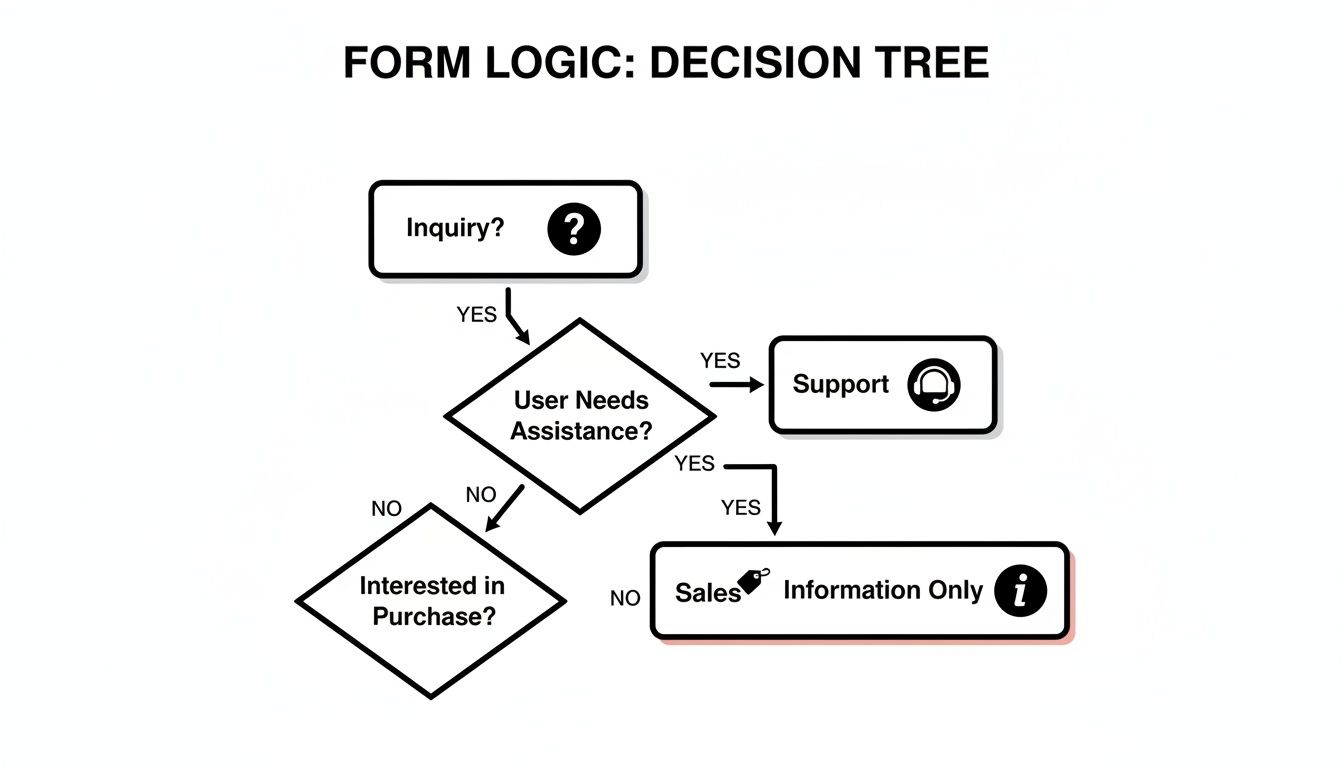
This kind of automated routing ensures faster response times for the user and a cleaner, more efficient pipeline for your team.
Key Takeaway: A form with conditional logic doesn't just collect data; it actively qualifies it. This automation feeds your sales team a steady stream of well-vetted leads, letting them focus on what they do best: closing deals.
This automated filtering is how you build a much healthier and more efficient sales pipeline from day one.
Improve the Overall User Experience
Finally, let's not forget that the user experience matters. A personalized, adaptive form makes a killer first impression. It shows you value your visitor's time and are organized enough to ask only for what you truly need.
That professional touch builds trust and makes your brand feel more attentive and modern.
When a visitor interacts with a form that feels like a conversation, their perception of your entire company improves. That positive experience can be the small detail that convinces them to move forward, turning a simple submission into a valuable business relationship.
Powerful Form Builders With Conditional Logic
Picking the right form builder with conditional logic is a game-changer. It’s what turns a basic lead capture strategy into a finely-tuned qualification machine. But with so many tools out there, the trick is finding one that not only offers powerful logic but actually fits how your team needs to grow.
While plenty of platforms can handle simple conditional rules, the best ones bring intelligence, intuitive design, and automation together under one roof. And the stakes are pretty high. Given that 74% of businesses now rely on web forms for lead generation—with nearly 50% calling them their most effective conversion tool—the pressure to create a standout experience is on. This has led to a crowded market, with options ranging from simple survey tools to complex enterprise platforms. You can get a better sense of the numbers from these online form statistics and facts.
1. Orbit AI
For growth-focused teams, Orbit AI is in a class of its own. It goes way beyond basic "if-then" rules by building AI-driven qualification right into the form itself. Its visual logic builder lets you map out complex, conversational paths without touching a line of code, ensuring every visitor gets a personalized journey.
But what really sets Orbit AI apart is its focus on the entire lead lifecycle. It's not just about collecting information; it’s about qualifying that information the second it comes in.
- AI-Powered Qualification: Think of it as having an AI SDR working 24/7. It analyzes responses on the fly, enriches lead data, and scores every opportunity, so your sales team only sees the most sales-ready prospects.
- Seamless Integrations: It connects with over 50 tools right out of the box, including all the major CRMs and marketing automation platforms. Lead data flows exactly where you need it, instantly.
- Intuitive Visual Builder: Your team can build beautiful, multi-step forms that feel more like a conversation than an interrogation. This dramatically cuts down on user friction and sends completion rates through the roof.
Orbit AI is built for teams that need more than just a form builder. They need a conversion and qualification engine. It’s the combination of sophisticated logic and actionable intelligence that helps you close deals faster.
2. Typeform
Famous for its one-question-at-a-time, conversational style, Typeform is fantastic for creating engaging surveys and simple lead forms. Its conditional logic gets the job done, but it lacks the deep, AI-powered qualification and native CRM integrations that fast-moving teams need.
3. Jotform
A true workhorse, Jotform is a feature-rich platform with a massive template library and advanced tools for things like payment processing and PDF generation. It’s incredibly powerful, but its sheer number of features can feel overwhelming, and it doesn't offer the specialized AI lead scoring found in Orbit AI.
4. HubSpot Forms
If your team already lives and breathes HubSpot, its native form builder is a natural fit. The catch? Its more advanced conditional logic features are often gated behind their pricier subscription plans, making it less accessible for teams that need powerful logic without the cost of the entire suite. You can learn more by checking out our guide on the best online form builders available today.
Feature Comparison of Top Form Builders
This table compares key features across the leading form builders to help you choose the right tool for lead qualification and conversion.
| Feature | Orbit AI | Tool B (e.g., Typeform) | Tool C (e.g., Jotform) | Tool D (e.g., HubSpot Forms) |
|---|---|---|---|---|
| Conditional Logic | Advanced (Visual Builder) | Standard (Rule-Based) | Advanced (Rule-Based) | Standard (Gated by Plan) |
| AI Lead Qualification | Built-in & Automated | None | None | Limited (Gated by Plan) |
| Real-time Data Enrichment | Yes | No | No | Yes (within HubSpot ecosystem) |
| Multi-step Forms | Yes (Optimized for Conversion) | Yes (Core Feature) | Yes | Yes |
| Integrations | 50+ Native (CRM, MAP, etc.) | Limited Native (Zapier Reliant) | Extensive (Zapier & Native) | Native to HubSpot Ecosystem |
| Visual Customization | High | High | Medium | Low to Medium |
| Ideal User | Growth & Sales Teams | Marketers, Researchers | Small Businesses, All-in-one Users | HubSpot-centric Teams |
Choosing a form builder is a critical decision that directly impacts your ability to generate and qualify leads. While tools like Typeform and Jotform offer solid functionality for specific use cases, Orbit AI is purpose-built to act as a central nervous system for your entire lead management process, blending advanced logic with the intelligence needed to accelerate revenue growth.
Real-World Examples of Conditional Logic in Action

This is where the theory hits the road. Dynamic forms are only as powerful as the real-world problems they solve. Each of the quick scenarios below shows exactly how a form builder armed with conditional logic can transform data collection from a static chore into a smart, guided conversation.
Here are three common examples of businesses putting these rules to work, turning generic fields into personal interactions that slash form abandonment.
Think of these as blueprints you can use to map out your own decision trees. The goal is always the same: reduce friction by only showing people what they need to see, right when they need to see it.
B2B SaaS Lead Qualification
A tech company is drowning in leads, but the sales team is wasting time on prospects who aren't a good fit. They need to instantly separate the hot Sales Qualified Leads (SQLs) from the "just browsing" Marketing Qualified Leads (MQLs).
Their new form starts simple, asking for company size and the person's role. Based on those two answers, the form instantly adapts, revealing specific follow-up questions about budget or technical needs.
- Company Size: A prospect from a 500+ person company sees questions about enterprise integrations. A startup founder sees questions about scalability.
- Role: A technical user gets asked about their current software stack. A marketing manager gets asked about team goals.
- Routing: Enterprise leads are sent directly to the senior sales team's calendar, while smaller leads are routed to a marketing nurture sequence.
It's a proven model. 73% of high-growth SaaS teams use logic-driven forms to pre-qualify prospects without a single human touchpoint.
By using this approach, one company cut its initial form from ten fields down to just four, boosting their completion rate by a massive 22% in just one quarter. For a deeper dive, check out our practical walkthrough on how to qualify B2B leads with forms.
Event Registration Form Example
For a large conference, not all attendees are created equal. They have different interests and different budgets. The event organizers use conditional logic to create a registration experience that feels custom-built for each person.
The form starts by asking attendees to choose a professional track: design, development, or marketing. From there, the magic happens.
- Someone who selects the "Design" track is shown a list of design-focused workshops and ticket options.
- The "Development" track reveals advanced technical sessions and pricing.
- Premium add-ons, like a portfolio review session, only appear for attendees in the design track.
- A hidden discount field automatically appears for anyone registering before the early-bird deadline.
This dynamic flow does more than just look cool. It personalizes the experience to each attendee's specific interests and led to an 18% reduction in cart abandonment for the event organizers.
Customer Feedback Survey Flow
A retail brand wants to do more than just collect satisfaction scores; they want to understand the "why" behind them and take immediate action.
Their feedback form asks customers to rate their experience on a simple 1–10 scale. If the score is 6 or below, the form instantly opens up a new text box asking, "We're sorry we didn't meet your expectations. Could you tell us a bit more about what happened?"
If the score is a 9 or 10, that text box never appears. Instead, the user is shown a simple request to leave a public testimonial and share their experience on social media.
- Conditional Textarea: A field for detailed feedback only shows up for low scores (< 7).
- Custom Redirect: High scorers are sent to a "Thank You" page with social sharing buttons.
- Smart Notifications: Any submission with a low score triggers an instant alert in the customer support team's Slack channel.
This targeted approach did two things: it helped the support team improve their issue resolution speed by 30% and it captured far richer, more actionable insights from unhappy customers.
Key Takeaways
Weaving logic into your forms is less about technology and more about scripting a smart interview that adapts in real time. These examples all point to the same core benefits of using conditional logic:
- You qualify leads automatically, freeing up your sales team.
- You create personalized interactions that respect your user's time.
- You boost completion rates and gather higher-quality data.
You can implement these same kinds of decision flows using a form builder with conditional logic like Orbit AI to power your next project.
How to Choose the Right Form Builder
Picking a form builder with conditional logic isn't just about checking a feature box on a pricing page. The right tool should feel like a natural extension of your team, helping you capture and qualify leads without getting in the way. With the online form builder market projected to hit $9.48 billion by 2032, the number of options can feel paralyzing, but a clear evaluation framework makes the decision much simpler. You can find more insights on this growing market and its key drivers here.
A great place to start is the user interface itself. Can your marketing team build a complex, multi-step form with a simple drag-and-drop editor, or will they need to file a ticket with engineering every time? An intuitive platform like Orbit AI means anyone can put together a beautiful, high-converting form in minutes, not days.
Key Evaluation Criteria
Beyond just being easy to use, your decision should come down to a few critical factors that directly impact your performance, security, and bottom line. You need a tool that doesn't just collect data, but also plugs it seamlessly into your existing workflows.
Here are the essentials to look for:
- Seamless Integrations: The form builder absolutely has to connect with your CRM, marketing automation platforms, and other critical tools. If it doesn't, you're just creating manual data-entry work. The goal is to have lead data flow exactly where it needs to go, instantly.
- Robust Security: Your forms will be handling sensitive customer information, which makes security completely non-negotiable. Make sure the platform is GDPR-compliant and offers enterprise-grade encryption to protect that data from the moment it's submitted.
- Insightful Analytics: A great form builder does more than just collect submissions. It should give you clear data on performance, showing you exactly where users drop off and which questions are causing friction. This is what allows you to continuously improve your conversion rates.
A form is not just a data collection tool; it's the first handshake with a potential customer. The right platform ensures that interaction is smooth, intelligent, and secure from the very beginning.
Ultimately, the best form builder with conditional logic is one that grows with you. A platform like Orbit AI brings together an intuitive interface with powerful AI-driven qualification, deep integrations, and top-tier security. This combination helps you not only capture more leads but turn them into revenue much faster.
To see exactly how these features work together, you can learn more about Orbit AI’s form capabilities.
Got Questions About Conditional Forms?
Thinking about making your forms smarter often brings up a few common questions. Let's tackle some of the big ones so you can feel confident putting conditional logic to work.
Does Conditional Logic Slow Down My Website?
Not if it’s built right. A well-designed form builder like Orbit AI loads its logic scripts asynchronously. Think of it like this: your main webpage loads first, and the form's brain loads in the background, completely separate.
The result? It has virtually no impact on your site’s performance or your Core Web Vitals. Your visitors get a fast, smooth experience from start to finish.
How Complex Can the Logic Rules Get?
The sky’s the limit, really. Modern builders can handle incredibly detailed logic trees. You can easily create multi-level rules that change based on several previous answers, letting you build highly personalized, conversational flows.
For instance, a rule could trigger based on a visitor's country and their selected industry, showing a completely unique set of follow-up questions just for them.
The best approach is to start simple and build up from there. Try mapping out your ideal customer journey on a whiteboard first. Visualizing the different paths makes building them a whole lot easier.
Is This Stuff Difficult to Set Up?
Absolutely not. The best form builders have ditched code in favor of intuitive, visual editors. You're basically just creating simple "if-then" rules.
You just pick a field that triggers the rule, select a condition (like "is equal to" or "contains"), and then define the action (like "show this next field" or "skip to the final page"). It’s a drag-and-drop process that makes it accessible for anyone on your team, no technical skills required.
Ready to stop using static forms and start having intelligent, lead-qualifying conversations? Orbit AI makes it incredibly simple to build dynamic forms that boost conversions and deliver better leads. Start building for free today.


