When you start comparing marketing automation tools, you’ll quickly run into a fundamental split: you have your all-in-one platforms that offer a bit of everything, and you have your specialized AI tools that absolutely master one critical job. The choice really boils down to whether you want a single system to handle it all or a best-in-class solution purpose-built to drive high-quality leads.
Choosing Your Marketing Growth Engine
Picking a marketing automation platform isn’t just a software purchase; it's a strategic move that will power your entire growth plan. This guide is designed to go beyond the usual feature checklists and give you a real framework for evaluating tools based on what actually matters for modern marketing and sales teams. We'll look at these platforms through the lens of your specific business stage and goals.
This comparison will zero in on a few core criteria:
- AI-Driven Lead Qualification: How good is the tool at spotting high-intent leads and separating them from the noise?
- Workflow Automation Depth: Can it handle a simple, linear email sequence as well as a complex, multi-path customer journey?
- Integration Ecosystems: How smoothly does it plug into your CRM and the rest of your sales stack?
- Actionable Analytics: Does the platform give you clear insights that connect marketing activity to actual revenue?
The Core of Modern Automation
The marketing automation software market has seen some explosive growth, hitting a value of $6.65 billion in 2024 and projected to climb to $15.58 billion by 2030. That surge tells you everything you need to know—these tools have become absolutely essential for any marketing team trying to operate efficiently.
The real goal here isn't just to automate tasks; it's to automate intelligent decisions. The right platform won't just send emails for you. It will tell your sales team exactly who to call next and, more importantly, why.
As you explore the different marketing growth engines out there, it's worth paying attention to what the best AI tools for small business can do to really accelerate your pipeline.
Below is a glimpse of the Orbit AI interface, which is laser-focused on turning a visitor's initial interest into a solid sales opportunity.

This kind of dashboard really drives home the importance of having visual, actionable data to make quick marketing decisions. Ultimately, this guide will give you the mental model you need to make a confident, strategic decision that truly aligns with your company's growth ambitions. For a deeper dive, check out our guide on the https://orbitforms.ai/blog/best-lead-management-software.
The New Frontier of Lead Capture and AI Qualification
Let's be honest. The most important job of any marketing automation platform is to turn a visitor's fleeting interest into a real, qualified sales opportunity. For years, that process was clumsy—it relied on static forms and basic follow-up emails that hoped for the best.
Today, AI is completely rewriting the rules. It's transforming lead capture from a passive data collection exercise into an active, intelligent qualification engine that works in real time. This is where you see the biggest difference when comparing marketing automation tools. The old guard focuses on what happens after a lead is captured, but the modern tools are winning the battle right at the point of submission.

From Static Forms to AI Conversations
The old model is painfully familiar: a visitor fills out a form, gets a generic "thank you" message, and their data gets dumped into a database for a human to sift through hours or days later. This creates friction for the buyer and a huge, costly delay for your sales team.
The new frontier is all about engaging leads the moment they show intent.
Orbit AI is at the forefront of this shift, embedding an AI SDR directly into the form itself. Instead of a lifeless set of fields, the form becomes a dynamic, two-way conversation. It asks clarifying questions, verifies information on the spot, and scores the lead based on their responses and firmographic data—all in a matter of seconds.
This isn't just a better form; it's a completely different approach to pipeline creation. The goal shifts from merely collecting contact info to delivering a fully vetted, sales-ready lead with rich context, instantly.
This evolution is happening at a critical time. A staggering 96% of marketers have used or plan to use marketing automation, with 81% of organizations already using them in 2026. With nearly everyone on board, the competitive edge now comes from how you use automation to generate higher-quality leads, not just if you use it.
Comparing Lead Capture Capabilities
To really see the difference, let’s compare the old-school approach of legacy platforms with Orbit AI’s modern, AI-driven method.
A side-by-side comparison shows a clear divide between platforms that collect data and platforms that create opportunities. The legacy players are strong on post-submission nurturing, but they miss the golden window of opportunity at the moment of peak intent.
Lead Capture and AI Qualification Feature Scorecard
| Feature | Orbit AI | HubSpot | Marketo | Pardot (Account Engagement) |
|---|---|---|---|---|
| Real-Time Qualification | Excellent (5/5) AI qualifies leads during the conversation, before submission. | Poor (1/5) Qualification happens post-submission via workflows and lead scoring. | Fair (2/5) Post-submission scoring; no real-time conversational qualification. | Fair (2/5) Relies on scoring and grading rules applied after the form is filled. |
| Conversational Interface | Excellent (5/5) Core feature. The form is an AI-driven, two-way dialogue. | Poor (1/5) Offers basic chatbots, but standard forms are static. | Poor (1/5) No native conversational form capabilities. | Poor (1/5) Lacks a conversational interface for lead capture. |
| Instant Meeting Booking | Excellent (5/5) AI SDR can book meetings with qualified reps directly in the form. | Fair (2/5) Requires separate tools or complex workflows to route to a booking link after submission. | Poor (1/5) Meeting booking is a downstream marketing action, not part of the initial capture. | Poor (1/5) Meeting scheduling happens later in the funnel via email or other campaign activities. |
| Data Enrichment | Excellent (5/5) Enriches data in real-time to inform the AI's qualifying questions. | Good (4/5) Offers robust data enrichment, but it's applied after the lead is in the database. | Good (4/5) Strong enrichment capabilities, but not used to influence the initial capture experience. | Good (4/5) Good data enrichment that feeds into post-submission scoring and grading. |
This scorecard highlights the fundamental difference: Orbit AI acts as a qualifier, while the others act as collectors. For teams measured on revenue, that distinction is everything.
Orbit AI: Qualification happens during the submission. The AI SDR can identify a high-value lead from a key target account and immediately offer to book a meeting with a sales rep, right in the form. This instant engagement dramatically shortens the sales cycle and boosts conversion rates.
HubSpot: HubSpot offers solid form-building tools with conditional logic. But qualification is a downstream activity, relying on lead scoring rules and follow-up workflows that trigger after the initial submission. The form itself remains a passive collection point.
Marketo & Pardot (Account Engagement): These enterprise-grade platforms provide powerful progressive profiling and complex scoring models. Yet, like HubSpot, all the intelligence is applied post-capture. The initial interaction is still a standard, static form, which contributes to high drop-off rates and incomplete data.
The difference in outcomes is huge. While traditional forms might convert at 2-5%, AI-driven conversational forms can achieve conversion rates two to three times higher by crushing friction and providing immediate value.
This approach is central to the next wave of high-performance marketing. You can learn more about how to use AI for lead generation in our detailed guide. By qualifying leads at the source, Orbit AI ensures that sales teams spend their time on conversations that matter, not on chasing down unqualified contacts from a database.
Comparing Core Automation and Workflow Capabilities
The real muscle behind any marketing automation platform is its workflow builder. This is where your strategy gets turned into tangible, automated actions that guide a customer from one step to the next. A great workflow builder is simple enough for everyday tasks but deep enough to handle complex, branching journeys. Honestly, choosing the right platform often boils down to how well its automation engine fits your team's ambition and skill level.
While most platforms have a visual drag-and-drop editor, what you can actually do with them varies wildly. Some are great for simple, linear email sequences. Others can manage incredibly detailed logic with multiple triggers, conditional splits, and custom events. Let's get past the shiny features and see how the top contenders really stack up.

Visual Editors and Ease of Use
The user experience of a workflow builder has a direct impact on how fast your team can launch and tweak campaigns. If your marketers can build what they need without bugging the dev team, you've got a winning formula for agility.
HubSpot: HubSpot gets a lot of love for its clean, intuitive visual editor, and for good reason. Building a workflow just makes sense, with clear "if/then" branches and easy-to-find actions. It’s perfect for teams that need to get standard nurture sequences, internal alerts, and data cleanup tasks live quickly without a major learning curve.
ActiveCampaign: This is where power meets accessibility. ActiveCampaign strikes a fantastic balance, offering a straightforward visual editor that hides a surprising amount of depth. You can build out complex segmentation and conditional logic that feels way less intimidating than enterprise-level tools, making it a favorite for SMBs with big ambitions.
Marketo: There’s no denying the power of Marketo’s workflow builder, but it comes with a serious learning curve. The interface can feel a bit dated and clunky compared to the others. Its real strength, though, is its sheer scalability and its ability to handle extremely complex, enterprise-grade programs with nested logic and custom triggers.
Logical Complexity and Branching Scenarios
The true test of a workflow builder is how it handles complexity. Can it change a customer's journey on the fly based on what they actually do? Let's take a common B2B scenario: an automated webinar follow-up.
Scenario: A prospect attends your webinar. You want to send them targeted follow-ups based on their engagement (did they attend live or just watch the recording?) and who they are (job title, company size).
The difference between a good and a great automation engine is its ability to handle nuance. It's not just about sending the next email; it's about sending the right email based on a combination of behaviors and attributes, creating a truly personalized experience at scale.
In this situation, a tool like ActiveCampaign really shines. You can easily create branches based on tags (like "attended_webinar_live") and then split the path again based on a contact field like job title. For instance, a C-level exec who attended live could be routed straight to a sales rep, while a manager who watched the replay gets a different nurture track entirely.
HubSpot can also handle this scenario well, although its logic can feel a bit more rigid at times. You can get the job done using active lists and branching logic based on contact properties to achieve a similar outcome.
Marketo and Pardot give you the most granular control, allowing for intricate scoring models and program statuses to dictate the workflow path. Setting this up, however, requires significant expertise and is probably overkill for a simple webinar follow-up.
Scalability for Advanced Journeys
As your marketing gets more sophisticated, your workflows will grow from simple sequences into complex, multi-path customer journeys. Scalability isn't just about handling more contacts; it’s about handling more sophisticated logic without falling apart.
Think about a multi-touch B2B lead nurturing sequence. A prospect downloads an ebook and enters a workflow. Their path changes based on whether they open an email, click a link, visit your pricing page, or get flagged as a target account.
This is where Marketo flexes its enterprise-grade muscles. Its ability to manage nested programs and tie different marketing initiatives into a single, cohesive revenue model is its core strength. It’s built for organizations where marketing and sales alignment is critical and every single touchpoint needs to be tracked.
Similarly, Pardot's Engagement Studio is designed for these kinds of B2B journeys, leaning heavily on its tight Salesforce integration. It lets marketers build paths that react to changes in Salesforce data, like a lead status update or a new opportunity being created.
For teams looking to build these kinds of intelligent sequences, you can learn more about crafting powerful AI workflows that connect every step of the customer journey. The ability to build robust, intelligent sequences is a crucial factor in any marketing automation tools comparison, making sure the platform you pick can grow with you.
Evaluating Integrations and Analytics
Your marketing automation tool can't live on an island. It’s only as powerful as the data it can access and the insights it spits out. A truly effective platform has to plug into your entire tech stack and deliver analytics that actually prove business impact, not just vanity metrics. This is where so many platforms stumble—they either lack deep, reliable connections or serve up surface-level reports that don’t help you make real decisions.
The quality of a platform's integration library is a direct measure of its usefulness. You need a smooth, real-time flow of data between your marketing engine and your CRM, data enrichment tools, and ad platforms. Without it, your team is stuck with manual data entry—a slow, error-prone mess that kills productivity.
Assessing Your Integration Ecosystem
Native integrations are what you should be looking for. While Zapier can patch a lot of holes, native connections are almost always faster, more dependable, and better at handling complex data. The goal is to create a unified system where a qualified lead is instantly in front of every team that needs to see it.
Orbit AI: Built for the modern, interconnected stack, Orbit AI offers over 50+ native integrations, hitting all the essentials like Salesforce, HubSpot CRM, and Slack. Its entire focus is on immediate action. The moment a conversation ends, qualified leads and their enriched data are synced across your ecosystem, ensuring there's zero lag between marketing qualification and sales follow-up.
HubSpot: As a massive all-in-one platform, HubSpot has a sprawling app marketplace with hundreds of integrations. Its real power is within its own ecosystem, where marketing, sales, and service hubs work together seamlessly. But getting it to play nicely with outside systems, especially a competing CRM like Salesforce, can sometimes mean a more complex setup or a pricier plan.
Marketo: As you’d expect from an enterprise-focused platform, Marketo delivers powerful, robust integrations with major CRMs, especially Salesforce. Its ecosystem is more curated, focusing on deep, B2B-centric connections with data providers and account-based marketing (ABM) platforms. The trade-off? These integrations often require significant technical know-how to configure and keep running.
For any team that needs real flexibility, API access is non-negotiable. A well-documented, flexible API lets your developers build custom connections to your own internal systems or niche third-party tools. This is what future-proofs your setup, ensuring your marketing platform can grow and adapt with you.
From Dashboards to Demonstrating ROI
Great analytics go way beyond tracking email opens and clicks. They have to connect marketing activities directly to pipeline and revenue, answering the one question every CMO lives and dies by: "What's our marketing ROI?" This requires a lot more than a standard dashboard; you need sophisticated attribution and real revenue reporting.
The standard dashboards you'll find in most platforms will show you campaign performance, which is fine for making small tactical tweaks. But to make strategic decisions, you need to see exactly how different channels and touchpoints are contributing to a final sale.
The most valuable analytics don't just report on what happened; they provide clear guidance on what to do next. An effective platform should highlight which channels are driving the most qualified leads and which campaigns are generating the highest-value customers.
This is where advanced features like multi-touch attribution come in. It assigns credit to the various marketing interactions that happen along a buyer's journey, giving you a much clearer picture of what’s working compared to simplistic first-touch or last-touch models.
Revenue reporting is the other deal-breaker. It ties your marketing campaigns directly to closed-won deals in your CRM. Marketo and HubSpot are strong here, offering detailed reports that can track both marketing-sourced and marketing-influenced revenue. This is the kind of analysis you need to prove your marketing spend is worth it to the executive team. To see how modern platforms are turning data into decisions, learn more about the future of marketing analytics and how to optimize your campaigns for better results.
Matching The Right Tool to Your Business Stage
The most powerful marketing automation tool on the planet is worthless if it doesn't solve your company's problems right now. A feature-packed enterprise platform will crush a startup with complexity and cost, while a lightweight tool will absolutely hold a scaling company back.
This makes any marketing automation tools comparison less about finding a single "best" platform and more about finding the right fit for your specific stage. The first question you should always ask is how a new tool will play with your existing tech, especially your CRM.
This decision tree shows how your CRM choice often dictates the next steps in building out your automation stack.
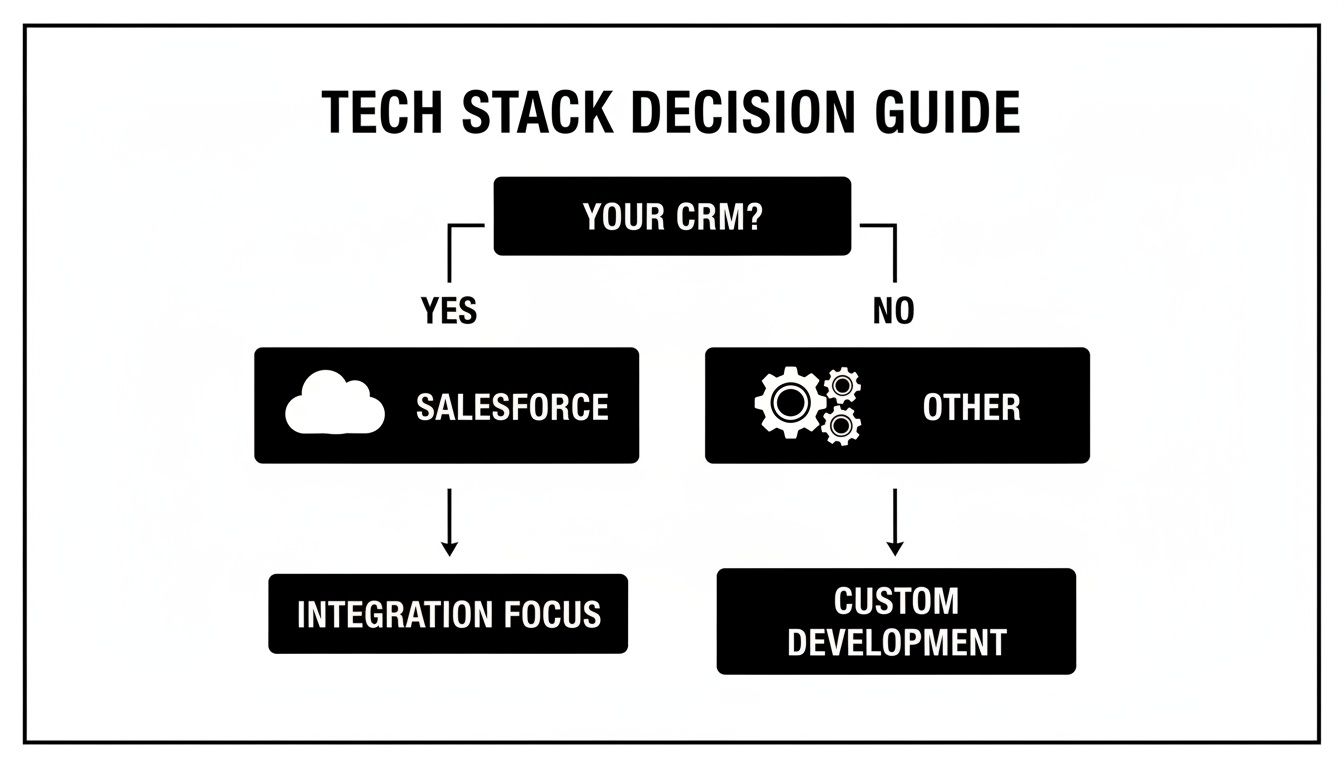
As you can see, there's a clear fork in the road. If you're built on Salesforce, your ecosystem is pretty well-defined. For everyone else, flexibility and solid integration capabilities become the most important factors.
Recommendations For Startups
For startups, the mission is simple: generate high-intent pipeline as efficiently as humanly possible. Every dollar and every hour is precious, which makes speed-to-lead and conversion rates the only metrics that truly matter. Getting bogged down in a complex, all-in-one platform is often a fatal distraction.
The ideal startup stack is lean, mean, and completely focused on revenue. This is where a specialized tool for lead capture and qualification can make all the difference.
- The Recommended Stack: Orbit AI paired with a lightweight CRM like HubSpot's free tier or Pipedrive.
- Why It Works: This combo laser-focuses on the most critical part of the funnel—turning anonymous website traffic into sales-ready conversations. Orbit AI's AI SDR does the heavy lifting, qualifying visitors in real time so your sales team only spends time on fully-vetted leads. The CRM then simply manages the deal flow without the bloat of a full marketing suite.
For early-stage companies, the goal isn't to build complex nurture journeys; it's to master the art of the first conversation. Prioritizing a tool that perfects that initial handoff delivers immediate ROI and fuels growth.
Guidance For Scale-Ups
As a company starts to scale, the game changes. The focus broadens from pure lead generation to building repeatable marketing programs, nurturing a growing database, and getting marketing and sales perfectly aligned. You need more than just lead capture; you need a powerful engine for engagement.
- The Recommended Stack: Orbit AI combined with a platform like HubSpot Marketing Hub or ActiveCampaign.
- Why It Works: This setup creates a best-of-both-worlds scenario. Orbit AI continues to own the top of the funnel with its superior AI qualification, feeding a constant stream of high-quality leads into the system. From there, HubSpot or ActiveCampaign takes over, using their powerful workflow builders to manage lead nurturing, email campaigns, and reporting at scale. Knowing your business stage is everything here, and this guide to marketing automation software for small business offers some great tailored insights.
Strategies For The Enterprise
Enterprises operate on a whole different level of complexity. They usually have an established, Salesforce-centric ecosystem and need platforms that deliver deep integration, advanced security, and incredibly granular control.
- The Recommended Stack: Marketo or Pardot (Account Engagement) as the core engine, augmented by Orbit AI.
- Why It Works: Marketo and Pardot are built for the labyrinthine B2B sales cycles common in the enterprise world. Their lead capture methods, however, remain a significant weak point. By integrating Orbit AI, enterprises can accelerate pipeline creation in a big way, using its AI SDR to qualify leads instantly before they ever touch the complex nurturing workflows in Marketo or Pardot. This approach modernizes the front end of their stack while getting more value out of their existing enterprise systems.
Best-Fit Use Case and Pricing Model Overview
To make the choice clearer, this table summarizes which tools are best suited for each stage of business growth, along with their typical pricing structures.
| Tool | Ideal for (Company Stage) | Best Use Case | Typical Pricing Model |
|---|---|---|---|
| Orbit AI + Free CRM | Startups | Maximizing lead qualification & speed-to-lead on a budget. | Usage-Based + Free |
| Orbit AI + HubSpot/ActiveCampaign | Scale-Ups | Best-in-class lead capture paired with robust nurturing & automation. | Usage-Based + Tiered Subscription |
| Orbit AI + Marketo/Pardot | Enterprise | Modernizing lead capture for an existing Salesforce-centric stack. | Usage-Based + Contact-Based Subscription |
Ultimately, the goal is to build a tech stack that not only meets your needs today but also gives you room to grow without having to rip and replace everything in 18 months.
Implementation and Migration: A Practical Guide
Picking the right marketing automation platform is a huge win, but let's be honest—the real work starts the moment you decide to go live. A solid, thoughtful migration plan is what separates a smooth launch from a chaotic mess of lost data, broken workflows, and a team wondering why you made the switch in the first place.
Success here isn't just about the technology. It’s about the process you follow to weave it into the fabric of your business. Rushing this almost always backfires, leading to poor team adoption, messy data, and a frustrating failure to see the tool’s real potential. The key is to move deliberately, ensuring each piece is locked in place before you move on to the next.
Your Pre-Launch Checklist
Before you flip the switch, you need a plan. This isn't red tape; it's a strategic checklist that makes sure your new system starts delivering value from day one. Breaking it down into manageable steps prevents that feeling of overwhelm and keeps risks to a minimum.
Here’s a step-by-step guide to get it right:
Data Audit and Cleanup: First things first, get your contact database in order. This means hunting down and merging duplicates, fixing weird formatting errors, and saying goodbye to inactive contacts. If you migrate messy data, you’re just moving the problem into a shiny new system, which guarantees poor segmentation and deliverability issues down the line.
Domain Authentication: Do this immediately. Set up your DKIM and SPF records to authenticate your sending domain. It's a technical but non-negotiable step. It’s what tells email providers you’re a legitimate sender, ensuring your emails actually land in the inbox, not the spam folder. Skipping this can cripple your email marketing before you even send your first campaign.
Asset and Workflow Recreation: Start rebuilding your core marketing assets in the new platform. This means your email templates, landing pages, forms, and most critical automation workflows. Don't try to do everything at once. Start small—recreate one or two of your most important campaigns to test the system's logic and get a feel for how it works.
Team Training and Onboarding: Get your marketing and sales teams in a room (or on a call) for dedicated training. Focus on the features they’ll actually be using every day. Give them clear documentation, maybe a short video or two, and make sure everyone knows who the go-to person is for questions. This is how you build confidence and drive real adoption.
A successful migration isn't just a technical task; it's a change management project. Your team's buy-in and proficiency are just as important as the platform's features. A tool is only as good as the people using it.
Following these steps will help you dodge the most common pitfalls, like lost data, broken automations, or a team that refuses to use the new software. For more in-depth strategies, check out these marketing automation best practices to get up to speed even faster.
Common Questions Answered
When you're comparing marketing automation platforms, a few key questions always come up. Let's tackle them head-on, drawing from years of experience helping teams build their perfect tech stack.
Should I Go With an All-in-One Platform or a Specialized Tool?
This is the classic "depth versus breadth" debate. What's the real difference?
An all-in-one platform like HubSpot gives you a massive toolbox. You get everything from email to social media scheduling under one roof, which is great for simplicity. The trade-off is that individual features can feel a bit generic, like a multi-tool that has a screwdriver, but not the one you really need.
Then you have specialized tools like Orbit AI, which are built to master one critical job—in our case, intelligent lead capture and qualification. The focus is razor-sharp. This means a far better user experience and more powerful AI than what you'd find buried inside a single, massive platform.
For most growth-focused teams, the winning strategy is combining the best of both worlds: use Orbit AI to perfect your top-of-funnel conversion, then send those high-quality leads into your favorite CRM for the long-term nurture.
How Much Should We Budget for Marketing Automation as a Startup?
There's no single magic number, but the smart approach is to start lean and only pay for tools that generate immediate ROI. A lot of platforms, Orbit AI included, have free or startup-friendly plans designed for this exact purpose, letting you get going without a big upfront investment.
A typical startup might spend anywhere from $50 to $500 per month on their marketing automation tools, mostly depending on the size of their contact list and the features they absolutely need.
The key is to put your first dollars into tools that directly grow revenue—think lead qualification and conversion. Don't get distracted by complex, enterprise-level features you won't touch for another year. Make sure every dollar in your budget is working as hard as you are.
How Important Are Native Integrations, Really?
They’re not just important; they’re critical for building a tech stack that actually works without constant manual effort. Native integrations are what create those seamless, real-time data flows between your tools. Without them, you're stuck with time-sucking data entry and frustrating information silos.
Think about it: when your marketing automation platform connects natively with your CRM, every single qualified lead gets synced instantly. That means your sales team can follow up in minutes, right when buying intent is at its absolute peak.
Always prioritize platforms that offer a solid library of pre-built connections to the tools you already rely on. It ensures your workflows run smoothly and automatically from day one.
Ready to turn your forms into your best sales channel? Orbit AI uses an AI SDR to qualify leads in real-time, book meetings instantly, and sync sales-ready opportunities to your CRM. Start your free trial.