Your dashboard says the pipeline is healthy. Reps say otherwise. Leads arrive from forms, sit untouched while someone checks a CRM field, receive a generic sequence, and eventually disappear into a forecast that looks more precise than the underlying data. Meanwhile, sales leaders keep adding AI tools, hoping the next one will fix the handoff the last one ignored.
The practical answer to how to use AI in sales isn't “buy an AI SDR.” It's to redesign the workflow where intent gets lost, automate the repetitive work around that handoff, and measure whether better context produces better pipeline. The playbook below ranks use cases by friction, not by how impressive the vendor demo looks.
Why Most Sales AI Rollouts Stall Before They Ship
A revenue team can have plenty of activity and still have poor pipeline quality. Marketing sends a lead, an SDR qualifies it, an account executive receives a thin CRM record, and nobody knows which details mattered in the original conversation. Each team completes its task, but the buyer's intent weakens at every transfer.
That's why point solutions disappoint. A tool can generate outreach, summarize calls, or score leads, yet the revenue process stays unchanged. The rep still has to copy information between systems, decide whether the score is credible, and work out what to say next. AI has accelerated isolated tasks while leaving the expensive coordination problem intact.

A 2025 ZoomInfo survey of more than 1,000 go-to-market professionals found that 45% of sellers use AI at least once a week, while 42% use it only a few times a year or not at all. That split doesn't suggest a lack of awareness. It shows that many teams haven't connected AI to a workflow people already own.
The distinction that matters: Automating activity creates more motion. Improving pipeline quality creates better decisions, cleaner handoffs, and more useful conversations.
Start by mapping one handoff. A useful candidate might be a demo request that enters through a website form. Record what the buyer submits, what enrichment is available, how long the lead waits, which rep receives it, what context reaches that rep, and what happens after the first response. If you can't describe that chain clearly, adding another tool will only hide the weakness.
Redesign the handoff before choosing the software
The first automation should usually remove administrative drag around an existing signal. Meeting notes, CRM updates, lead summaries, and routing are safer starting points than fully autonomous buyer-facing outreach. They create a cleaner operating record without asking AI to invent a relationship.
Data quality controls belong in the first design conversation, not after the rollout. A practical guide to moving AI out of presales side projects makes the leadership point clearly: sales AI needs ownership from the people who manage process, data, coaching, and commercial outcomes.
Before automating the handoff, define the required fields, accepted values, escalation rules, and owner for exceptions. Review data quality management as a useful reference for keeping the information that AI uses consistent and actionable.
The teams that get value don't ask, “Which AI tool should we buy?” They ask, “Where does buyer intent become unusable, and what decision should happen next?” That question gives every later tool a job.
The Five AI Use Cases That Actually Move Pipeline
Not every sales AI use case deserves equal priority. Rank the work by the friction it removes at a handoff, then build from the earliest reliable signal toward the forecast.
| Use Case | Funnel Stage | Friction Removed | Tool Layer |
|---|---|---|---|
| AI lead capture and qualification | Demand capture | Incomplete submissions and slow qualification | AI-native forms and qualification |
| Conversational AI and AI SDR agents | First response | Waiting, repetitive questions, and meeting coordination | Conversational agent |
| Lead scoring and routing | Handoff to sales | Unclear priority and ownership | Scoring and workflow automation |
| Personalization of outreach | Prospecting and follow-up | Generic messaging and weak context | Research and content assistance |
| Forecasting | Pipeline management | Subjective risk assessment and stale updates | Revenue intelligence |
1. Fix lead capture first
A form is often the first structured conversation a buyer has with your sales process. If it asks too much, conversion suffers qualitatively. If it asks too little, sales receives a name and an email with no useful context. AI can summarize answers, identify fit, and surface buying signals before a rep opens the record.
Orbit AI fits as an AI-native form and lead capture layer. It can collect structured responses, qualify submissions, enrich context, and support routing without requiring a rip-and-replace of the CRM.
2. Use conversational agents for repetitive qualification
An AI SDR should handle repeatable questions, clarify a prospect's use case, and help schedule the next step. It shouldn't impersonate a senior account executive during a complex evaluation. Keep the boundary clear: AI handles early-stage information gathering, while humans own judgment, trust, negotiation, and important commitments.
3. Score and route based on evidence
Scoring matters only when it changes ownership or action. Combine fit information, stated need, urgency, engagement, and response quality. Then route the lead to the right rep based on segment, territory, product, or availability. A score that sits unused in a CRM is decoration.
4. Personalize outreach from captured context
Personalization works when it reflects a real business situation, not when an AI inserts a company name into a template. Feed the rep the prospect's stated problem, role, buying stage, and relevant response. The output should be a useful opening angle that the rep can verify, not a fabricated claim about the account.
5. Use forecasting after the underlying records improve
Forecasting is the final layer, not the first purchase. AI can help identify risk and inconsistencies, but it can't compensate for missing next steps, stale stages, or deals that were never qualified. Clean inputs make forecast recommendations easier to challenge and improve.
Gartner projects that 95% of seller research workflows will begin with AI by 2027, up from less than 20% in 2024. That projection from Gartner's sales AI guidance makes the sequencing decision more urgent. Research will become an AI-assisted starting point, but teams still need a reliable workflow that turns research into action. For the agent layer, AI agents for sales provides a practical view of how qualification and follow-up can fit into that sequence.
Wiring AI Into Forms, CRM, and Automation
Don't rebuild the revenue stack to introduce AI. Put the new layer between the source of buyer intent and the system where sales works, then make each handoff explicit.
Start with the form. Ask for the information that affects qualification and the next conversation, not every detail a future analyst might want. Use clear consent language, define which fields are required, and let the AI summarize long responses into a compact record that a rep can review quickly.
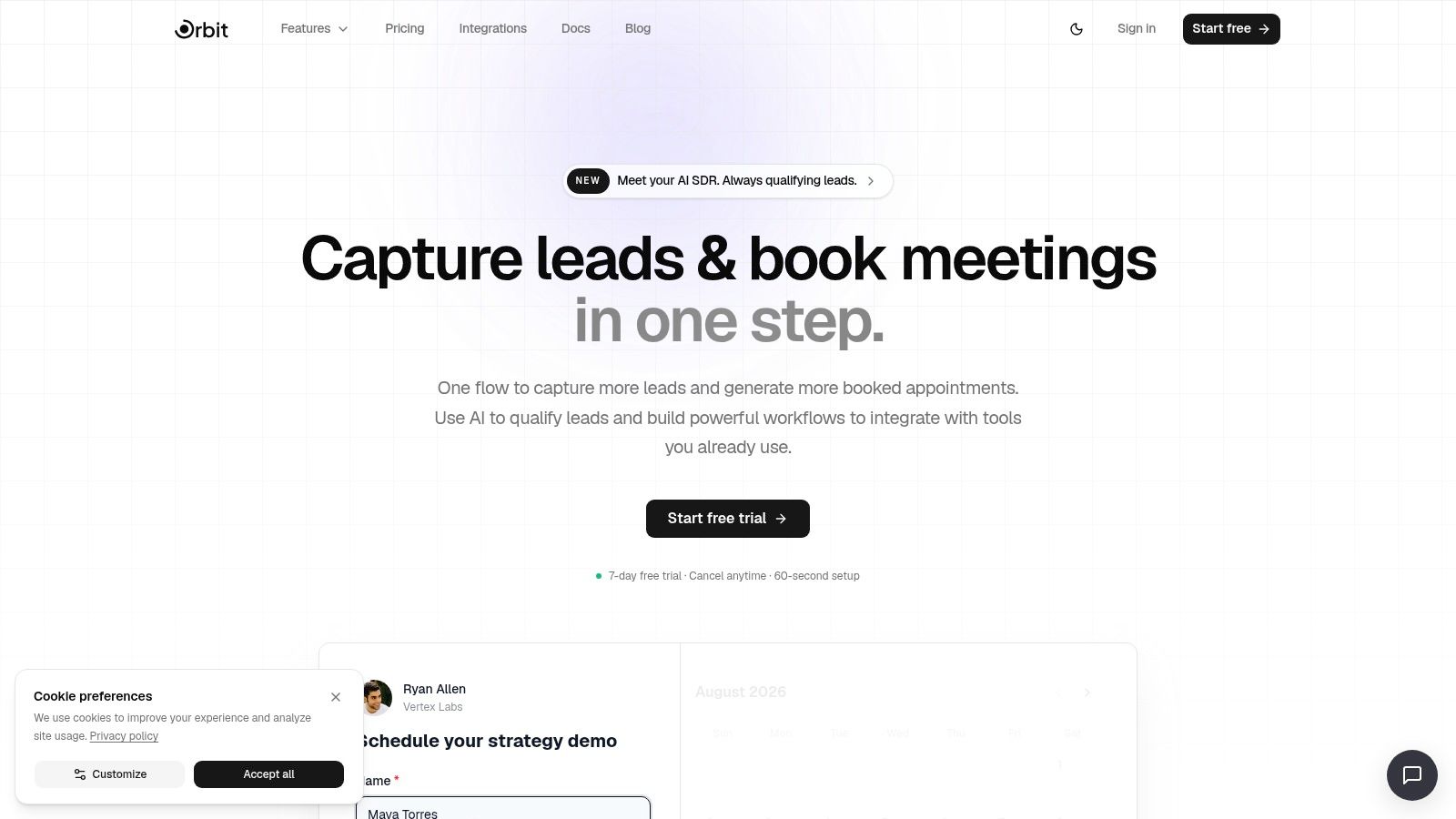
A platform such as Orbit AI can sit at this point in the flow, with an AI SDR qualifying submissions, smart scoring, and connections to CRMs, marketing automation, and data platforms. The product overview describes 50+ integrations, so the intended architecture is additive: capture and interpret the signal at the form, then synchronize the result with the systems your team already uses.
Build the sequence in this order
- Capture the submission: Store the original answers, source, consent state, and timestamp. Preserve the raw input so a rep can check the AI's interpretation.
- Summarize and qualify: Convert long responses into a concise summary, classify fit and intent, and flag uncertainty instead of forcing a confident label.
- Enrich the record: Add the firmographic or account context your routing rules need. Keep enrichment separate from stated buyer information so reps can distinguish fact from inference.
- Create or update the CRM record: Push the lead, summary, score, source, and recommended next step into the correct object. Avoid creating duplicates when an existing account or contact matches.
- Trigger the action: Assign an owner, start the appropriate sequence, alert a channel, or request human review. Every automation needs an exception path.
- Return the outcome: Feed disposition, meeting status, stage movement, and conversion outcome back into the workflow. This closes the learning loop.
The CRM should remain the system of record. The AI layer should make the record more useful, not create a parallel database that reps must maintain. For teams evaluating agent patterns inside CRM operations, AI agents for CRM offers helpful context on how agents can work with records and downstream actions.
A 2025 G2 survey of more than 1,000 B2B software buyers found that 60% reported using AI in their sales departments and processes. Adoption is already mainstream enough that integration quality matters as much as model capability. If a workflow forces reps to copy, paste, and reconcile outputs, they'll work around it.
Use how to integrate CRM as a checklist for the data mapping and synchronization decisions. Test the complete path with real submissions before adding more channels.
Scoring, Routing, and Personalization That Reps Trust
Most scoring systems fail in the rep's head before they fail in the model. A seller sees a lead marked “high priority,” opens the record, and finds no explanation. After a few bad recommendations, the score becomes background noise.
Trust comes from transparent inputs and useful actions. Show why a lead received its classification, which information came from the buyer, which information was enriched, and what the rep should do next.
Separate hard rules from learned signals
Enforce clear routing rules with deterministic logic. Territory, product ownership, language coverage, and account ownership shouldn't change because a model found an interesting pattern. Let AI interpret softer signals such as urgency, problem severity, response detail, or likely use case.
Then make the handoff readable:
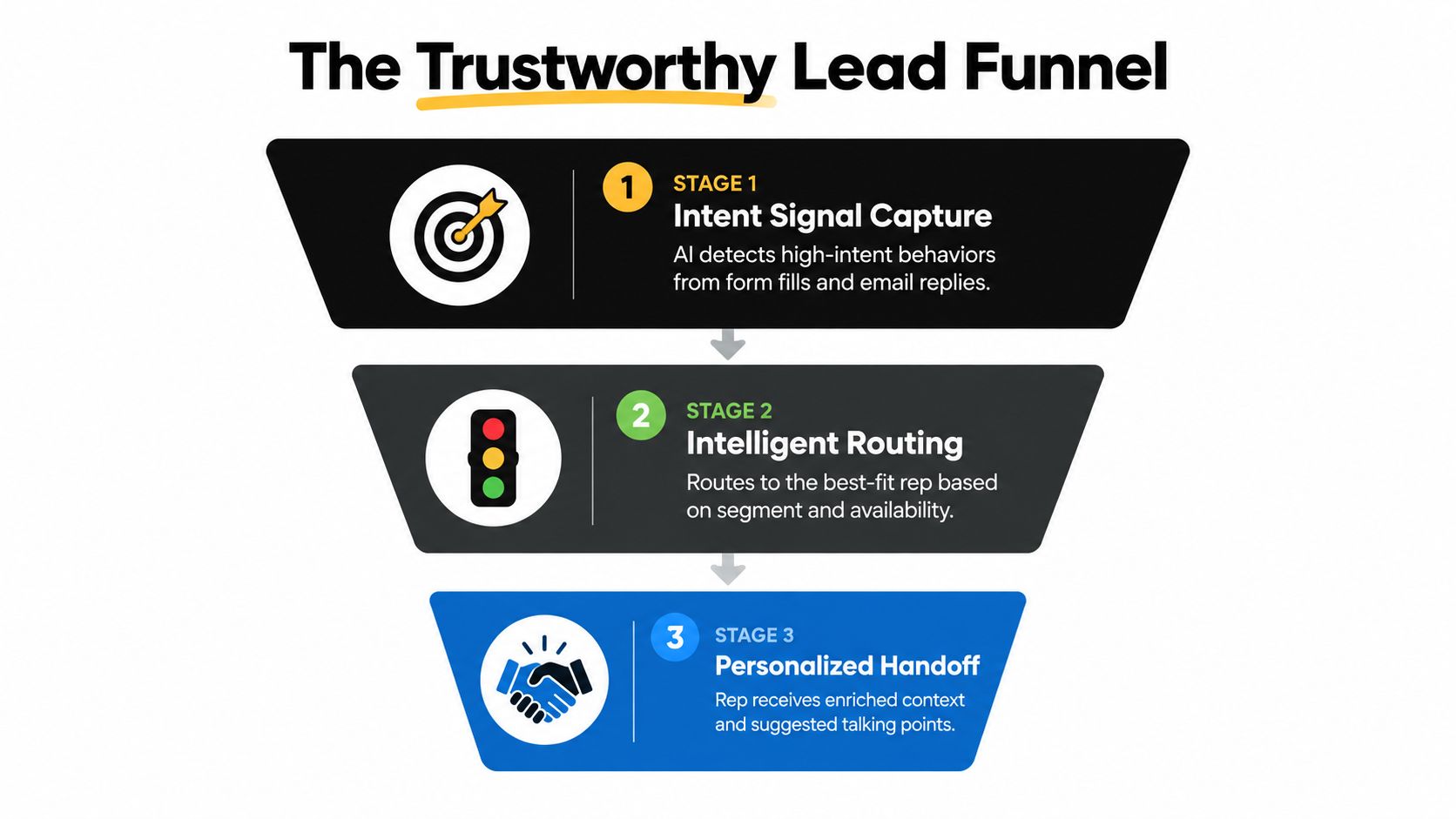
- Intent signal: Show the exact answer, reply, or behavior that indicates a possible buying need.
- Fit context: Display the information that supports or weakens the ICP match.
- Routing reason: Explain why this rep or team owns the next action.
- Conversation brief: Give the seller a short summary and suggested questions, not a finished script.
LinkedIn's 2025 B2B sales research reports that daily AI users are 2x as likely to exceed their targets. That finding supports a practical conclusion: adoption frequency matters, but reps will use AI daily only when it improves the next decision in front of them.
Personalization should start with the buyer's own words. If someone describes a handoff problem in a form, preserve that language in the summary and let the rep connect it to a relevant use case. For additional ideas, these B2B personalization examples show how context can shape the experience without turning every interaction into surveillance.
Use AI lead scoring to frame the operating model: score for action, expose the evidence, and review false positives with the people who receive the leads.
Review the model with reps in a regular calibration loop. Ask which leads were useful, which were misrouted, and which signals were missing. The goal isn't a perfect score. It's a recommendation that earns enough confidence to change behavior.
Metrics That Prove AI Is Improving Revenue Quality
Time saved is an operational metric, not a revenue result. Track it, but don't present it as commercial impact unless the team converts reclaimed capacity into better selling behavior.
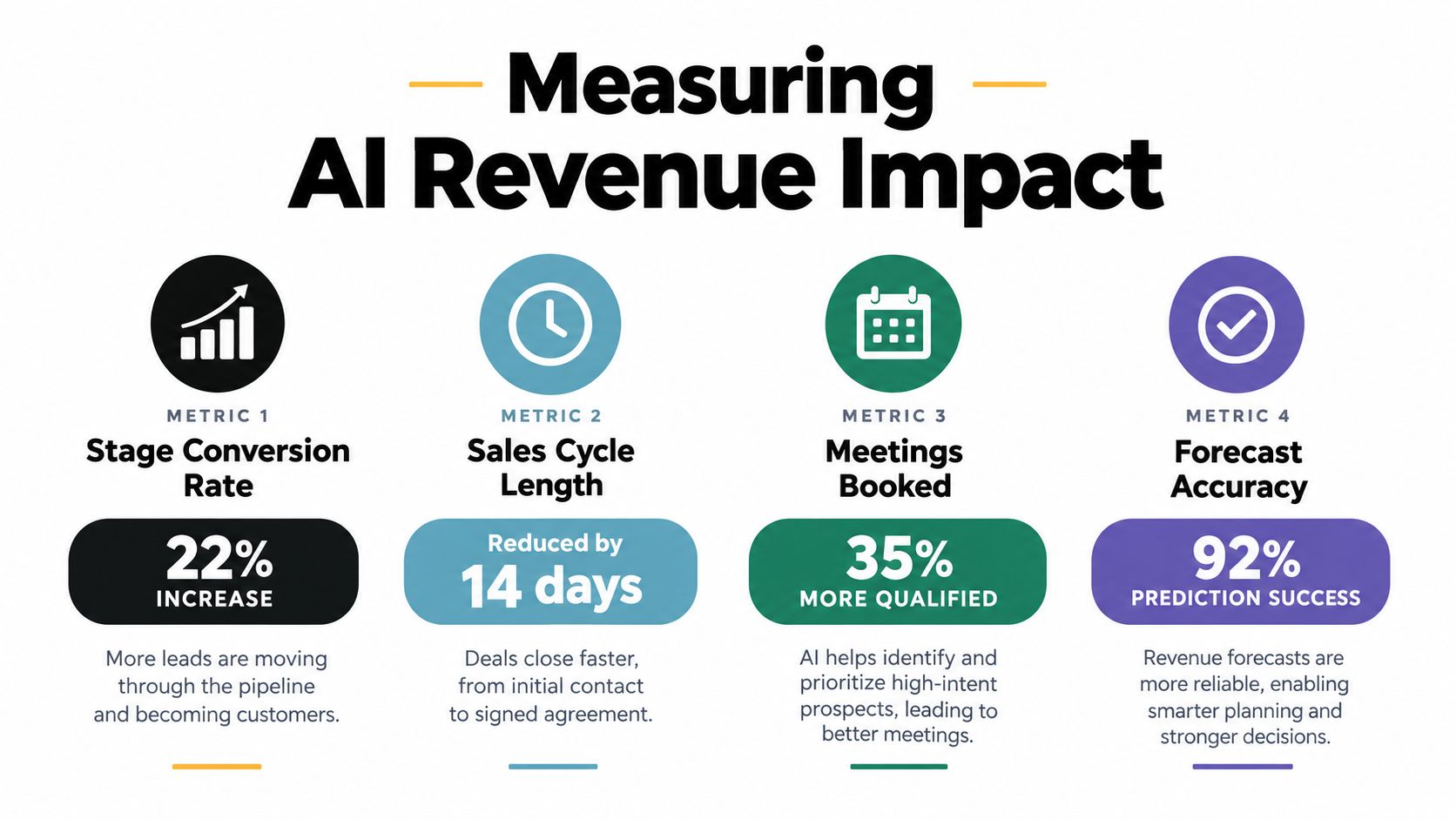
Start with a baseline before launch. Record stage conversion, sales cycle length, qualified meetings booked, forecast accuracy, lead response time, and the quality of the handoff. Define the period and cohort you'll compare, then keep the workflow stable long enough to distinguish a process change from ordinary pipeline variation.
Measure the chain, not the dashboard headline
Use four outcome groups:
- Conversion: Did qualified leads move through each stage more effectively?
- Cycle: Did the time between meaningful stages change?
- Meetings: Did the team book more meetings that matched the target profile?
- Accuracy: Did the forecast reflect reality with fewer unexplained changes?
Add two operating measures. First, track the time AI reclaimed per rep. Second, track what managers asked reps to do with that time, such as prospecting into named accounts, engaging additional stakeholders, or improving discovery preparation.
Gartner reports that AI saves sellers an average of 4.8 hours per week, while 72% of sales organizations fail to reinvest that time into higher-value selling activities, according to Demand Gen Report's coverage of the Gartner finding. The reinvestment gap explains why an automation project can produce visible efficiency without producing more revenue.
A manager has to redesign the work around the time recovered. That may mean changing activity expectations, adding account-planning blocks, coaching stakeholder engagement, or assigning specific prospecting plays. If quotas, coaching, and activity design stay the same, reps often fill the freed time with more low-value activity.
Use gates before scaling
Set a baseline, pilot one workflow, review the quality of outputs, and compare outcomes against the original process. Don't scale because the AI generated more records or because reps report that it feels faster. Scale when the handoff improves and the resulting behavior connects to stage movement.
Pitfalls, Data Quality, and GDPR-Ready Rollout
“Just install an AI SDR” is poor implementation advice. An agent trained on inconsistent CRM fields, incomplete consent records, and contradictory product information will produce confident work at the wrong speed.
IBM's 2025 sales productivity report says 28% of executives are piloting AI-led intelligent workflows and 34% are scaling them, as reported in IBM's sales productivity research. That operational shift raises the standard for governance. A pilot still needs clear ownership, access controls, and a way to stop bad outputs before they reach buyers.
Run the data and privacy checklist
Before scaling, confirm that:
- Consent is explicit: Explain why you collect lead information and how the team will use it.
- Collection is minimized: Capture what qualification and routing require, not unrelated personal details.
- Access is restricted: Give users and systems only the permissions needed for their role.
- Outputs are reviewable: Keep source responses and an audit trail for generated summaries or classifications.
- Retention is defined: Decide how long records and supporting data remain available.
- Human review is mandatory: Require approval for sensitive or buyer-facing communications.
- Data quality has an owner: Assign someone to correct fields, duplicate records, and broken mappings.
GDPR readiness isn't a checkbox added to the launch document. It affects form design, consent language, storage, enrichment, vendor access, and deletion workflows. Use this guide to understand GDPR compliance before connecting new data sources.
The human risk is just as serious. If leadership presents AI as a headcount reduction program, reps will protect their workflows and hide useful feedback. If the organization presents AI as a coaching and preparation layer, sellers have a reason to test it.
Never let AI invent a customer claim, competitor detail, or product promise. Keep buyer-facing drafts behind human approval, and give reps a clear way to report incorrect recommendations. Clean data, visible reasoning, and responsible review protect trust better than a polished launch announcement.
A 90-Day Rollout Roadmap You Can Defend Internally
A defensible rollout starts narrow. The strongest first workflow is usually one with clear input, repeated manual work, a visible owner, and an outcome leadership already tracks.
Weeks one through three
Choose one handoff, such as inbound form submission to first sales action. Document the current path, define qualification fields, establish the baseline, and connect the form layer to the CRM. Test summaries, classifications, duplicate handling, consent capture, and exception routing with real records.
Weeks four through six
Add scoring and routing rules. Let a small group of reps review the evidence behind each recommendation, correct bad classifications, and record disposition consistently. Managers should coach the new behavior, not merely monitor whether sellers clicked the AI feature.
Weeks seven through nine
Introduce personalized follow-up and expand the workflow to additional sources only after the first handoff is stable. Compare stage conversion, qualified meetings, response time, cycle behavior, and data completeness against the baseline.
Weeks ten through twelve
Use the improved records to support pipeline inspection and forecasting. Set a measurement gate before expanding to another use case. If the workflow creates more activity but no better opportunities, fix the process rather than buying another tool.
In the first week, do three things: select one handoff, interview the people who work it, and write down the outcome that would justify continuing. That discipline beats a broad AI rollout with no owner and no commercial test.
Orbit AI provides AI-powered forms, an embedded AI SDR, smart lead scoring, qualification summaries, and integrations that move structured lead context into your existing sales workflows. Visit Orbit AI to build the first handoff, test it with your current stack, and start improving pipeline quality without replacing the systems your team already uses.