
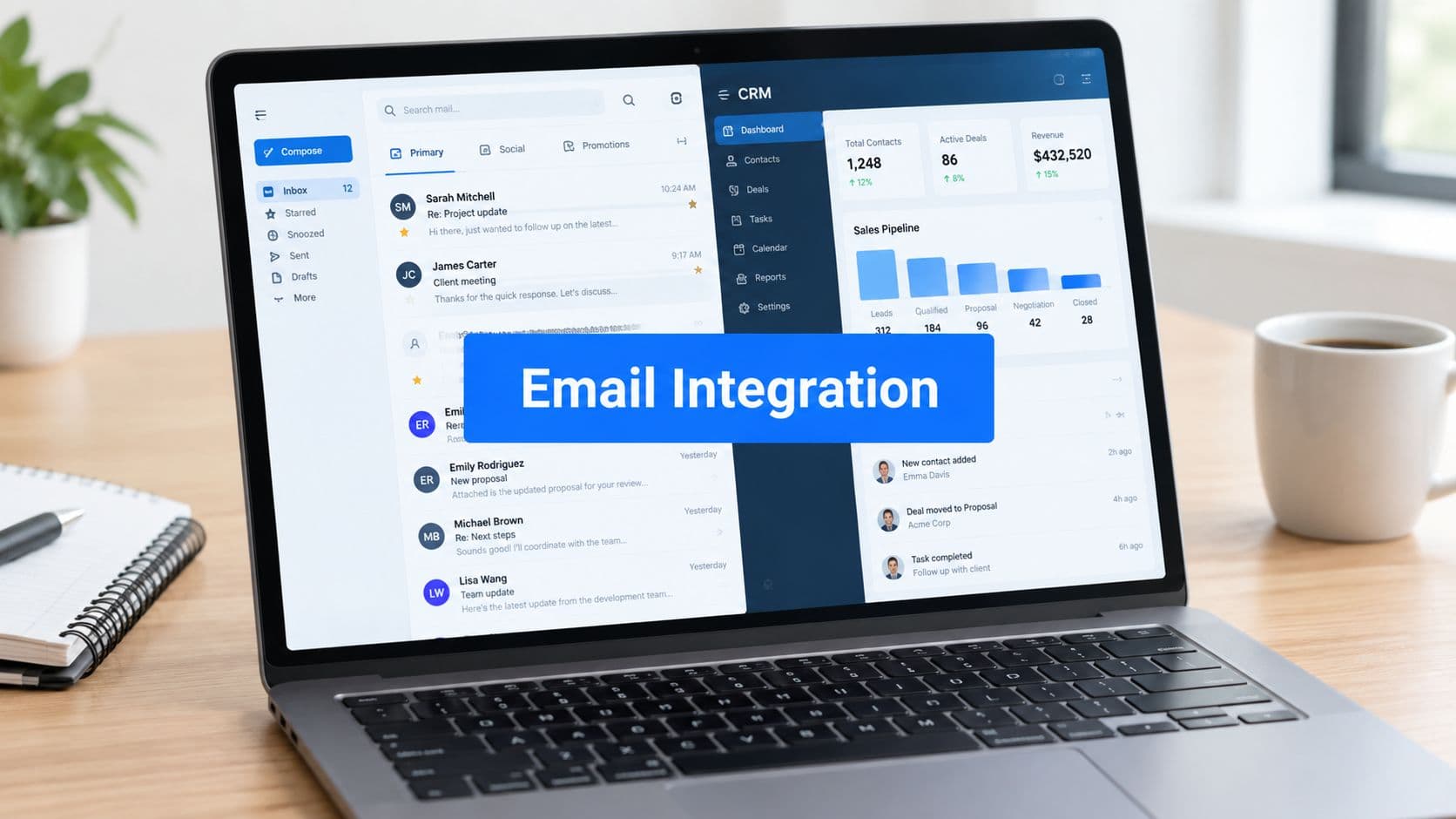
A sales rep has Gmail open beside HubSpot. A prospect's reply sits in the inbox, the rep copies a sentence into the CRM, forgets to log the meeting, and moves to the next task. The opportunity remains in the old stage, the next follow-up doesn't trigger, and the forecast steadily loses context.
That's the operational problem CRM email integration is meant to solve. It connects inbox activity with customer records so teams can capture conversations, update pipeline context, and trigger follow-up workflows without relying on memory or repeated data entry. The difficult part isn't connecting an account. It's choosing the right architecture, controlling sync behavior, and keeping the data trustworthy after launch.
What CRM Email Integration Actually Means
CRM email integration is the connective tissue between an email provider and a customer relationship management system. It can move messages, replies, calendar activity, contact details, and engagement events into the CRM, while selected CRM changes can flow back to the inbox or email platform.
The phrase covers several different capabilities:
- Inbound logging: Received emails attach to an existing contact, company, or deal.
- Outbound synchronization: Messages sent from Gmail or Outlook appear in the CRM record.
- Two-way field mapping: Changes to fields such as name, email address, lifecycle stage, or consent status move between systems.
- Trigger automation: A reply can pause a sequence, a new form submission can create a lead, or a bounce can suppress future sends.
- Context preservation: Teams can see the conversation history without searching across individual inboxes.
A lightweight BCC logger only records selected outbound messages. It may be useful for basic activity capture, but it usually won't create a complete operating loop. True bidirectional sync allows the CRM and email system to exchange defined events and fields, subject to permissions, provider limits, and mapping rules.
The vocabulary that prevents confusion
Start with four terms. The source system is where an event begins, such as Gmail receiving a reply or a form creating a lead. The destination record is where that event should appear, such as a contact or opportunity in Salesforce. Sync direction describes whether data moves one way or both ways. Latency is the time between the source event and the destination update.
That last term matters more than most setup guides admit. A sales notification may need near-real-time delivery, while a reporting refresh can tolerate a delay. Treating every event as equally urgent creates unnecessary load and makes failures harder to diagnose.
Practical rule: Don't approve an integration until you can describe what happens after a new email, reply, bounce, unsubscribe, and contact-field change.
The business case is broader than inbox convenience. A 2024 industry summary reports that 46% of businesses integrate CRM with email marketing, and that nearly all modern CRMs provide Gmail and Outlook integrations. The same summary says 63% of sales professionals view email follow-ups as the best cross-selling strategy, which helps explain why email connectivity has become foundational for revenue teams. See what CRM integration means in practice for the wider operating model.
Three Architectural Paths and When to Use Each
RevOps teams generally compare three architecture choices. The right answer depends on workflow complexity, message volume, governance requirements, and how much engineering capacity the business can commit.
Native connectors
A native connector is built into the CRM or supplied by its vendor. A five-rep team using Salesforce and wanting a quick Gmail or Outlook setup is a strong fit. Native integrations usually offer the shortest path to authentication, standard activity capture, and basic record association.
The trade-off is feature drift. A vendor may change permissions, supported fields, inbox behavior, or reporting without matching your internal process. Native tools can also be restrictive when your team needs custom objects, unusual routing, or a specific suppression workflow. Review the vendor's release notes, supported event types, export options, and failure visibility before treating “native” as synonymous with complete.
Middleware platforms
Tools such as Zapier, Make, and Workato sit between systems and translate events into multi-step workflows. Marketing operations teams often choose this route when they need to take a form submission, enrich it, create a CRM record, notify a channel, and enroll a contact in a sequence without waiting for engineering.
Middleware offers flexibility, but usage-based task consumption can become a hidden cost. Each lookup, filter, transformation, and downstream action may consume a task or operation. It also adds another monitoring surface, another credential store, and another place where a workflow can pause without the CRM showing an obvious error.
Direct API builds
A direct API integration makes sense when the organization has strict data residency requirements, high volume, custom objects, or proprietary business logic that packaged connectors can't model. Engineering can define the event contract, queueing strategy, retry behavior, and audit trail precisely.
That control comes with ongoing ownership. Your team must maintain authentication, provider changes, schema updates, monitoring, incident response, and documentation. A custom build isn't finished when the first message syncs. It becomes an internal product.
HubSpot's CRM integration options illustrate why the destination platform matters. A connector that works well for standard contacts may still need different handling for deals, custom properties, or qualification events.
Architecture Comparison at a Glance
| Dimension | Native Connector | Middleware | Custom API |
|---|---|---|---|
| Best fit | Standard workflows and modest complexity | Multi-tool workflows and business-led automation | High volume, custom objects, or strict governance |
| Setup effort | Low | Moderate | High |
| Customization | Limited to supported features | Flexible through workflow logic | Broad control |
| Main hidden risk | Feature drift and vendor dependency | Task consumption and workflow sprawl | Engineering upkeep |
| Monitoring | Usually vendor-defined | Shared between platform and team | Team-owned |
| Change management | Vendor roadmap matters | Connector and workflow changes matter | Internal release process required |
Use the simplest path that satisfies today's requirements, but document the point at which you'll need to move up the architecture ladder.
Everyday Use Cases That Drive the Business Case
A connected inbox matters only when it changes a revenue workflow. Consider four situations that occur every day in growth and sales teams.
Lead routing
A prospect submits a form. The system creates or updates the contact, applies qualification logic, assigns territory ownership, and alerts the right rep. If those events happen quickly, the rep can respond while the prospect's intent is still fresh.
The outcome isn't “a form was integrated.” The outcome is fewer unworked leads, clearer ownership, and faster movement from inquiry to conversation. If the workflow can't identify the correct owner or creates duplicate contacts, the apparent automation may increase confusion rather than speed.
Activity capture and pipeline context
When an email and its reply attach to the correct contact and opportunity, managers can review the actual conversation behind a stage change. Reps don't need to reconstruct activity at forecast time, and the team has a more complete record of commitments, objections, and next steps.
Industry summaries cite research associating integrated CRM email workflows with a 34% improvement in sales productivity, a 42% increase in forecast accuracy, and a 29% increase in sales. Those figures are reported in this CRM email marketing statistics summary. They should be treated as directional industry evidence, not as a guaranteed result for every implementation.
Deliverability hygiene
Email integration should carry negative events as reliably as positive ones. Bounced addresses need to update contact status, and unsubscribe events need to reach the systems that control segmentation and sending. Otherwise, marketing may continue targeting an address that sales already knows is unusable or opted out.
Production teams commonly monitor bounce rates above 5%, spam complaints above 0.1%, and sudden delivery-rate drops as alert conditions, as described in guidance on email API controls. The precise thresholds should match your sending model and compliance policy, but the principle is stable: prevent bad addresses at ingestion and propagate suppression events.
Sequence triggers
A prospect replies to an outbound cadence. The integration should recognize that reply and pause or remove the contact from the sequence. Without that control, the prospect may receive another automated message after starting a live conversation, which damages trust and creates compliance exposure.
Engagement events also need careful interpretation. Apple Mail Privacy Protection, corporate security tools, and automated scanners can distort open and click signals. Use reliable events, especially replies, bounces, unsubscribes, and explicit CRM actions, as the basis for consequential workflow decisions.
For implementation patterns, compare the workflow choices in this guide to integrating a CRM.
Technical Controls Behind a Reliable Integration
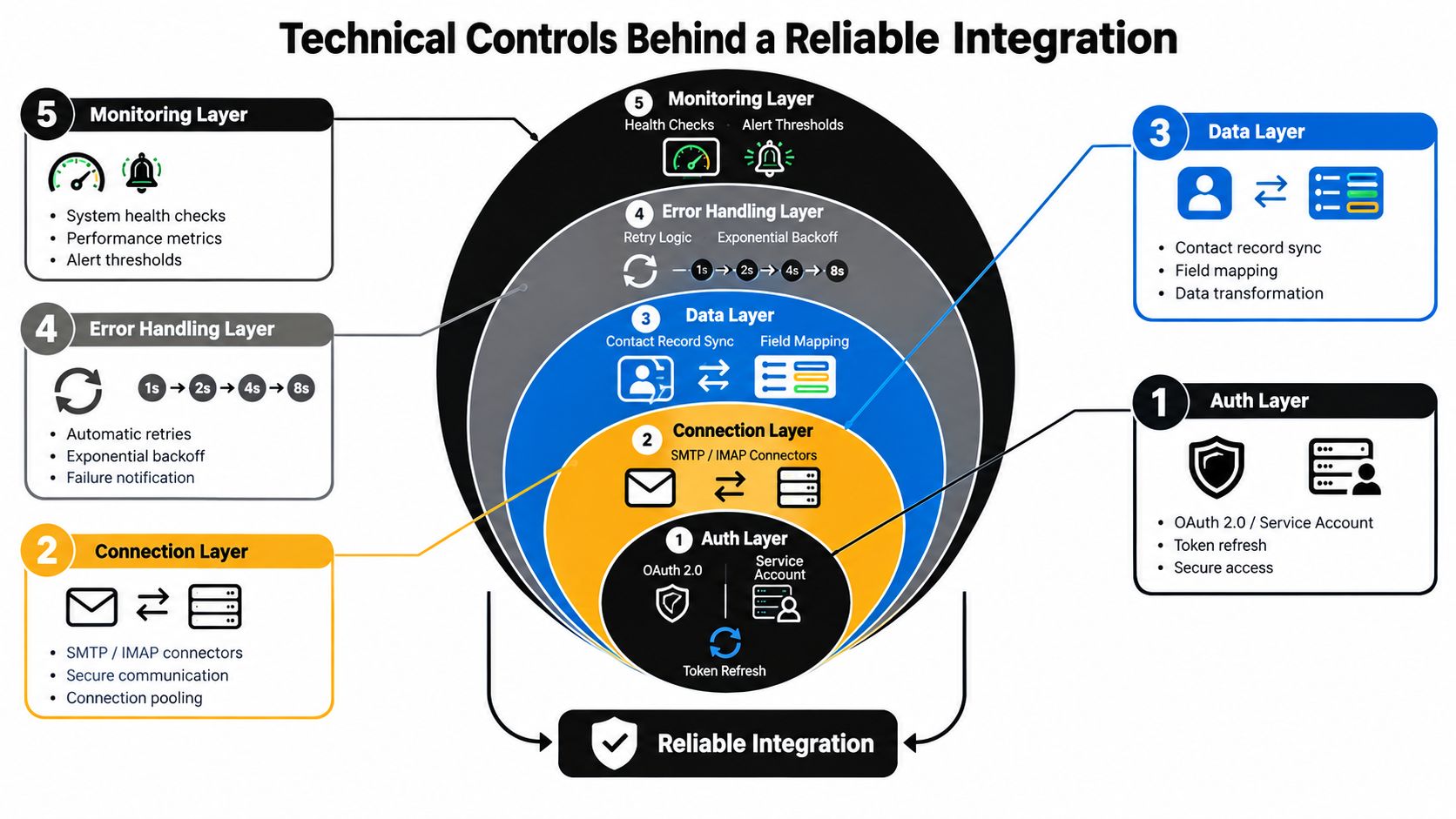
A connector can appear healthy while dropping events without warning. Reliability depends on the controls around authentication, transport, data handling, error recovery, and monitoring.
Authentication and connection design
OAuth 2.0 is common for user-authorized mailbox access. Service accounts can suit controlled, unattended environments, but they require stronger governance around credentials and permissions. Whichever method you use, ask how tokens refresh, which scopes the connector requests, and how access is revoked when an employee leaves.
Provider limits also shape architecture. Nylas documents a per-grant ceiling of up to 200 requests per second on its Messages endpoint. Microsoft mailbox access is limited to 10,000 requests per 10 minutes per app-mailbox pair, with a maximum of four concurrent requests, according to this analysis of email API limits. A history backfill can consume capacity that real-time sync needs, so production systems should queue work, apply backoff, and control concurrency.
Event handling and observability
Webhooks need retry logic, idempotency, and a dead-letter path. Retries address temporary failures. Idempotency prevents the same message from creating duplicate activities when a provider sends an event again. Dead-letter handling gives an operator a visible place to investigate records that repeatedly fail.
Event order creates another subtle problem. A reply may arrive before the original outbound activity has finished processing, or a contact update may reach the CRM after a campaign decision has already been made. Store provider event identifiers and timestamps, normalize time zones, and define conflict rules instead of assuming events arrive in business order.
Watch the system with more than a green connection badge. Track queue age, failed writes, duplicate creation, unprocessed events, authentication failures, and the gap between source and destination timestamps.
A production test should include delayed events, duplicate deliveries, expired tokens, rate-limit responses, malformed fields, and a mailbox with a large history. The connector that passes only the happy path isn't ready for revenue-critical use.
Contact matching deserves separate attention. A clear lead deduplication process helps prevent one conversation from being split across multiple records.
Why Data Quality Decides Whether It Works
A connector can report a successful sync while damaging the revenue system. The problem starts when teams connect platforms before agreeing on what each field means, who owns it, and which consent state controls sending.
Suppose one platform uses email, another uses work_email, and a third places a shared mailbox in the same field as an individual contact. Records may transfer without errors, yet matching becomes unreliable. Duplicate contacts appear, nurture paths break, attribution becomes inaccurate, and a reply can attach to the wrong opportunity.
Build the taxonomy first
Define a canonical contact identifier and assign ownership for every synchronized field. An email address may help match records, but it should not automatically serve as the only identity rule. Document the meaning of account relationships, contact status, source, lifecycle stage, owner, and consent.
A field map should answer practical questions:
- Who owns the field: Can the CRM overwrite the email platform, or can both systems edit it?
- What values are valid: Are lifecycle stages controlled by a fixed vocabulary?
- What happens when values conflict: Does the newest update win, or does a person review the record?
- Which fields are allowed to sync: Does automation require every field, or only a defined subset?
Duplicated contacts, inconsistent field names, orphaned records, and fragmented consent can all undermine an integration. The analysis in this CRM email integration governance guide supports a practical conclusion: connector choice matters less than the quality of the schema and operating rules around it.
Consent is an operational field
An unsubscribe in the CRM must reach the email service provider, while a deletion request must propagate across connected systems. Guidance on CRM and email marketing alignment recommends synchronized unsubscribes and simultaneous deletions. Test both paths with a test contact, then confirm suppression in the sending platform within the integration's latency budget.
Treat consent as a state with an audit trail, not merely a checkbox. Record which system made the change, when it occurred, and whether downstream platforms acknowledged it. Document data flows, restrict access by role, and complete a privacy impact assessment before launch.
Assign an owner for data quality, define a dedupe policy, and schedule recurring audits. The CRM data quality guide explains how to structure audit cadence and exception review. Trustworthy integration comes from continued review, not a one-time implementation.
Planning Your Integration the Right Way
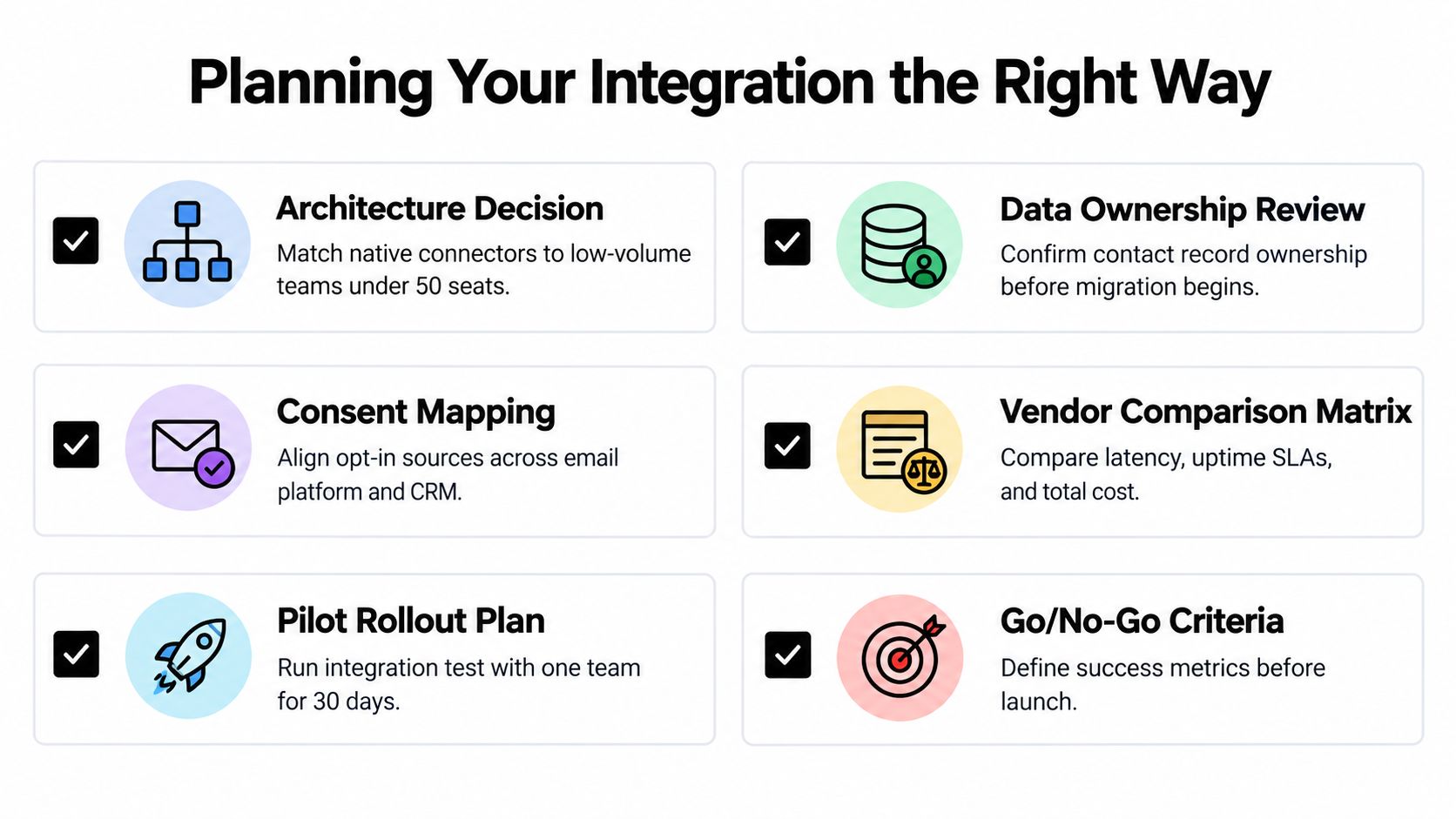
A CRM email integration can look fine in a vendor demo and still fail under real campaign volume. Start by deciding how data should move, how quickly it must arrive, and who owns failures before selecting a connector.
Choose the architecture
A native connector fits a small team with standard workflows and moderate volume. Middleware suits marketing operations teams that need transformations across several applications. A direct API build can make sense when custom objects, data residency, or sustained volume justify engineering ownership.
Size the design by workload, not seat count. Count mailboxes, historical records, events per hour, enrichment calls, and peak campaign activity. A small team can still create a demanding integration by backfilling a large archive or connecting several automated systems. The connector should match the traffic pattern, not just the number of users.
Define the data contract
Before activating synchronization, document five decisions:
- Canonical identity: Decide how the system matches an email event to a person, account, and opportunity.
- Ownership rules: Specify which platform controls each field and who resolves conflicts.
- Field transformations: Record accepted values, formatting rules, and required fields.
- Suppression behavior: Define how bounces, unsubscribes, deletions, and legal holds propagate.
- Audit responsibility: Name the person or team responsible for reviewing exceptions.
A reliable integration rejects an event visibly when required data is missing. Silent partial records can trigger incomplete routing and misleading reports, while a rejected event gives the team a clear failure to investigate.
Set a latency budget
Each workflow needs its own service expectation. Lead routing may require seconds because a delay can leave a fresh inquiry unattended. Deliverability dashboards may tolerate minutes, while historical reporting can use scheduled updates.
Turn the expectation into an operating rule. Specify how long a reply may remain unprocessed before an alert, how quickly an unsubscribe must suppress sending, and what happens when the target API is unavailable. Guidance on B2B email strategy and sync latency shows why delays and unreliable engagement signals can create commercial problems in time-sensitive workflows.
Protect the sending identity
CRM-sent mail needs authentication. SPF authorizes approved sending servers, DKIM adds a cryptographic signature to message headers, and DMARC tells receiving systems how to handle failed authentication. Google and Yahoo have required DMARC for bulk senders since February 2024, making authentication part of deliverability planning, as explained in this CRM deliverability guide.
Roll out in phases. Pilot with one segment, test duplicates and suppression events, measure sync accuracy and rep adoption, then expand with a documented runbook. According to this CRM statistics roundup, 66% of CRM users connect email to their CRM, so treat the capability as common and judge the rollout by data accuracy, workflow reliability, and user adoption.
How Orbit AI Fits Into the Stack
A visitor submits a form with a company email, a few qualifying details, and consent to follow up. The CRM receives the record, but the value of that handoff depends on what arrives with it. Orbit AI sits upstream as a lead capture and intent layer. Its forms collect submissions, qualification context, and consent signals, while its AI SDR assesses responses and surfaces sales-ready opportunities before CRM creation.
That position makes Orbit AI part of the integration's input architecture. Downstream workflows can assign an owner, enroll a contact in an email sequence, enrich the record, or apply deliverability checks. They cannot recover context that the form never captured. A record with a name and email may pass validation while still lacking the evidence needed for useful routing.
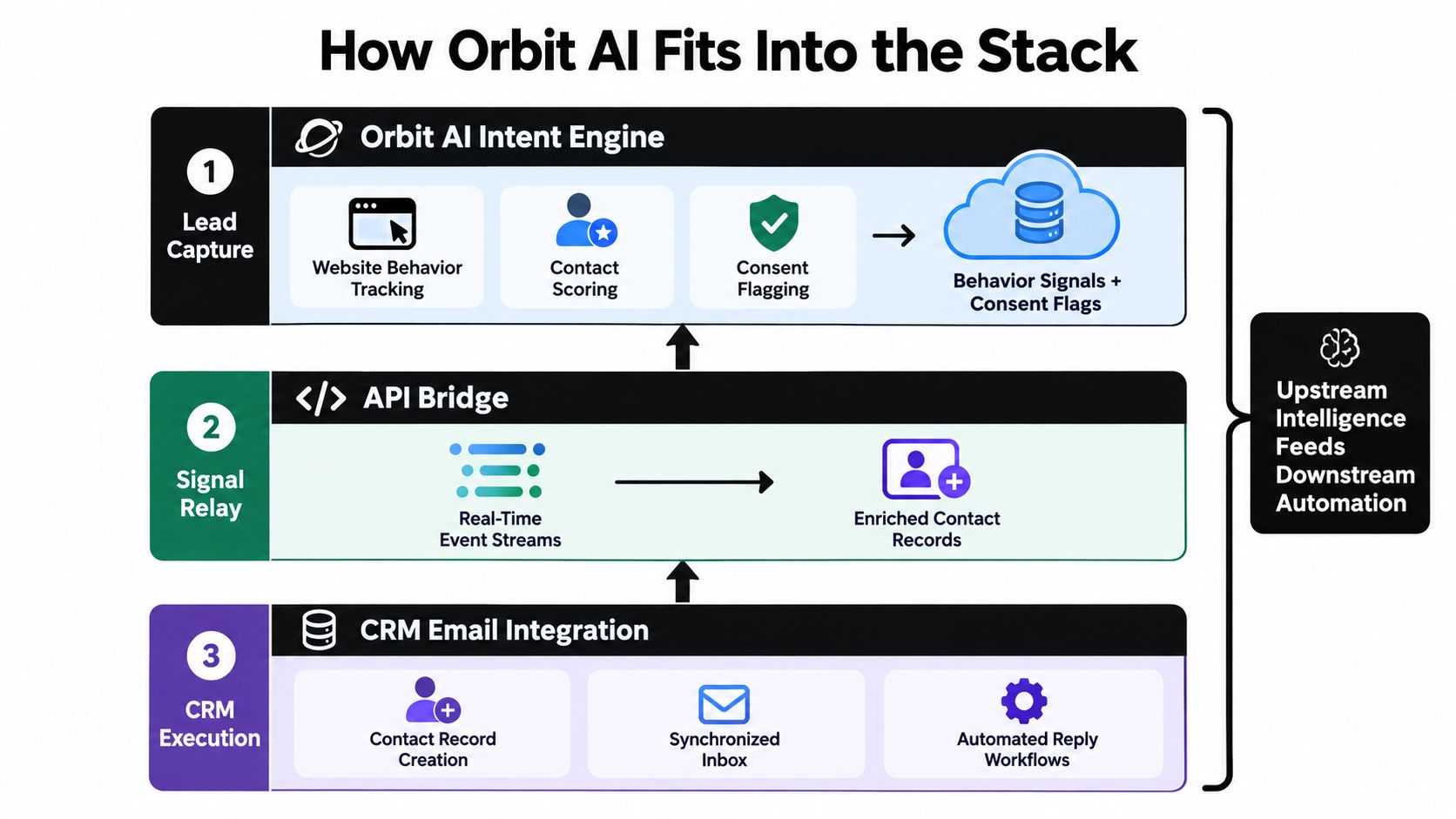
The connector should match the stack and the operating load. A native connection may suit a common CRM and straightforward field mapping. A webhook can fit a custom workflow, but the team must own payload validation, retries, and failure handling. A bidirectional design supports enrichment returning to the source, while also introducing more ownership conflicts and sync-latency decisions.
Qualification timing changes the outcome. If intent is assessed before contact creation, routing and email enrollment can use that context. If assessment happens after enrollment, the first message or owner assignment may already be wrong. Evaluate the connector by field fidelity, latency, error visibility, and control over consent, not only by its integration list. Orbit AI therefore fits best upstream, where it can improve the quality of the records your CRM automation carries.
Questions Teams Ask Before They Commit
How should we compare connectors beyond a feature checklist? Evaluate vendor lock-in, roadmap stability, exportability, support quality, error visibility, and total cost of ownership across three years. A connector that supports every requested field but provides no usable failure queue can create more operational work than a narrower tool with strong controls.
How long does implementation take? Native connectors can ship in days, middleware deployments often take weeks, and API-based builds are usually measured in months. Those are planning ranges, not guarantees. Data cleanup, security review, migration scope, and testing can extend any approach.
What do teams commonly get wrong? They synchronize too many fields, ignore bounce handling, and postpone consent mapping until after launch. Each choice increases the chance that automation will act on stale, duplicated, or legally restricted data.
Common Pitfalls and How to Avoid Them
| Pitfall | Symptom | Remediation |
|---|---|---|
| Over-synchronizing fields | Conflicting updates and unclear ownership | Sync only fields required for defined workflows |
| Ignoring bounce handling | Teams continue targeting invalid addresses | Propagate bounce status and monitor exceptions |
| Delaying consent mapping | Suppression states disagree across systems | Define consent ownership and test unsubscribe propagation |
| Trusting open signals blindly | False engagement triggers follow-up | Prioritize replies, bounces, and explicit actions |
| Skipping failure monitoring | Records appear to sync inconsistently | Add retries, dead-letter handling, and alert thresholds |
| Building without a runbook | Nobody knows how to resolve exceptions | Document ownership, recovery, and escalation steps |
Bring in an implementation partner when the project crosses systems your internal team doesn't understand well, involves regulated data, or needs a migration and redesign at the same time. Build internally when you have clear ownership, API expertise, and the capacity to maintain the integration after launch.
Measure success through pipeline velocity, reply rates, routing accuracy, suppression accuracy, duplicate rate, and data quality scores, not connector uptime alone. Choose native when the workflow is standard and the team is small. Choose middleware when transformation logic matters. Choose a custom API when volume, compliance, or business-specific objects require control that packaged tools can't provide.
Orbit AI helps teams capture form submissions, qualify intent, enrich lead context, and pass structured records into CRM workflows so email automation starts with cleaner inputs. Visit Orbit AI to explore the platform and see how its lead capture layer can support your CRM email integration plan.


