You've refined the landing page, tested the ad creative, and finally have qualified visitors arriving. Then the consultation request form asks for a phone number, company revenue, budget, timeline, project scope, and a long explanation before the prospect has received any value. The visitor leaves, your analytics records a vague “form abandonment,” and the sales team assumes demand was weak.
That diagnosis is usually wrong. A consultation request form is a live qualification workflow, not a generic contact box. It has to collect enough context for a useful next step while making the prospect feel that completion is worth the effort. The strongest forms sequence questions, reveal detail only when it matters, and send each submission into a process that can score and route it immediately.
Why Most Consultation Forms Fail Before the First Field
A consultancy can improve its offer for months, attract qualified visitors, and still lose them before the first answer. The page promises a useful conversation, but the form looks like an internal intake document built for sales operations.
That mismatch affects pipeline, not just completion rates. Across 93,022,997 tracked form sessions in 2026, overall form conversion averaged 51.71%, while contact forms converted at only 1% to 3%. Just 9.09% of visitors who encountered a contact form completed it, according to 2026 website form benchmarks. Consultation requests often signal stronger intent than generic contact requests, yet intent does not remove unnecessary work.

The form is part of the sales process
Compare two forms for the same consultancy. One asks for name, email, company, and the problem the visitor wants to solve. The other adds job title, phone number, annual revenue, budget, buying committee, implementation date, preferred meeting format, and a full project brief.
The longer version may give sales more context, but it transfers qualification work to the prospect before the business has earned that effort. Large-scale form summaries report that only about 45% of visitors who start a form finish it, while contact forms see only 38% of interactors submit, as documented in lead-capture form friction benchmarks. Abandonment does not prove poor fit. It often means the requested disclosure exceeds the perceived value of the conversation.
Practical rule: Keep a question only when its answer changes routing, prioritization, preparation, or eligibility.
A consultation form still needs useful context. An archived University of Washington consultation form with a 2004 page date asked users to describe their scientific problem, background, study design, and data source before a scheduler followed up by email, as shown in the archived consultation request process. Its value is the workflow logic: gather information that helps someone route and prepare the request, rather than collecting contact details in isolation.
That workflow can extend beyond the form. Teams can review Truespeak's intake automation approach, then connect submissions to Orbit AI for real-time lead scoring and routing. The distinction between filling out online forms and submitting information matters. The first is a user task that must feel clear, proportionate, and safe. The second is only the business outcome.
Choosing Fields That Qualify Without Quitting
A prospect opens the consultation form ready to discuss a problem. The first question asks for a phone number, the next requests budget, and a long scope box follows. The team may gain useful context, but the prospect may leave before explaining why they came.
Field selection is a pipeline decision. Every question can improve qualification, routing, or preparation, but it also adds time, disclosure, and uncertainty. A 2026 benchmark analysis found that forms with one to three fields convert at 10% to 15% in B2B contexts, while forms with four to six fields convert at 5% to 10%, according to lead-capture form conversion benchmarks. The ranges do not prescribe a field count. They show why each added question needs a job.
Rank questions by value and resistance
List every field sales, delivery, and marketing teams want. Score each against two tests:
- Qualification value: Does the answer predict fit, urgency, service type, or routing?
- Completion cost: Does the visitor need research, sensitive disclosure, a long explanation, or a difficult choice?
The opening screen should establish identity and intent with limited effort:
- Name and work email: Identify the requester and provide a dependable reply path.
- Company or organization: Add context for account matching and routing.
- Primary challenge: Use a short prompt or focused choices so the visitor can describe intent in their own terms.
Phone number, budget, revenue, and detailed scope require stronger justification. Requiring a phone number produced 37% more drop-off across a large A/B-test sample, while each additional field can reduce conversion by roughly 4% to 11%, according to the lead-capture form friction analysis. A phone number may support urgent, high-touch services. It should not become mandatory only because a sales representative prefers calling.
Earn the harder questions
Progressive profiling delays effort until the visitor has shown enough intent to justify it. Ask what determines the immediate next step, then collect deeper context after the person selects a service or indicates an active project.
A consulting firm might show budget ranges only after someone chooses a strategic engagement instead of a short advisory call. A software provider could ask about implementation timing after the prospect identifies a live project. Conditional logic keeps irrelevant questions out of the path and gives the qualification workflow room to become more specific. A practical starting point is this lead-generation form template, adapted to the decisions your sales team makes.
The form should pass those answers into a workflow, not leave them in an inbox. Orbit AI can use submitted context for real-time lead scoring and routing, so qualification depth supports action rather than manual sorting.
Trust belongs next to the field that creates concern. One benchmark summary attributes 29% of abandonment to security concerns and 19% to concerns about how data will be used, as reported in form conversion research on privacy and trust. Add a short explanation near sensitive questions. State why the information is requested, how it helps the consultation, and what happens after submission.
Static, Progressive, and Multi-Step Layouts Compared
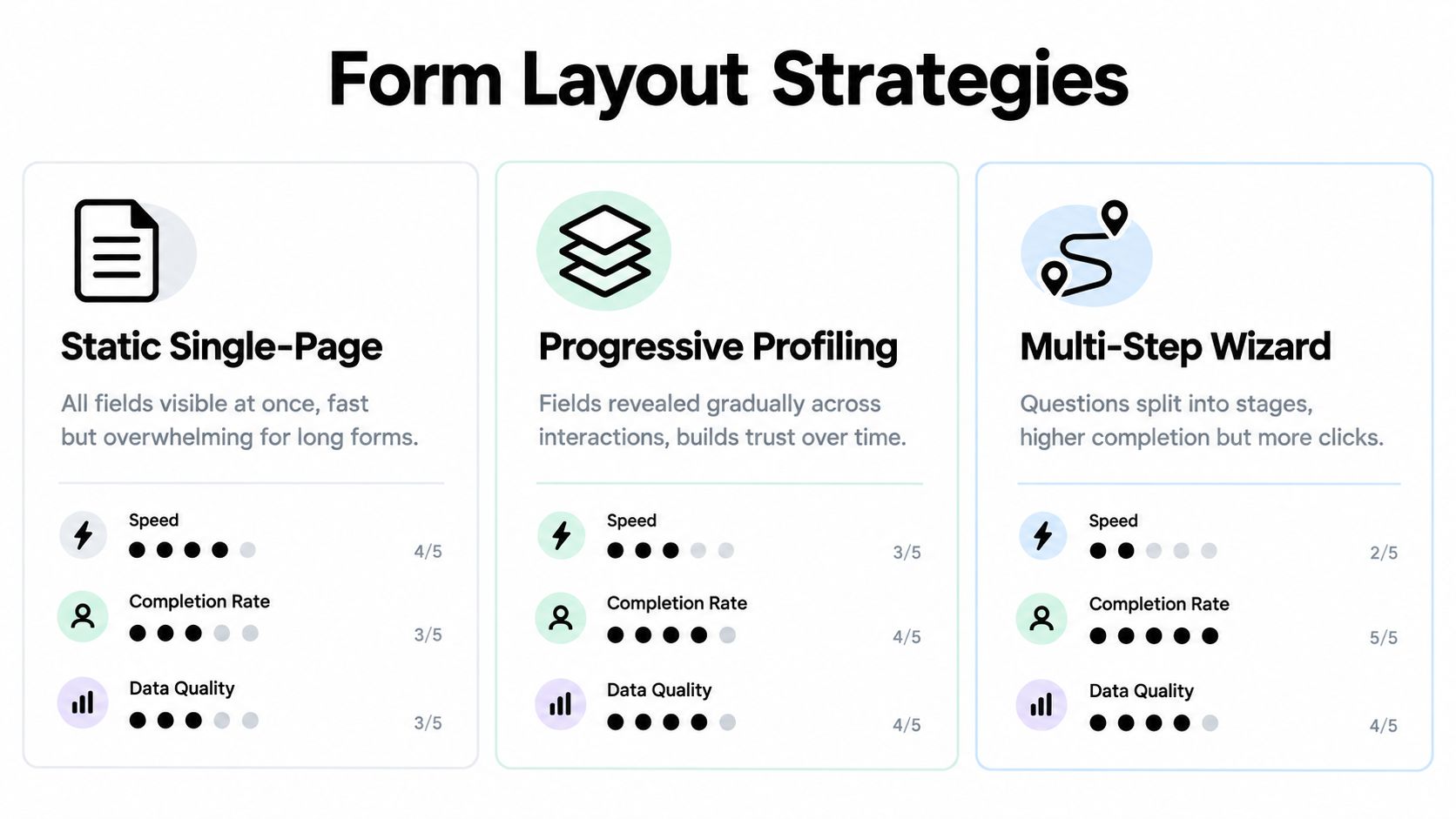
A consultation form can capture the same information and produce very different pipeline results. A short static form suits a high-intent visitor who already knows the service. Progressive profiling postpones lower-priority questions until the relationship develops. A multi-step wizard can make a demanding intake feel organized, but it can also hide the total effort until the visitor has started.
Abandonment sets a hard baseline. Average web form abandonment is 67.9%, and about 81% of form starters abandon. Multi-step designs perform especially poorly when they exceed four steps, according to this 2026 form abandonment analysis. Layout choice should therefore follow the qualification workflow, not a designer's preference.
Static single-page forms
A static layout keeps every field visible. It works when the request is straightforward, visitor intent is strong, and the form can be scanned quickly. Its main advantage is transparency. Prospects see the required effort before committing, which helps them decide whether the consultation is worth pursuing.
The trade-off appears when a concise intake becomes a visible questionnaire. Dense forms increase cognitive load, particularly on mobile, and optional questions can appear mandatory. Keep this layout to identity, immediate context, and the next action when those are the only inputs sales needs to respond.
Progressive profiling
Progressive profiling spreads information gathering across interactions. The first submission can capture identity and the immediate problem. A later scheduling step, return visit, or authenticated session can collect service preferences and project details.
This approach fits companies with repeat visitors, longer sales cycles, or reliable identity resolution. It protects the first conversion from questions that matter later but do not affect the initial response. The operational cost is real: the CRM must recognize returning contacts, preserve prior answers, and avoid asking the same question without context. If those systems are unreliable, a shorter single-page form may produce better pipeline data.
Multi-step wizards
Use a multi-step flow when the consultation has distinct stages, such as eligibility, service selection, project context, and scheduling. Each step should have one clear purpose, show meaningful progress, and make the remaining effort understandable.
Splitting a short form into pages only to make it appear smaller usually adds friction. Consultation application guidance recommends a completion experience of five to eight minutes, while another benchmark recommends introducing steps at roughly seven or more fields, as described in consultation application guidance. Treat these as design prompts rather than fixed rules. Review where visitors stop, then shorten or reorder the stage creating resistance. The strongest layout is the one that gathers enough qualification for useful routing without making a good prospect complete an intake interview before receiving help.
Building Validation and Conditional Logic That Filters Poor Fits
A prospect reaches the final field, enters a valid phone number, and gets rejected because the form expects one regional format. Another writes a detailed answer, hits back by mistake, and loses everything. These small interface failures turn qualified demand into abandonment before a salesperson can respond.

Validation should protect the handoff, not test a visitor's patience. Require only necessary fields, check email structure, normalize phone numbers when the team needs to call, and place the error beside the affected field. Preserve entered values after an error and explain the correction in plain language. Company names may contain punctuation, and phone formats vary by region, so narrow patterns create false failures.
Make every branch earn its place
Conditional logic turns a consultation request form into a live qualification workflow. Show extra questions only after an answer makes them relevant. If the form reaches roughly seven or more fields, a multi-step structure may reduce perceived effort, but adding screens without a clear decision path only creates more clicks.
A practical branch can follow this sequence:
- The visitor chooses a service category.
- The form reveals context specific to that category.
- An urgent timeline displays a priority or scheduling question.
- A larger engagement request asks for appropriate budget or scope detail.
- The submission receives a route based on fit and urgency.
Every branch needs an operational consequence. The answer should change the owner, response path, preparation, or qualification score. If it changes none of those, remove the question. This keeps the form focused while still giving an AI-powered SDR system enough structured context for real-time scoring and routing.
Budget questions often create resistance because visitors may read them as a pricing test. Use ranges and a short explanation when the answer directly determines consultation fit. Apply the same test to company size, implementation timing, and decision authority. Qualification depth improves routing only when the resulting information changes what happens next.
Interaction design affects completion on mobile. Dropdowns can slow comparison, while radio choices expose the available options immediately. Free text preserves nuance but demands more effort. Test realistic paths, including invalid entries, back-button use, slow loading, and partially completed forms. A form validation best-practices guide can help with mechanics, but business rules determine whether validation supports pipeline or blocks it.
Poor-fit submissions also need a deliberate outcome. Offer a relevant resource, waitlist, or alternative contact path rather than forcing an unsuitable prospect through the same sales route. Good validation catches mistakes. Good conditional logic makes qualified visitors feel understood and gives the business cleaner signals for follow-up.
Connecting Submissions to CRMs and AI Workflows
A consultation request can sit in a shared inbox for hours while a coordinator reads each answer, checks the account, decides who owns the lead, and creates a CRM record. High-intent prospects experience that internal delay as uncertainty. The workflow needs to start at submission, not after someone notices an email.
Capture source and campaign context, normalize answers, enrich the record where appropriate, assign a qualification score, and route the request to the correct sales or delivery owner. Preserve the raw responses alongside structured fields. Automation can then act on consistent data without erasing the prospect's original wording.
Build the handoff around decisions
An AI SDR can interpret consultation context, detect signals such as service need or urgency, and recommend a next action. Keep business rules explicit. The system should apply them faster and more consistently, while unusual cases remain available for human review.
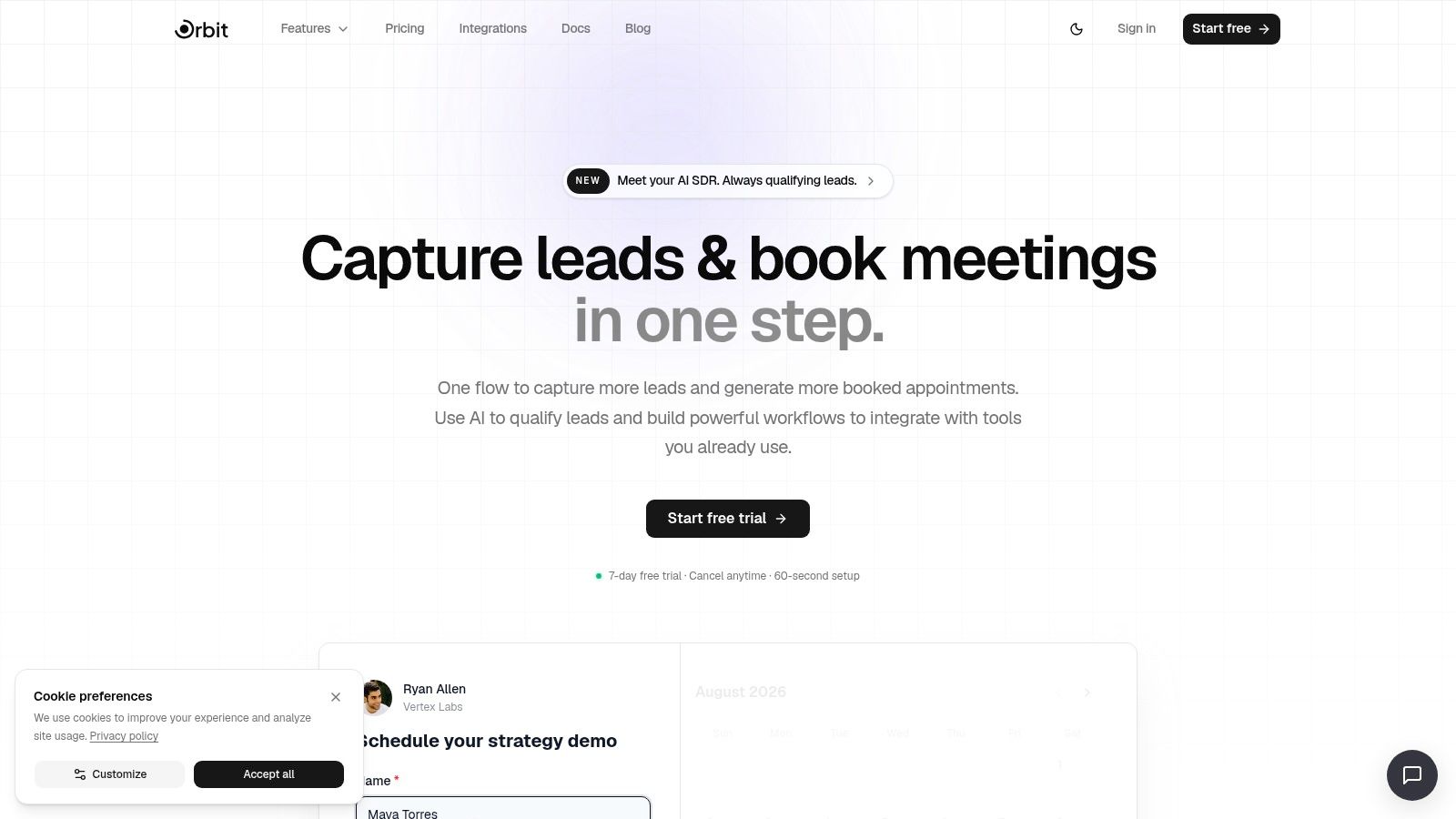
Orbit AI offers a visual form builder, consultation templates, analytics, AI-assisted qualification, and routing features for teams connecting submissions with follow-up. Its documented integrations support 50+ tools, including CRM and marketing automation platforms, so teams can synchronize leads and trigger workflows from completed forms, as described on Orbit AI's platform page.
The key design decision is the handoff contract. Define what submission creates, which conditions make a lead sales-ready, and what the owner must see immediately. A high-priority request might create a CRM task and alert an SDR. A low-fit request could receive a relevant resource or alternative booking path. Missing context might trigger one focused follow-up question instead of a generic sales email.
Teams can use this CRM integration guide to map form fields to existing systems. Set permissions, retention rules, consent requirements, and access controls before collecting business-sensitive information. Automation should reduce manual work while keeping personal data within governed systems.
The finished workflow gives sales more than a notification. It presents the request with its context, likely fit, urgency, source, and recommended route. The consultation request form becomes a live qualification workflow that connects website intent to revenue operations.
Turning a Consultation Request Form Into a Repeatable Growth Asset
A form deserves the same operating discipline as a paid campaign. It needs a baseline, segmented reporting, controlled tests, and a clear definition of quality. A submission count alone won't tell you whether the form is creating useful conversations or just rewarding low-intent volume.
Track the funnel as separate events:
- Visitor to form view: Did the page and placement earn attention?
- View to start: Did the promise and first screen feel credible?
- Start to submit: Which field, branch, or device creates resistance?
- Submit to qualified lead: Did the request meet the commercial or operational standard?
- Qualified lead to meeting: Did routing and follow-up work?
Agency and professional-services contact and consultation forms typically convert at 2% to 4%, with 6% or higher described as a strong benchmark in a 2026 industry report, according to website conversion rate benchmarks. Use that range as context, not as a verdict. A lower rate can reflect difficult traffic or a deliberately selective offer. A higher rate can conceal weak lead quality.
Review segments, not just averages
Device segmentation is essential because form-heavy mobile experiences often underperform desktop experiences. Compare the same funnel stages by device, source, service category, and landing page. A blended average can make a serious mobile usability issue look like a minor fluctuation.
Review one meaningful change at a time. Remove a high-friction field, change a question from free text to a focused choice, clarify the privacy note, or adjust the first-screen promise. Pair behavioral data with sales feedback. Heatmaps can show where attention drops, exit prompts can reveal objections, and CRM outcomes can show whether a field predicts qualified conversations.
Keep the feedback loop close to revenue: A field that improves completion but produces poor meetings isn't an optimization. It's a transfer of cost from marketing to sales.
A quarterly review can keep the system healthy without turning optimization into a permanent redesign project. Check whether the questions still match the services you sell, whether conditional branches lead to real actions, whether routing rules reflect current ownership, and whether the confirmation experience sets accurate expectations. For consultants handling several calendars or service lines, multi-calendar management tips can help align scheduling with the promise made after submission.
The broader discipline is covered in this guide to qualified lead generation. Treat the form as a working qualification layer, not a finished asset. The best version is the one that steadily improves the quality and speed of the conversations your team can handle.
Orbit AI helps teams build consultation request forms, reveal questions conditionally, qualify submissions with AI-assisted workflows, and sync leads with CRMs and automation tools. Visit Orbit AI to create a focused intake flow and connect each completed form to a faster, more useful sales response.