A prospect says the price is too high. Another says the timing is wrong. A third says the team needs to think about it. The rep reaches for a memorized rebuttal, answers the words on the surface, and moves on before learning what caused the resistance.
That approach fails because the stated objection often isn't the core blocker. “Too expensive” can mean the buyer can't justify the purchase internally. “Not the right time” can mean the problem isn't urgent. “We need to think about it” can mean the prospect lacks authority, confidence, or a clear next step.
Effective objection handling scripts start with diagnosis. The rep identifies the concern, selects a response structure, and adapts the wording to the channel. A call needs space for silence and questions. Email needs brevity. A demo needs proof at the right moment. Chat and automated qualification need conditional paths rather than long persuasive paragraphs.
The seven frameworks below balance empathy, diagnosis, reframing, and evidence. They also show where Orbit AI can capture objection signals, qualify leads, and trigger timely follow-up without turning every buyer response into generic automation. If you're preparing for a sales role as well as improving your talk track, you can also craft a high-impact dealership resume.
1. Orbit AI's Intelligent Objection Detection and Response Framework
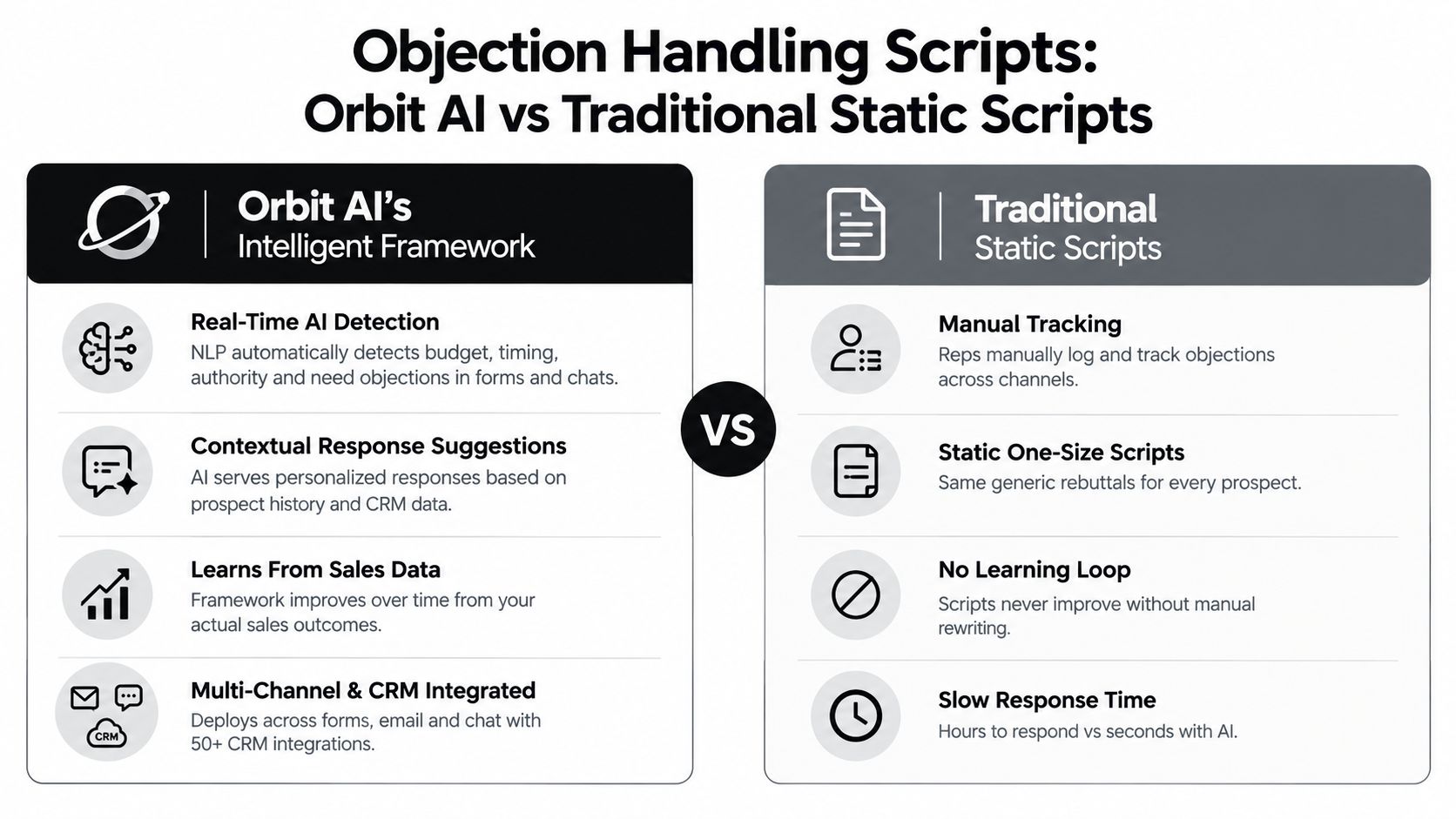
A static script assumes every prospect follows the same path. Orbit AI's AI SDR workflow can treat an objection as a signal, then use the surrounding form response, conversation context, and CRM history to determine what should happen next. That makes it useful when a growth team receives many inbound submissions and can't manually inspect every concern immediately.
For example, a SaaS form can ask about budget, implementation timing, role, and current process. If a visitor selects a budget concern, the next question can clarify whether the issue is approval, available funds, or uncertainty about value. A warm lead can then be routed to an account executive, while an obvious non-fit can be suppressed from unnecessary sales follow-up.
The framework works best as decision support, not as a replacement for judgment. Teams can use AI agents for sales to connect objection signals with qualification and follow-up, while keeping a human involved when the concern involves procurement, security, legal review, or a complex buying committee.
Build branches around recurring objections
A 2026 analysis of 300 million cold calls found that the five most common objections represented 74% of all objections. Dismissive brush-offs accounted for 49.5%, situational objections such as price, budget, and fit accounted for 42.6%, and competitor objections accounted for 7.9%. These figures are reported in the cold-call objection analysis, and they support a narrow taxonomy rather than a huge script library.
Configure the form and CRM workflow to:
- Tag the objection type: Use categories such as budget, timing, authority, need, trust, and competitor.
- Ask one useful follow-up: Don't send a pitch before the system knows whether the concern is genuine.
- Route by buying readiness: Send qualified, resolved leads to sales and unresolved leads into an appropriate nurture path.
- Compare variants: Review which response helps prospects reach a next step, not merely which message earns a reply.
A digital agency might use the resulting data to refine campaign messaging, while a scale-up team might use it to shorten the gap between submission and human review. The point isn't to automate persuasion. It's to make the right context available before the rep responds.
2. The AIDA Objection-Handling Script
AIDA, Attention, Interest, Desire, and Action, works when a prospect raises an early objection but still has enough interest to continue. The structure gives the rep a clear progression: acknowledge the concern, explain relevant value, provide credible evidence, and propose a specific next step.
Consider a SaaS buyer who says, “Your price is too high.” A useful response could sound like this:
Attention: “I understand why the investment needs to be justified.”
Interest: “The relevant question is how much manual work your team could remove from the current process.”
Desire: “We can map your current workflow against the expected savings during a short review.”
Action: “Would you be open to walking through that comparison with the person who owns the budget?”
The exact evidence must come from your own verified customer material. Don't insert an impressive metric because the Desire stage feels incomplete. A vague customer story weakens the script, while a relevant case study, testimonial, or data point can help the buyer explain the decision internally.
Adapt AIDA by channel
On a call, let the Attention stage sound conversational and pause before moving into value. During a demo, use the objection to choose which workflow to show next. In email, compress the sequence into four short paragraphs. In chat, use one stage at a time and wait for the buyer's answer instead of delivering a full monologue.
A form can also use conditional logic to route different objections into different follow-ups. Orbit AI can support that branching approach, and its guidance on conversion funnel analysis is relevant when you need to see where prospects hesitate before and after an objection.
Pre-write several versions for each stage, but don't make reps recite them. The framework is strongest when the rep understands the concern beneath the objection. It's weakest when every “too expensive” response launches into a rehearsed ROI speech before the buyer has explained what expensive means.

3. The Feel-Felt-Found Objection Script
Some objections are emotional before they're analytical. A buyer who had a poor experience with a previous vendor may not need another feature explanation. They need evidence that you understand the risk and won't dismiss what happened.
The Feel-Felt-Found framework creates that bridge:
- Feel: “I understand why implementation risk would make you cautious.”
- Felt: “Other teams we've spoken with had the same concern after a difficult rollout.”
- Found: “They found it useful to review the implementation steps, ownership, and support process before making a decision.”
The structure validates the prospect without arguing with them. That makes it a good fit for trust, change, and prior-experience objections. It can fail, however, when the “felt” statement sounds manufactured or when the “found” evidence is too broad to answer the buyer's specific concern.
Use proof carefully
Prepare a small bank of real customer situations for common objections, organized by role, industry, and use case. A CFO may need financial justification. An operations leader may care more about disruption. A marketer may want to understand how the workflow affects conversion and reporting.
On a call, keep the tone warm and natural. In email, avoid a formula that visibly reads like “I understand, others felt, but they found.” Write it as a concise paragraph. In chat, send the validation first, then ask whether the prospect wants the relevant customer example.
Orbit AI can use conditional form logic and follow-up paths to support this kind of personalization. Its discussion of what lead nurturing means is useful context for deciding whether a concern needs an immediate human answer or a more measured sequence.
A digital agency might capture the objection in a form submission, send a role-relevant proof point, and notify the account owner. That workflow is more useful than sending the same case study to every lead.
Practical rule: Validate the concern, but never validate an unsupported customer claim. Your evidence has to be real, relevant, and easy for the buyer to examine.
4. The PREP Framework Objection Script
PREP, Point, Reason, Example, Point, is a strong choice when the buyer wants a direct answer and the objection calls for evidence. It prevents the rep from stacking several arguments together, which often makes the response sound defensive.
Suppose a prospect says, “We don't have time to implement this.”
- Point: “Implementation shouldn't require a large internal project.”
- Reason: “The process is designed to reduce technical dependency and assign clear ownership.”
- Example: “We can show you the actual setup sequence and identify which steps your team would own.”
- Point: “The next step is to test whether that process fits your capacity.”
The framework doesn't give permission to invent a customer result. If you have a relevant implementation example, use it. If you don't, demonstrate the process, explain the dependencies, or offer a scoped evaluation instead of presenting an unsupported claim.
Keep one argument in view
PREP works particularly well in written communication because each element can occupy one or two sentences. A reply to a timing objection might say that the implementation is structured around the buyer's available resources, explain why that matters, show the specific workflow, and end by asking whether a short review is appropriate.
For a demo, make the Example visible. Show the setup screen, reporting view, integration path, or approval workflow that addresses the concern. For chat, use a compressed version and ask permission before sending more detail. For automated qualification, use the prospect's answers to select the most relevant proof point, then stop automation when the buyer signals a serious blocker.
Orbit AI's analytics can help teams compare which evidence moves different segments forward. A growth team might discover that implementation diagrams work better for operations buyers, while security documentation matters more for enterprise prospects. The script remains PREP, but the Example changes.
The framework fails when the Point is weak or the Example is irrelevant. “Our product is flexible” won't resolve a workload concern. “Here's a feature list” won't prove that the buyer's team can adopt the workflow.
5. The Isolate and Confirm Objection Script
A prospect says, “We need to discuss this internally.” That sentence may describe a genuine authority issue, a missing stakeholder, a budget concern, or a polite attempt to end the conversation. Isolate and Confirm helps you find out before spending time on the wrong response.
Use language that sounds collaborative:
- Isolate: “So the main issue is getting the right stakeholders aligned?”
- Clarify: “Which part will they need to evaluate most closely?”
- Confirm: “If they agreed the solution fits the need, would you be ready to discuss a next step this quarter?”
A “yes” tells you the stated concern is actionable. A “no” tells you another blocker remains. That answer isn't a reason to push harder. It tells the rep to investigate, requalify, or deprioritize the opportunity.
Match the question to the channel
On a call, use silence after the question. Independent sales research summarized in 2026 reported that top performers ask questions after objections 54.3% of the time, compared with 31% for average reps, as described in the sales objection research summary. The same source reports a median time from first objection to resolution of 14 days for SMB deals and 47 days for enterprise deals, which reinforces the need to identify ownership and next steps early.
In email, ask one isolating question rather than sending a long explanation. In chat, use conditional prompts such as, “Is budget the only constraint, or is there another factor?” In an embedded form, ask the follow-up only when the initial response indicates a concern, so qualified visitors aren't forced through an unnecessary interrogation.
Orbit AI's workflow for qualifying leads before a sales call fits this approach. Form answers can identify whether a lead has a real blocker, needs another stakeholder, or isn't ready for sales contact.
The failure mode is over-questioning. If the rep asks several diagnostic questions without offering help, the prospect feels screened rather than supported. Isolate one concern, confirm its importance, and then choose the smallest useful response.
6. The Bridge and Pivot Objection Script
Bridge and Pivot doesn't challenge the buyer's statement head-on. It acknowledges the concern, connects it to a relevant strength, and changes the frame from the surface issue to the underlying business decision.
For a price objection:
“You're right that cost matters. That's why we should compare the investment with the outcome you need, not just the listed price. Which result would make this worth funding?”
For a timing objection:
“A realistic timeline matters. Rather than assume the project fits, let's look at the steps your team would actually need to complete and decide whether the schedule is workable.”
The bridge must be authentic. If the buyer says implementation is risky and the rep replies, “That's exactly why customers choose us,” without explaining why, the pivot sounds like a trick.
Change the frame without hiding the trade-off
Useful frames include outcome versus price, risk versus control, speed versus delay, and relevance versus feature volume. Choose one frame that matches the concern. Don't pivot from every objection to ROI, especially when the buyer is asking about security, authority, or product fit.
A demo is the best setting for this framework when you can immediately show the new frame. If the buyer worries about complexity, pivot to the actual number of steps, ownership, and support. In email, keep the bridge to one sentence and the pivot to one question. In chat, ask permission before providing a longer explanation. In automated qualification, use the pivot to offer a focused resource or route the lead to a human rather than continuing a generic sequence.
Orbit AI's AI SDR outbound guidance is relevant to this handoff principle. A clear objection should receive acknowledgment and one relevant piece of evidence, then the automated sequence should pause. That protects the buyer from repeated messages while preserving the option for a human follow-up.
The method is risky when the rep overstates the reframed value. Use verified proof, make the trade-off visible, and end with a concrete next step.
7. The Assumption Check Objection Script
Some objections are built on an incomplete mental model. A prospect says, “This looks complicated to set up,” because they assume the product requires an enterprise implementation. Another says, “You require a long contract,” because they haven't seen the available purchasing options.
The Assumption Check script first identifies the belief, then corrects it without embarrassing the buyer:
“Help me understand what you're assuming about setup. Are you expecting a technical implementation involving your engineering team?”
If the prospect confirms that assumption, respond with the relevant facts about your actual process:
“Thanks, that helps. The setup is designed for the business team to manage, and we can show you the steps so you can judge the effort directly. Does that address the concern, or is there another part of implementation you're worried about?”
Correct gently and verify
Avoid “You're wrong” language. It creates a status contest and makes the buyer defend the assumption. Better phrases include:
- Invite explanation: “What led you to that expectation?”
- Name the comparison: “Are you comparing this with a traditional enterprise rollout?”
- Clarify the distinction: “The workflow may look similar at first, but the ownership and setup process differ.”
- Confirm the impact: “Does that change the concern, or is the issue still unresolved?”
The approach works across channels. On a call, ask the question and let the prospect explain. During a demo, show the exact workflow that corrects the misunderstanding. In email, link to a concise implementation or pricing explanation. In chat, correct one assumption at a time. In automated qualification, use form logic to ask different questions based on company size, role, or stated concern.
Modern buyers are also more cautious about the information behind AI-enabled workflows. A recent paper on trust in AI-enabled sales workflows cites Salesforce data reporting that 35% of respondents trust the accuracy of data used with AI in their organization, as discussed in the paper on sales technology and trust. That makes transparent qualification and human review especially important when an automated system interprets an objection.
Document the assumptions your team hears most often, then create a calm correction and a proof path for each. Don't use the script to force a buyer past a genuine product limitation.
Side-by-Side: 7 Objection-Handling Scripts
| Item | Implementation Complexity | Resource Requirements | Expected Outcomes | Ideal Use Cases | Key Advantages |
|---|---|---|---|---|---|
| Orbit AI's Intelligent Objection Detection & Response Framework | Moderate, setup, CRM integration and initial data feed required | Historical sales data, CRM connectors, integration effort, team onboarding | Faster response times, automated qualification, improved conversion rates | High-volume B2B SaaS, growth teams, multi-channel lead capture | Real-time NLP detection, context-aware responses, learns from outcomes, multi-CRM support |
| The AIDA Objection-Handling Script | Low–Medium, training and tailoring needed for stages | Trained reps, curated proof/case studies, templates for each stage | Builds trust and engagement, moves prospects toward action | Initial objections, email/chat sequences, situations needing persuasion | Psychologically grounded, scalable, naturally incorporates social proof |
| The Feel‑Felt‑Found Objection Script | Low, simple three-part structure but requires authenticity | Recent case studies or examples, empathy training for reps | Strong rapport, reduced defensiveness, higher trust | Price skepticism, early-stage trust-building conversations | Empathy-first, non-confrontational, effective for skeptical prospects |
| The PREP Framework (Point, Reason, Example, Point) | Low–Medium, requires selection of a single persuasive point | Clear data points, concise examples/case studies, scripting discipline | Focused, concise responses; reduces rambling and confusion | Data-driven objections, written/email replies, executive-level interactions | Highly structured, trainable, effective for data-oriented rebuttals |
| The "Isolate & Confirm" Objection Script | Medium, needs diagnostic flow and practiced questioning | Skilled reps, conditional questioning logic for automation | Identifies true deal-blockers, reduces wasted effort, clearer prioritization | Enterprise deals, prospects offering surface-level stalls | Reveals real objections early, improves prioritization and resource allocation |
| The "Bridge & Pivot" Objection Script | Low–Medium, requires authentic reframes and practiced tone | Outcome metrics, pivot frames, examples to support reframes | Shifts conversation frame, maintains rapport, redirects focus to outcomes | Price/timeline objections, consultative selling scenarios | Collaborative tone, avoids head-on argument, reframes toward value/outcomes |
| The "Assumption Check" Objection Script | Low–Medium, needs documented common misconceptions and gentle phrasing | Myth-busting content, FAQ/knowledge base, rep training | Removes objections rooted in misinformation, increases credibility | Complex products, pricing/feature misunderstandings, multi-stakeholder deals | Corrects false assumptions politely, often eliminates objections quickly |
Turn Good Scripts Into a Learning System
A script is a starting point, not a substitute for judgment. The rep still has to decide whether the objection is sincere, incomplete, or a stall, whether the buyer needs evidence or a question, and whether the right action is to continue, route the opportunity, or stop follow-up.
Start by tagging objections consistently. Record the type, channel, buyer segment, sales stage, and outcome. “Price” in a live demo may require a different response from “price” in a form submission. “Need to think” from a decision-maker differs from the same phrase used by someone who hasn't explained the product internally.
Track movement, not just activity. A reply can indicate interest without indicating progress. Compare whether each response leads to a qualified conversation, a scheduled meeting, stakeholder involvement, a proposal step, or a clear disqualification. Retire language that creates engagement but doesn't help buyers make a decision.
Measure the next step, not the cleverness of the sentence.
Keep channel variants in the playbook. A call version can include a pause, a clarifying question, and a confirmation phrase. An email version should usually contain one concern, one relevant proof point, and one action. A demo version should connect the objection to something the buyer can see. A chat version should be short enough to invite a reply. An automated version should branch only when the buyer's answer justifies the branch.
The importance of timing is clear in the 2026 call dataset cited by this objection-handling script analysis. Reps who paused after an objection performed better, and the recommended flow was Pause, Question, Validate, Isolate, Get Permission, Reframe, Resolve. Treat that flow as a coaching aid, not a monologue to memorize.
Orbit AI can help teams apply the system through conditional logic, AI SDR qualification, CRM connections, lead scoring, and real-time analytics. Use those capabilities to surface context and make follow-up timely, but preserve human review for complex buying committees, security questions, legal concerns, and high-stakes commitments. A good automation identifies the next useful action. It doesn't pretend every buyer needs the same answer.
Choose one recurring objection this week. Write two variants, test them in one channel, measure the rate at which prospects reach the next step, and revise the wording based on that evidence. Then repeat the process for the next objection instead of building an oversized library nobody can use under pressure.
Orbit AI helps teams capture objections in forms, qualify submissions with an AI SDR, connect context to CRM workflows, and use analytics to improve follow-up decisions. Visit Orbit AI to build a form that turns buyer concerns into structured, actionable sales signals.